

A video case study portfolio is a short, structured video that walks a viewer through one project’s problem, your specific role, the decision that mattered most, and the measurable result. Designers reach for this format when static screenshots can’t convey motion, interaction, or a before/after transformation. If you’re ready to build one, the sections below cover scripting, production, distribution specs, and how to attach verifiable evidence so the video isn’t just persuasive, but checkable.
TL;DR:
- Short, focused videos should highlight a single decisive choice, clearly stating the problem, your role, and measurable results within 2 to 3 minutes.
- Use video primarily for projects involving motion, interactions, or complex flows that static images cannot effectively demonstrate.
- Embed the video directly beside or above the written case study on the same page to allow viewers to scan quickly and verify claims.
- Capture screen recordings at native resolution, keep edits tight, and add captions to ensure accessibility and maximize engagement across platforms.
- Attach verifiable project evidence and avoid embellishing results, ensuring each claim can be checked through linked files or data for credibility.
Table of Contents
- Why Include Video in a Design Portfolio?
- What Belongs in a Designer’s Video Case Study?
- How to Plan, Shoot, and Edit a Case Study Video
- Choosing Lengths, Formats, and Where to Host Your Video
- Example Patterns Worth Modeling
- How Alloquy Makes Case Study Videos Verifiable
- Measuring What Actually Works in Your Video
- Permissions, Releases, and Privacy Before You Publish
- Optimizing Your Video Case Study for Search
- Adding Captions and Transcripts for Every Viewer
- Trends and a Caution on Authenticity
- Get Your First Video Case Study Live With an interactive portfolio platform
- Sources
- FAQ
Why Include Video in a Design Portfolio?
A screenshot shows a finished state. A video shows the thinking that got there, which is exactly what hiring managers say they can’t assess from a static grid of mockups. Motion, transitions, and interaction states are lost the moment you flatten a prototype into a PNG, and that loss is precisely where video earns its place.
Video pays off hardest in three project types:
- UX flows and user journeys, where the sequence of screens and the friction points you removed matter more than any single frame.
- Motion and animation design, where the deliverable is literally movement, and a still image can’t demonstrate it.
- Interaction prototypes and complex brand systems, where a viewer needs to see cause and effect (tap here, this happens) to understand your reasoning.
Formatting choices affect whether anyone finishes watching. Think Branded Media’s research found that hooks, paced B-roll, captions, and platform-correct aspect ratios directly change watch-through and conversion rates, and that short teaser clips drive higher completion on social platforms than long, unedited walkthroughs.
Pro Tip: Don’t shoot video for every project. Reserve it for the two or three pieces where motion or interaction is the actual selling point, then let your written case studies carry the rest.
The takeaway isn’t “add video everywhere.” It’s that video is a precision tool for a specific job: proving something static images structurally cannot.
What Belongs in a Designer’s Video Case Study?
Every strong case study video answers the same three questions, in this order: what was the problem, what did you decide to do about it, and what changed as a result. ThinkCK’s analysis of video case study formats frames this as the core test of the format. A video that skips straight to a polished final screen without ever naming the problem leaves viewers with nothing to measure your work against.
Build the script around this structure:
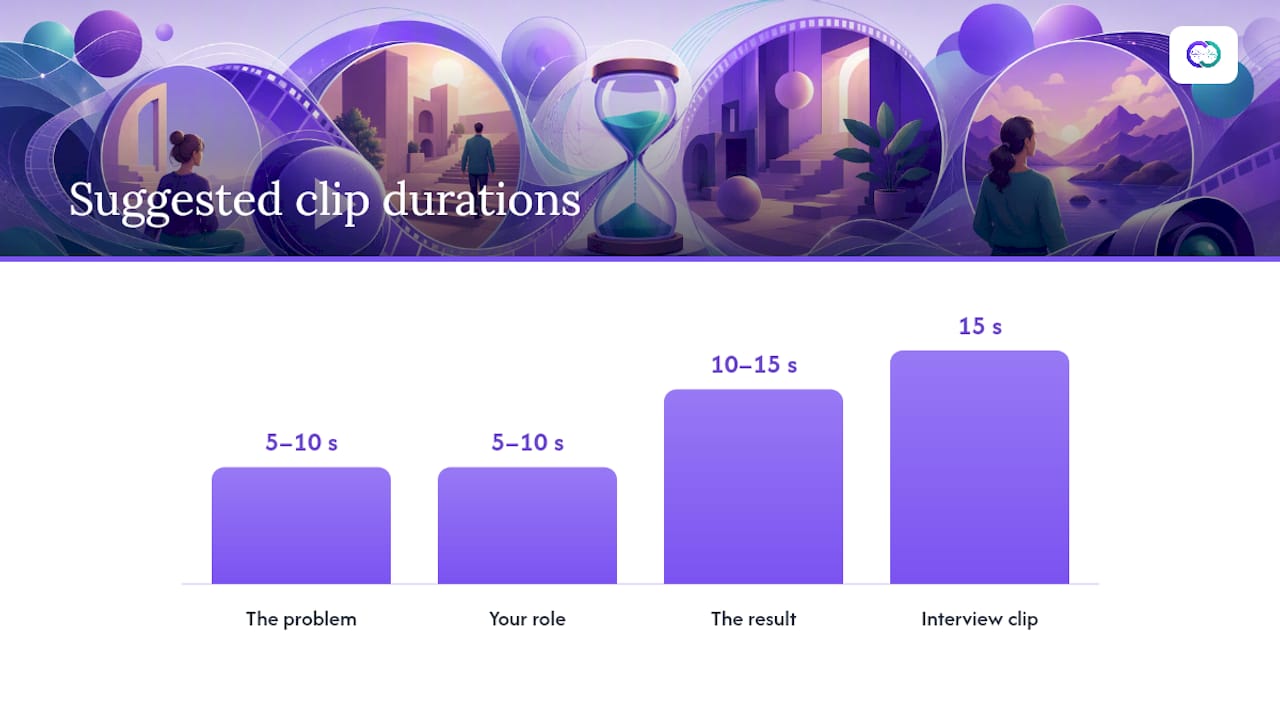
- The problem (5 to 10 seconds). State the constraint or pain point in plain language. No jargon, no throat clearing.
- Your role (5 to 10 seconds). Name what you specifically owned. If you led research, say research. If you owned only the visual system, say that.
- The one key decision (the core of the video). Pick a single decisive choice, not five. Explain why you chose it over the alternative.
- The result (10 to 15 seconds). State the outcome, ideally with a number or a concrete before/after comparison.
- The next click. Tell the viewer exactly where to go for more: the full written case study, your resume, or a contact link.
That last beat matters more than most designers realize. Wrecking Crew Media’s guidance on video portfolios lists a clear next step, alongside a strong intro, selected samples, project context, your role, and proof of impact, as one of the defining traits of portfolios that actually convert viewers into interview requests.
On assets, aim for a mix rather than one format stretched thin:
- Screen recordings of the actual interface in motion, not static exports.
- A before/after comparison, ideally side by side rather than sequential.
- Prototype playback showing real tap or click states.
- One short interview clip of you narrating the key decision (even 15 seconds helps).
- A few seconds of B-roll: hands on a keyboard, a whiteboard sketch, a sticky-note wall.
- Burned-in captions, since a meaningful share of viewers watch muted.
Placement is where a lot of otherwise good videos get wasted. Put the video directly above or beside the written case study on the same page, never on a separate page a viewer has to hunt for. PortfolioVideo’s guidance for designers is explicit on this point: a video portfolio should guide the viewer through selected work, but it should never replace a scannable, written case study. Recruiters skimming twenty portfolios in an afternoon need the option to read instead of watch, and a video-only case study locks them out of that choice.
How to Plan, Shoot, and Edit a Case Study Video
You don’t need a production team to make a video that works. You need a script, a phone or screen recorder, and a ruthless edit. Here’s the workflow.
Preproduction.
- Pick exactly one project. If you’re torn between two, choose the one with a clearer before/after or a more visual decision point.
- Define your audience and goal in one sentence: “A hiring manager scanning ten portfolios needs to see I can turn ambiguous research into a shippable flow in under 90 seconds.”
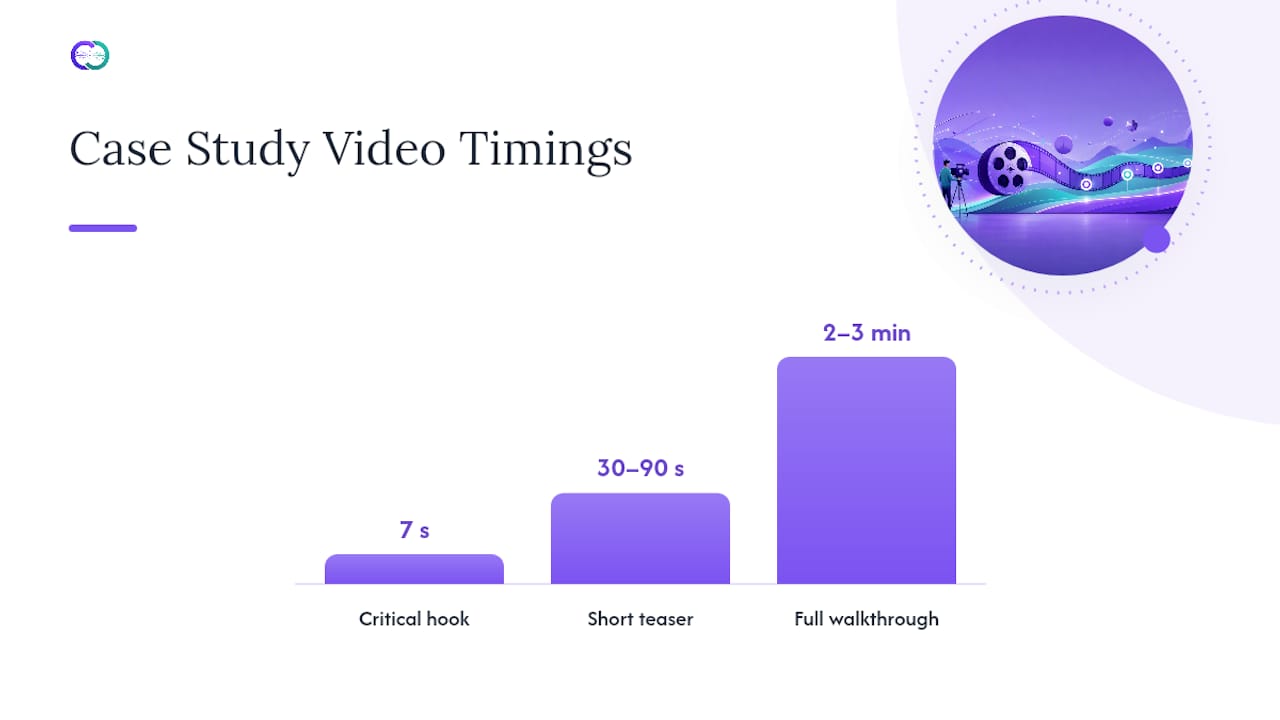
- Write a script or tight outline. For a short teaser, 30 to 90 seconds is the target. For a fuller walkthrough meant to live on your portfolio page, 2 to 3 minutes is reasonable, but only if you chapter it so viewers can skip ahead.
Production.
- Frame yourself for the interview clip at eye level, in front of a plain background, with a window or lamp facing you rather than behind you.
- Record screens at native resolution using your OS’s built in recorder or a capture card if you’re demoing hardware or a physical product alongside software.
- Grab B-roll last, after you know what gaps the edit needs. Ten seconds of you sketching or scrolling a whiteboard fills more transitions than you’d expect.
- A phone on a small tripod, shot in good window light, is enough for the interview segment. Nobody is grading your lighting setup.
Editing.
- Front-load the hook. The first 7 seconds decide whether anyone watches the rest, a threshold production guidance on case study videos treats as the make-or-break window.
- Cut straight to the decision. Trim every second of setup that doesn’t earn its place.
- Add captions before you export, not as an afterthought bolted onto a finished file.
- Keep the export lightweight. A bloated file slows your portfolio page’s load time, and a slow page loses viewers before the video even starts.
Pro Tip: Let the interface do the talking. Practitioners who study short-form video strategy consistently advise minimal narration over screen recordings, letting the “aha” moment in the design itself carry the scene instead of a voiceover explaining what’s already visible.
Choosing Lengths, Formats, and Where to Host Your Video
The right length depends entirely on where the video lives, and treating every platform the same way is the single most common mistake designers make with case study videos.
- Portfolio page walkthroughs: 2 to 3 minutes, 16:9, embedded directly on the case study page.
- LinkedIn: 60 to 90 seconds, square or 4:5, captioned by default since most viewers scroll with sound off.
- Instagram Reels or Stories: 30 to 60 seconds, 9:16, built as a teaser that points back to the full case study.
- YouTube: 2 to 5 minutes, 16:9, useful when you want the video to also surface in search results for your name or project.
- Email pitches: 60 seconds or under, since most recipients won’t click through to a longer video from an inbox.
DesignNominees’ reporting on portfolio video trends notes that short-form clips in the 30 to 90 second range are increasingly outperforming long narrated walkthroughs, particularly when the video leans on screen recordings and before/after comparisons rather than talking-head narration.
You don’t need to shoot four separate videos. Shoot one longer master, then cut it into a teaser for social and a chaptered full version for your portfolio page. Add timestamped chapters to anything past 90 seconds so viewers can jump straight to the decision that interests them.
On hosting: YouTube and Vimeo both handle bandwidth and playback better than self-hosting a video file directly on your portfolio, which can slow page load to a crawl on mobile connections. YouTube has the search-visibility edge if you want the video discoverable on its own; Vimeo tends to look cleaner and ad-free when embedded on a portfolio page. Either way, embed rather than link out, so viewers never leave your page to watch.
Example Patterns Worth Modeling
Three recurring patterns cover almost every strong case study video, and picking the right one depends on what you’re trying to prove.
- The role-focused teaser (30 to 90 seconds). Built almost entirely from screen recordings and a before/after cut, with a single line of narration or on-screen text stating the problem and result. Use this when you want a scannable proof point for social feeds or the top of a portfolio page, not a full narrative.
- The interactive walkthrough (2 to 3 minutes). Structured around live prototype playback, showing the actual flow a user moves through. This pattern works best when the thing you’re proving is interaction design or a multi-step flow that a still image genuinely cannot convey.
- The deep case study video (3 to 5 minutes). Follows the full problem-role-decision-result arc with an interview clip carrying the narrative. UX Playbook’s guidance on UX storytelling recommends structuring this longer format around a story arc, defining the hero (usually the user, not you), setting the stage, showing the conflict, and landing on a clear turning point. Chapter this version so viewers who only want the decision can skip the setup.
For layout inspiration once you know which pattern fits your project, portfolio design examples built around interactive case studies show how designers position video against written proof without cluttering the page.
How Alloquy Makes Case Study Videos Verifiable
A video can claim anything. What separates a credible case study from a polished one is whether a viewer can check the claim, and that’s the gap Alloquy’s evidence linking closes.
Attach the actual project files behind a case study, whether a Google Drive folder of research notes, a Figma export, or a metrics deck, and Alloquy connects them directly to the achievement your video is talking about:
- Link Google Drive documents or manually add evidence so every claim in your video traces back to a real source.
- Place your short video above the written case study, then let recruiters query the attached evidence with an AI assistant instead of taking your word for the result.
- Give hiring teams a way to ask follow-up questions your video doesn’t cover, answered from your actual project documentation rather than a generic resume line.
For the written half of this pairing, Alloquy’s portfolio case study guide walks through structuring the proof your video should sit next to, and UX portfolio examples shows how role-specific evidence gets attached in practice.
Measuring What Actually Works in Your Video
Play count tells you almost nothing on its own. The metrics that matter are completion rate (what percentage of viewers watch to the end), click-through to your full case study or contact page, and average watch time relative to total length.
A video with 2,000 views and a 15% completion rate is weaker than one with 200 views and 70% completion, because the second one is holding attention long enough to make its case. If your analytics show a steep drop-off in the first 10 seconds, the hook isn’t working, not the content. If viewers finish the video but never click through to the written case study, your “next click” prompt at the end is either missing or too weak.
Track these per video, not in aggregate across your whole portfolio:
- Completion rate at 25%, 50%, and 100% markers.
- Click-through rate to the linked written case study or contact page.
- Where on the page the video sits relative to scroll depth, since a video buried below the fold gets fewer plays regardless of quality.
If you’re hosting on YouTube or Vimeo, both platforms surface this data natively. If the video is embedded on your own portfolio site, a simple event tracker tied to your analytics tool will do. The goal isn’t vanity metrics. It’s finding the one clip that’s actually converting viewers into interview requests, then studying why that one works better than the rest.
Permissions, Releases, and Privacy Before You Publish
Before a case study video goes live, confirm you have the right to show what’s in it. Client work, employer projects, and anything under an NDA carry real legal exposure if you publish without clearance, regardless of how proud you are of the work.
Get written permission, even a short email, from the client or employer before publishing footage of their product, brand, or internal tools. If a colleague or user appears on camera or in a testimonial clip, get a signed release confirming they agreed to be recorded and featured publicly. This matters just as much for a 15 second B-roll clip of a coworker as it does for a full interview segment.
Screen recordings of real user data need special care. Blur or redact real names, emails, and any personally identifiable information before you export, even if the data belongs to a test account you assumed was safe to show. The same caution applies to real revenue figures, user counts, or internal metrics; confirm with the client whether those numbers are cleared for public use, or replace them with approved ranges.
When in doubt, default to blurring rather than assuming footage is fine to publish. A quick redaction pass costs you a few minutes in your editor. A privacy complaint from a former client or employer costs you a lot more.
Optimizing Your Video Case Study for Search
Your video’s title, description, and file metadata determine whether it ever gets found outside your own portfolio link. Treat these fields the way you’d treat page SEO, because on platforms like YouTube, they function the same way.
Write a title that names the role and the outcome, not just the project name: “Redesigning Checkout Flow: Cut Drop-off by Restructuring the Cart” tells a viewer more in five seconds than “Project Alpha Case Study” ever will. In the description, restate the problem and result in the first two lines, since that’s what shows before a viewer clicks “show more,” and include a link back to your full written case study.
For self-hosted embeds, add descriptive alt text and a transcript on the page itself, both of which search engines can index even though they can’t watch the video. Name your video file something readable before upload, not “final_v3.mp4,” since some platforms still surface filename text in search results.
Adding Captions and Transcripts for Every Viewer
Burned-in captions aren’t optional anymore. A meaningful share of viewers watch video with sound off by default, particularly on LinkedIn and Instagram, and a video without captions loses that audience in the first three seconds.
Beyond sound-off viewing, captions and full transcripts open your case study to viewers who are deaf or hard of hearing, and to non-native English speakers who read faster than they process spoken narration. A transcript posted alongside the video also gives search engines text to index, which a video file alone can’t provide.
Generate captions with your editing software’s built-in tool or a dedicated captioning service, then proofread them by hand. Auto-generated captions routinely mangle product names and technical terms, and a garbled caption under your own project name undercuts the credibility you’re trying to build.
Trends and a Caution on Authenticity
Motion-first, short-form formats are winning attention in 2026, and brevity is the reason: a tight 60 second video that lands its one decision beats a polished five-minute film that buries it. Producers researching authentic content creation are converging on one rule for AI-assisted video tools: use AI to present real work more clearly, never to invent or embellish a result you can’t back up. The practical takeaway is simple: script for one decision, keep it short, and never let polish outrun proof.
— Alloquy Team
Get Your First Video Case Study Live With an interactive portfolio platform
An interactive portfolio platform can provide a place for your video to be not just persuasive but also checkable. Instead of a portfolio page that asks recruiters to trust your claims, such platforms can link your Google Drive documents and project evidence directly to each achievement, potentially enabling an AI assistant to answer follow-up questions from real source material rather than a generic summary.

Start with a free profile, place your first case study video above one linked project, and attach the research file, metrics deck, or design doc that backs it up. From there, Alloquy can also generate a tailored resume or cover letter pulled from that same verified evidence. If you outgrow the free tier’s storage or AI limits, plan details are available on the pricing page. For a deeper look at how the evidence-linking works in practice, the interactive case study guide walks through making any project queryable, not just watchable.
Sources
- What are the pros and cons of video case studies? — ThinkCK
- Video portfolio tips — Wrecking Crew Media
- How to format your case study video for maximum engagement — Think Branded Media
- Video portfolio for designers — PortfolioVideo
- How to tell a story in your UX case study — UX Playbook
FAQ
What Is a Case Study Portfolio?
A case study portfolio presents your work through structured stories, each covering a problem, your role, the key decision you made, and the measurable result, rather than just a gallery of finished screens. A video case study portfolio adds motion and narration to that structure, useful specifically when interaction or transformation matters more than a static final image.
How Do You Make a Video Portfolio?
Pick one project with a clear before/after or interaction to show, write a short script covering the problem, your role, one decision, and the result, then record screen footage, a short interview clip, and light B-roll. Edit down to a 30 to 90 second teaser or a chaptered 2 to 3 minute walkthrough, add captions, and place it beside your written case study rather than instead of it.
What Is a Good Platform for Hosting a Video Portfolio?
YouTube and Vimeo both handle playback and bandwidth better than self-hosting a video file directly on your site, which can slow page load. YouTube adds search discoverability if you want the video findable on its own, while Vimeo tends to embed more cleanly, without ads, on a portfolio page. Platforms like Alloquy let you embed that video directly beside linked project evidence, so the platform choice for hosting the clip and the platform choice for presenting your case study don’t have to be the same decision.
What Are Some Good Examples of Portfolios to Model?
Strong examples generally fall into three patterns: a 30 to 90 second role-focused teaser built from screen recordings, a 2 to 3 minute interactive walkthrough showing a real flow, and a 3 to 5 minute deep case study structured around a story arc. Reviewing interactive case study examples for designers shows how these patterns pair video with verifiable project evidence in practice.