

Use a resume to pass screening; use a portfolio to prove your work. A resume is the required, keyword-optimized document that gets you through applicant tracking systems and past the initial recruiter scan. A portfolio is the curated evidence, case studies, and artifacts that back up the claims your resume makes. Most job seekers need both, sequenced correctly: resume first, portfolio as the supporting proof point.
TL;DR:
- A well-structured resume should be tailored with targeted keywords and quantifiable achievements to pass automated screening and make an immediate impression within the first few seconds.
- Portfolios provide in-depth proof of skills through case studies and artifacts, with formats tailored to professions like design, development, or writing, emphasizing measurable outcomes.
- For most roles, a resume is mandatory, while a portfolio is essential in creative, technical, or client-facing positions, especially during later interview stages or for freelance pitches.
- Combine both assets by optimizing the resume for quick scans and linking to a verified, interactive portfolio that can be checked for authenticity and relevance.
- Verification and active links are crucial; static portfolios with broken or outdated links diminish credibility, while interactive, source-backed profiles hold more trust and support tailored applications.
Table of Contents
- What Is a Resume and What Should It Include?
- What Is a Portfolio and What Belongs in It?
- Portfolio Vs Resume: The Differences That Actually Matter
- When Do You Need a Resume, a Portfolio, or Both?
- How to Combine a Resume and Portfolio: A Step-by-Step Checklist
- Copy-Ready Templates and a Final Pre-Submit Checklist
- Why Static Portfolios Are Losing to Interactive, Verified Ones
- Why a Multi-Format Approach Wins in Modern Hiring
- Turn Your Verified Work Into an Interactive Portfolio
- Sources
- FAQ
What Is a Resume and What Should It Include?
A resume is a one- to two-page document that summarizes your work history, skills, and qualifications for a specific role. It exists to get you past two filters in rapid succession: the applicant tracking system (ATS) software that parses your document for keywords, and the human recruiter who decides whether you’re worth a closer look.
That human decision happens fast. Hiring managers form an impression of a resume within the first several seconds of scanning it, often cited as the “7-second rule” (some data points to closer to 7.4 seconds). Whatever sits in the top third of page one carries disproportionate weight, because that’s the section a recruiter actually reads before deciding whether to continue.
A resume built around this reality contains five core sections:
- Header and contact information, including your name, phone, email, and LinkedIn or portfolio link, kept to one line so it doesn’t eat into scan time.
- A headline or summary, two to three lines stating your target role, years of experience, and a single standout achievement.
- Work experience, formatted as quantified bullets, not job descriptions. “Reduced onboarding time by 30%” beats “Responsible for onboarding process” every time.
- A skills section, matched to the language in the job posting so ATS parsing recognizes your keywords.
- Education, positioned lower unless you’re an early-career candidate where it carries more relevance.
An outcome based resume that leads with results rather than duties consistently performs better in both machine parsing and human review, because it front-loads the specifics that matter to both readers. A targeted resume format built around a single job posting’s language will always outperform a generic one sent to twenty different employers.
What Is a Portfolio and What Belongs in It?
A portfolio is a curated collection of work samples that demonstrates what you’ve actually built, written, designed, or shipped. Where a resume tells, a portfolio shows. It’s more in-depth than a resume and typically includes case studies, a career summary, and a statement of originality confirming the work is genuinely yours.
Portfolios come in several formats depending on your field and audience:
- Personal websites with case study pages, common for designers, marketers, and product managers.
- GitHub repositories with runnable code, README notes, and live demos, standard for software developers.
- PDF portfolios, useful when a static, downloadable document is expected (some academic and government applications still require this format).
- Demo reels, standard for video editors, animators, and motion designers.
- Physical binders, still occasionally requested in architecture, education, and fine arts interviews.
Career development frameworks also distinguish portfolio types by purpose: a working portfolio (an evolving collection you draw from), a display portfolio (a polished, client-facing selection), and an assessment portfolio (used to evaluate skill level, common in education and workforce development settings).
Whatever the format, a strong project entry answers four questions: What was the problem? What was your specific role? What actions did you take? What was the measurable outcome? A UX designer might show a redesign that cut task completion time by 40%. A marketer might show a campaign that lifted conversion rate 15%. A writer might show a piece that drove a measurable traffic spike. Vague descriptions without outcomes read as filler, not proof.

Pro Tip: If you’re a developer, don’t just link your GitHub. Annotate each repository with a one-line summary of the outcome and a link to a live demo. Recruiters rarely have time to run your code themselves.
Portfolio Vs Resume: The Differences That Actually Matter
The portfolio vs resume debate isn’t really a debate. They serve different functions in the hiring pipeline, and confusing the two wastes effort on both.
- Purpose: A resume screens candidates in or out. A portfolio proves the candidate who made it through screening can actually do the work.
- Audience: ATS software and recruiters read resumes first, often in the first pass. Hiring managers, technical leads, or clients review portfolios later, once you’ve cleared initial screening.
- Content: Resumes summarize scope and results in bullet form. Portfolios show the work itself, artifacts, screenshots, code, writing samples, with narrative context.
- Length and format: Resumes are capped at one or two pages by convention. Portfolios have no fixed length; a strong one might feature three to five deep case studies rather than twenty shallow ones.
- Interactivity: A resume is static text. A portfolio can be a live, clickable, sometimes queryable experience, particularly relevant when comparing an online portfolio vs PDF format, where the online version lets a reviewer explore rather than just scroll.
A resume is mandatory for nearly every corporate, administrative, and technical application in the hiring process. A portfolio never replaces it, even in creative fields, it supplements it. The question isn’t which one to build. It’s how to sequence them so the resume gets you noticed and the portfolio gets you hired.
When Do You Need a Resume, a Portfolio, or Both?
Role and context dictate the answer more than personal preference does.
- Corporate, administrative, and most technical roles: A resume is non-negotiable. A portfolio is optional unless the role explicitly involves visible creative or technical output, like software engineering or data visualization.
- Design, writing, marketing, and many technical roles: Both are expected. A results oriented resume gets you through the door; a portfolio with case studies convinces the hiring manager you can execute.
- Freelancers and consultants pitching clients: Lead with the portfolio. Clients care about outcomes on similar projects far more than employment history. Keep a resume ready anyway, since some client relationships eventually require formal contracting paperwork that references your background.
- Interview stage, after resume screening: Bring the portfolio out. This is where hiring managers actually dig into your work, ask you to walk through decisions, and probe the metrics you claimed.
- Internal promotions: A portfolio built from verified project outcomes often does more work than a resume, since your manager already knows your title and tenure. What they need is documented proof of expanded scope.
- Job boards and cold applications: Resume only, unless the application explicitly requests work samples. Don’t force a portfolio link where it wasn’t asked for; it can read as padding.
Career experts frame it simply: the resume wins you the interview, and the portfolio wins you the offer. Recruiters typically need both to move a candidate from initial screening through to a final hiring decision.
How to Combine a Resume and Portfolio: A Step-by-Step Checklist
Building both assets well takes a specific sequence. Skipping steps is how job seekers end up with a beautiful portfolio nobody sees, or an ATS-optimized resume with no proof behind the claims.
- Build an ATS-optimized resume first. Use a single-column layout (tables and columns confuse most parsers), mirror the exact keywords from the job posting, and put your strongest, most quantified achievement in the top third of the page. This is the section that gets read during that first fast scan, so design it for immediate impact: name and target title on one line, a 2-3 line summary with a headline number, then your best bullets.
- Curate three to five projects, not fifteen. For each, write a short case study using a STAR-style structure: Situation, Task, Action, Result. Every entry needs a measurable outcome, a percentage, a dollar figure, a time saved, or it doesn’t belong in the portfolio.
- Create a role-specific landing page or a short set of direct links. Don’t send every recruiter to your generic homepage. Tailor the portfolio entry point for the specific role and shorten the public URL into something clean and brandable. Place that link in your resume header and again next to the relevant work experience bullet it supports.
- Test everything before you submit. Run your resume through an ATS parse checker to confirm your formatting survives. Click every portfolio link to confirm it loads. Check load speed and mobile rendering, since a large share of recruiters review candidates from a phone between meetings. Confirm you haven’t left private client data or unpublished work exposed.
Skipping step four is the most common failure point. A portfolio link that 404s, or a PDF that takes eight seconds to load on mobile, undoes the resume’s first impression instantly.
Copy-Ready Templates and a Final Pre-Submit Checklist
A few structural patterns work across nearly every field and role level.
Top-third resume template:
- Name, target title, phone, email, portfolio link (one line)
- Summary: “[X] years in [field] specializing in [skill]. Led [notable achievement with number].”
- First 2-3 bullets: action verb, task, quantified result
Portfolio project template:
- Project title and one-line context (what problem existed)
- Your specific role (not the team’s role)
- Actions you personally took
- Measurable outcome (percentage, revenue, time, or scale)
- Links to artifacts: live site, GitHub repo, PDF case study, or demo
| Pre-submit item | Why it matters |
|---|---|
| ATS parse test | Confirms formatting doesn’t break keyword scanning |
| Link verification | Broken portfolio links cost credibility instantly |
| Branded, shortened URL | Reads cleaner on a printed resume or business card |
| Sensitive info removed | Protects former employer or client confidentiality |
Run through this checklist every time you submit, not just once when you first build the documents.
Why Static Portfolios Are Losing to Interactive, Verified Ones
Most portfolios fail for a boring reason: broken links, outdated PDFs, and no way for a recruiter to verify the claims behind the case study. A hiring manager skimming ten portfolios in an afternoon won’t chase down a dead GitHub link or email you to ask if that “40% improvement” figure is real.
Alloquy addresses that gap directly by turning a portfolio into an interactive, evidence-backed profile instead of a static document:
- Verified artifacts linked from Google Drive documents mean the case study claims are traceable to source material, not just asserted.
- A custom AI assistant lets recruiters ask direct questions about your projects and get contextual, sourced answers instead of digging through pages.
- Role-specific landing pages, exactly the kind of targeted resume examples and tailored links this guide recommends building manually, come built in.
- Tailored resumes and cover letters can be generated straight from your verified evidence base, keeping the resume and portfolio consistent with each other.
Pro Tip: If you’re rebuilding your portfolio this year, prioritize verification over volume. Three case studies a recruiter can trust beat ten they have to take on faith.
Why a Multi-Format Approach Wins in Modern Hiring
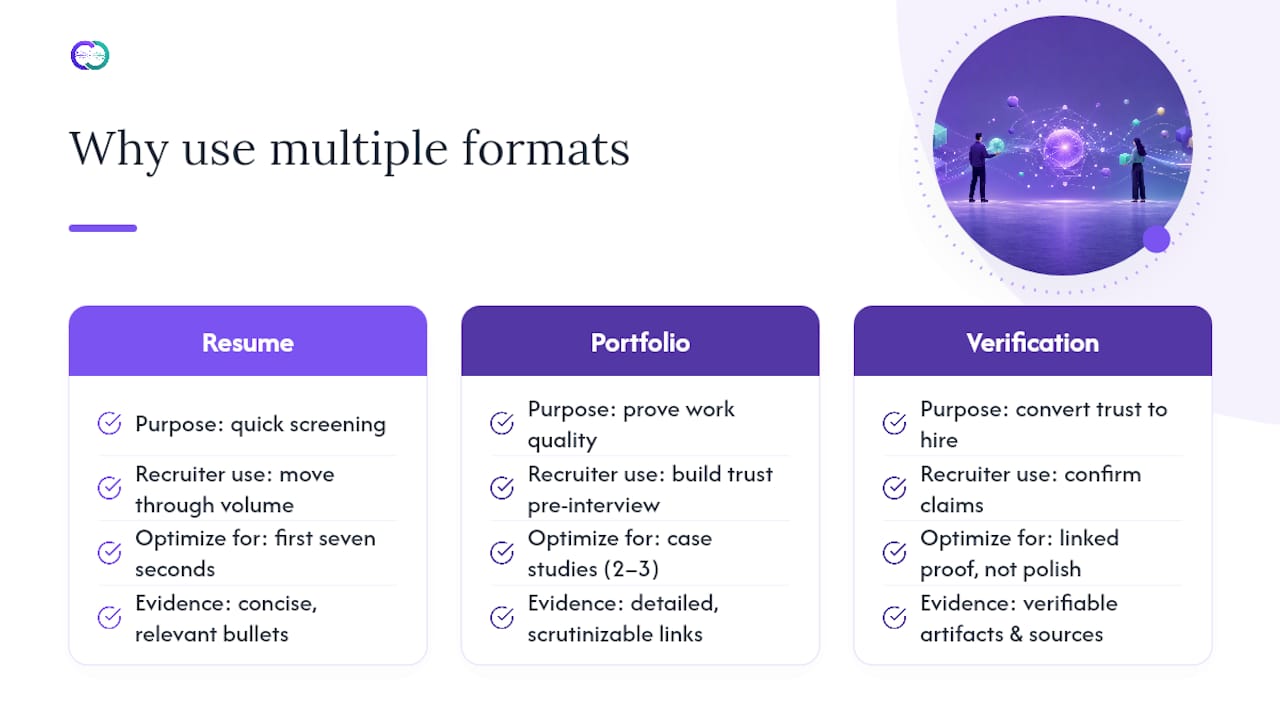
The mistake most job seekers make is treating the resume-versus-portfolio question as an either/or decision. It isn’t. Recruiters need the resume to move fast through volume, and they need the portfolio to trust what they’re seeing before they commit to an interview slot or a hire. Verification is the real currency here, not polish. A portfolio full of unlinked screenshots and vague descriptions asks the recruiter to take your word for it, and most won’t bother.
Build both. Optimize the resume for the first seven seconds, then back it with two to three case studies that hold up under scrutiny. That combination, not either document alone, is what actually moves candidates from the applicant pile to the offer stage.
— Alloquy Team
Turn Your Verified Work Into an Interactive Portfolio
Alloquy is the alternative to static PDFs and dead GitHub links: your projects live in one verified, queryable profile instead of scattered across documents recruiters have to chase down and take on faith.

Link your Google Drive documents, and Alloquy converts your existing work, case studies, decks, project files, into evidence-backed portfolio entries a recruiter’s AI assistant can query directly for verified answers. It generates tailored resumes and cover letters straight from that same verified evidence base, so your resume and portfolio never drift out of sync. Custom branding and role-specific landing pages mean you can send a hiring manager exactly the targeted link this guide recommends building, without doing it by hand every time. Start with Alloquy’s free tier to build your first verified profile, or check the pricing plans if you’re ready to unlock the full case study and AI Q&A features.
Sources
- Portfolio vs. Resume: What They Include and When to Use Them — Indeed
- 15 web developer portfolios to inspire you — freeCodeCamp
FAQ
What Is the 7-Second Rule for Resumes?
The 7-second rule describes how quickly a recruiter forms a first impression of your resume, often cited around 7.4 seconds. It’s why the top third of your resume needs your strongest, most quantified achievement, not your job history in chronological order.
Is a Career Portfolio the Same as a Resume?
No. A career portfolio is more in-depth than a resume and includes work samples, case studies, and a career summary, while a resume is a condensed, one-to-two-page screening document.
Do I Need a Portfolio if I Already Have a Strong Resume?
It depends on your field. A resume is required for nearly all corporate and administrative roles, but design, development, writing, and marketing roles typically expect a portfolio alongside it as proof of skill.
Should I Use a PDF Portfolio or a Web Portfolio?
A web portfolio generally wins for interactivity and easier updates, while a PDF suits cases where a downloadable, static document is specifically requested. Platforms like Alloquy combine both: a live, queryable profile that can still generate polished documents on demand.
Where Should I Put My Portfolio Link on My Resume?
Place it in your header, next to your contact information, and again beside the specific work experience bullet it supports. Always use a shortened, branded URL rather than a long, generic homepage link.
Recommended
- Proof Without Exposure: Showcase Your Work Without Compromising Privacy or Credibility
- Why Multi-Format Resume Assets Are Key to Modern Job Search Success
- Executive Career Portfolios: How VP & C-Suite Candidates Win Global Roles
- The 2026 Professional Verification Stack: Cloud Storage Meets Career Assets