

Put a labeled, visible URL in your resume header and make it clickable. That single line does more work than any design flourish: it survives applicant tracking systems, printed copies, and the six-second recruiter scan. Match the destination to your field. GitHub for engineers, an evidence-backed portfolio for case-study roles, LinkedIn as the floor for everyone else.
TL;DR:
- Including a clear, role-specific portfolio link in the resume header ensures visibility and reliable parsing by applicant tracking systems and recruiters.
- Use a short, HTTPS URL paired with descriptive labels like “Design Portfolio” or “Code Samples” to enhance professionalism and ease of typing manually.
- For developers, GitHub is often the primary destination, while designers and product managers should prioritize a narrative or evidence-backed portfolio alongside LinkedIn.
- Limit project links to three to six high-impact examples, each with a concise problem-action-impact description, and ensure full case studies are accessible through direct links.
- Regularly test all portfolio links on mobile and in incognito mode, and maintain privacy by removing unnecessary personal details or proprietary information.
Table of Contents
- Where to Put Your Resume Portfolio Link
- How to Format a Resume Portfolio Link Correctly
- Which Hosting Destination Should You Choose?
- How Do You Curate Which Projects to Link?
- What Do ATS Actually Do With Your Portfolio Link?
- How Often Should You Test Your Portfolio Link?
- Should You Worry About Privacy When Sharing a Portfolio Link?
- Should You Use a Shortened URL or Custom Domain?
- Does Your Portfolio Need to Work Well on Mobile?
- How Do You Get Recruiters to Actually Click the Link?
- Can You Track Clicks on Your Resume Portfolio Link?
- When Is an Interactive, Evidence-Backed Portfolio Worth the Setup?
- Turn Your Resume Portfolio Link Into a Verified Career Story
- Sources
- FAQ
Where to Put Your Resume Portfolio Link
Your resume portfolio link belongs in the contact header, next to your email and phone number, not buried in a footer or sidebar column. Applicant tracking systems parse single-column layouts far more reliably than graphic-heavy templates, and recruiters scan top to bottom in seconds. A header link gets seen before attention runs out.
A simple header template works: Jane Ortiz | jane@email.com | 555-0192 | linkedin.com/in/janeortiz | janeortiz.dev — Design Portfolio. Notice the label after the URL. That label tells a skimming recruiter what they’re about to click before they click it.
Project-specific links belong in a different spot: inside individual experience bullets, right where you describe the work.
- Header link: your primary hub (portfolio, GitHub, or LinkedIn)
- Inline links: specific case studies or repos tied to a bullet point’s claim
- Never rely on footers, text boxes, or embedded graphics; ATS scanners often skip them entirely
How to Format a Resume Portfolio Link Correctly
Show the link twice: once as clickable hypertext, once as plain visible text. This isn’t redundant. It’s insurance. Older ATS versions and printed resumes lose hyperlink formatting, but the visible URL survives as text, so a recruiter can still type it manually if needed.
Keep the domain short and use HTTPS. janeortiz.dev beats www.wixsite.com/janeortiz2019/portfolio-final-v3 on every metric that matters, including how it looks printed on paper.
- Pair the URL with a role-specific label: “Design portfolio,” “GitHub — code samples,” “Case studies”
- Avoid link shorteners, UTM tracking strings, or anything that isn’t HTTPS
- Skip QR codes on a standard resume; they add friction for a desktop-scanning recruiter
Pro Tip: Add a four-to-six-word hook right after the label, like “UI case studies from three product launches.” A one-line hook increases click-through because it tells the recruiter exactly what they’ll find before they invest the click.
Which Hosting Destination Should You Choose?
Your role should decide your primary destination, not personal preference. Developers get more mileage from a clean GitHub profile than a custom site, since hiring managers already know how to evaluate commit history and repo structure. Designers and product professionals need something GitHub can’t offer: narrative context around decisions, trade-offs, and measurable outcomes.
- Developers: GitHub as primary, personal site as optional secondary
- Designers, PMs, consultants: an evidence-backed portfolio or personal site as primary, LinkedIn as secondary
- Everyone else: LinkedIn at minimum, since it’s the one destination virtually every recruiter already trusts
Recruiters often lean on GitHub, LinkedIn, and resume keywords more than decorative portfolio sites, which is exactly why a portfolio works best as a hub linking outward to those signals rather than trying to replace them. For roles where hiring hinges on case studies rather than code, an interactive, evidence-backed platform like Alloquy gives recruiters something to query directly instead of skimming static pages.
How Do You Curate Which Projects to Link?
Cap your visible projects at three to six, matched tightly to the job description in front of you. More than that, and you’re asking a busy recruiter to do triage work that belongs to you.
- Pick a lead project that mirrors the target role’s core responsibility most closely.
- Add two supporting examples that show range: a different skill, a different type of problem solved.
- Write a one-line hook per project using a problem, action, impact structure: “Cut onboarding time 40% by redesigning the signup flow for a fintech app.”
- Link each hook to a full case study, not just a homepage, so the click lands on proof, not a landing page.
For confidential or employer-owned work, redact client names, specific revenue figures, or proprietary screens, and summarize outcomes in general terms instead (“reduced churn for a B2B SaaS client” rather than naming the client). Career guides consistently recommend limiting resume links to two to four high-value destinations and testing each one before you hit submit.
Pro Tip: If you only have one strong project, don’t pad the list with weak filler. One excellent case study beats four mediocre ones every time.
What Do ATS Actually Do With Your Portfolio Link?
An applicant tracking system records your visible URL as plain text. It does not follow that link, crawl your portfolio, or credit you for the work sitting behind it. Everything the ATS scores has to live in your resume’s own text.
That means your portfolio and your resume need to say the same things, just at different depths.
- Use a single-column, plain-text-friendly template; avoid tables, text boxes, and multi-column layouts for anything ATS-critical
- Mirror job description keywords in your summary and bullets, not just your portfolio
- Write short resume fragments that echo your portfolio’s own claims so ATS and human reviewers see consistent signals
Recruiters typically spend only a handful of seconds on an initial resume scan, according to eye-tracking research from TheLadders, which is exactly why header placement and mirrored keywords matter more than a beautifully designed external page nobody’s ATS will ever read.
How Often Should You Test Your Portfolio Link?
Test every link in incognito mode and on a mobile device before you submit an application, not just once when you first built the site. A link that worked in March can quietly break by June.
- Check load time and click through to at least two or three key pages, not just the homepage
- Confirm the URL matches exactly across your resume, LinkedIn, and any application forms
- Run a full check quarterly, and again before any major application push
- If a link breaks, update it everywhere at once. A stale URL in one place and a fixed one elsewhere confuses recruiters
Keep the landing page itself fast, with clear navigation to case studies and a visible fallback contact method. Guides on resume formatting note that broken links do more damage than no links at all, since they signal carelessness at the exact moment a recruiter is evaluating your attention to detail.
Should You Worry About Privacy When Sharing a Portfolio Link?
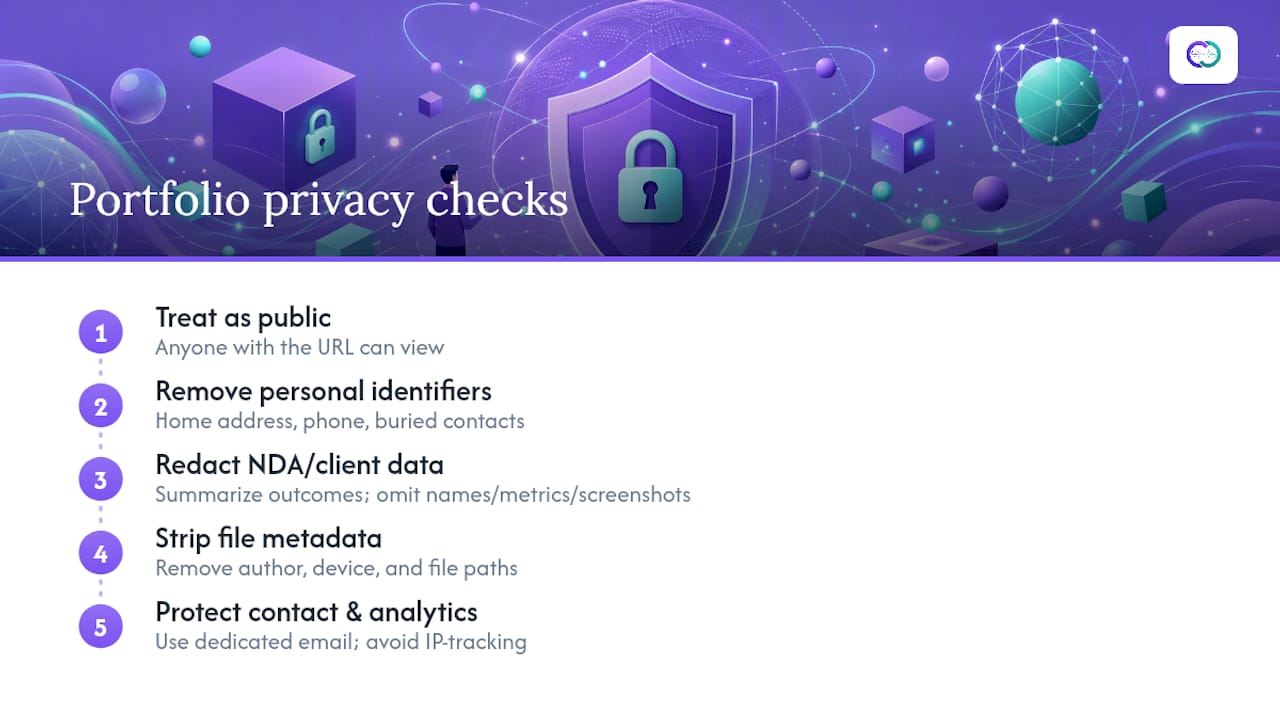
Yes, and the fix is simple: audit what’s public before you send the link anywhere. A resume portfolio link is, by definition, a public resume link, and anything on that page is visible to anyone who has the URL, not just the recruiter you intended.
Strip personal identifiers you don’t need exposed: home address, phone numbers buried in old project write-ups, or client data you haven’t cleared to share. If a past project involved a nondisclosure agreement, summarize the outcome and skip specifics like client names, internal metrics, or screenshots of proprietary interfaces. A general description (“redesigned checkout flow for a mid-size retailer”) protects you without gutting the story.
Watch for embedded metadata too. PDFs and image files sometimes carry author names, device information, or file paths from an old employer’s system. Most design and writing tools let you strip that metadata before export, and it’s worth doing once for every file you plan to publish.
If your portfolio includes a contact form, use a dedicated email address rather than your personal one, and consider whether the site needs analytics tracking that logs visitor IP addresses. None of this requires a security background. It requires a five-minute pass through your own site with a stranger’s eyes, checking for anything you wouldn’t want a competitor, a former employer, or a stranger to stumble across through a simple search.
Should You Use a Shortened URL or Custom Domain?
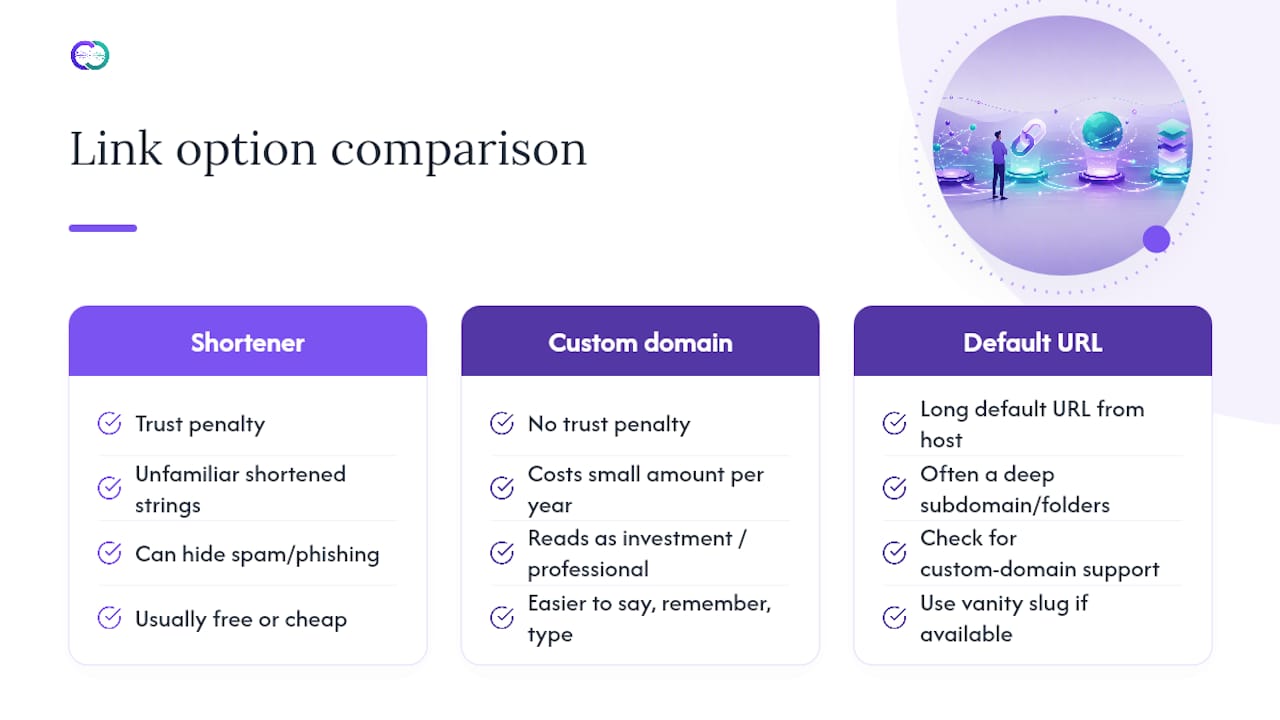
Skip the shortener. A custom domain does everything a shortened link claims to do, but without the trust penalty. Recruiters and hiring managers have learned to treat bit.ly or unfamiliar shortened strings with suspicion, since spam and phishing links frequently hide behind them.
A custom domain, by contrast, reads as a signal of investment. janeortiz.dev or janeortiz.design costs a small amount per year through most registrars and instantly looks more professional than a free subdomain buried three folders deep. It’s also easier to say out loud in an interview, easier to remember, and easier to type correctly from memory.
If you’re hosting through a platform that assigns a long default URL, check whether it supports a custom domain or at least a cleaner vanity slug. Most modern portfolio builders, including interactive platforms, offer this as a standard feature rather than a paid add-on. The goal is a domain short enough to read at a glance and specific enough that nobody confuses it with someone else’s site.
Avoid tracking parameters in the visible version of the link. UTM strings and analytics tags are useful internally, but they turn a clean URL into a wall of characters the moment they’re pasted into a resume header. If you need click tracking, apply it on the backend of your hosting platform, not in the URL string a recruiter has to read.
Does Your Portfolio Need to Work Well on Mobile?
Yes, and this matters more than most job seekers assume. A meaningful share of recruiters open resume links from a phone between meetings, not from a desktop workstation with time to spare. If your portfolio takes ten seconds to load or requires pinching and zooming to read a case study, you’ve lost that recruiter before they’ve seen your work.
Test your own site the way a recruiter would: open it on a phone, on cellular data rather than office Wi-Fi, and see what loads first. Images should compress automatically, navigation should collapse into something tappable, and body text should be readable without zooming. If your case studies rely on large embedded videos or unoptimized image files, expect slow loads that cost you the click.
Responsive design isn’t a luxury feature reserved for expensive custom sites. Most modern portfolio platforms, including interactive ones, build mobile responsiveness in by default, which removes one more thing you’d otherwise have to test and fix manually. If you’re using a personal site built from scratch, run it through a mobile-friendliness check before you ever put the URL on a resume, and fix layout issues before your first application, not after a recruiter mentions the site looked broken on their phone.
How Do You Get Recruiters to Actually Click the Link?
The label next to your link matters as much as the link itself. “Portfolio” tells a recruiter nothing. “UX case studies: 3 fintech product launches” tells them exactly what they’ll find and why it’s relevant to the role they’re hiring for.
Position the link where it’s impossible to miss, in the header, and repeat the most relevant project link again inline next to the bullet point it supports. Recruiters who skip the header sometimes catch the second placement instead.
Consistency across channels helps too. If your resume, LinkedIn, and cover letter all point to the same polished destination with matching language, you’re reinforcing one coherent story instead of scattering a recruiter’s attention across three different half-finished impressions. A portfolio that lets recruiters ask direct questions and get verified answers, rather than making them hunt through pages themselves, removes the last bit of friction between curiosity and a click.
Can You Track Clicks on Your Resume Portfolio Link?
You can, and it’s worth doing if you’re actively applying to more than a handful of roles. Basic analytics tools built into most website platforms show page views, time on page, and which case studies get the most attention, all without needing a marketing background to interpret them.
Watch for two signals specifically: whether the link gets clicked at all, and whether visitors go past the homepage into an actual case study. A high click rate with a low case-study read rate suggests your homepage isn’t doing enough to guide attention. If you’re applying broadly and getting almost no portfolio traffic, the header placement or the label itself is likely the problem, not the work behind the link.
Some interactive portfolio platforms go further, surfacing which questions recruiters actually ask an embedded AI assistant, which gives you a much clearer picture of what hiring managers care about than a generic pageview count ever could. That kind of engagement data turns your portfolio from a static file into a feedback loop you can actually act on before your next application round.
When Is an Interactive, Evidence-Backed Portfolio Worth the Setup?
A static site proves you can build a page. An interactive portfolio, where recruiters can ask direct questions and get verified answers, proves the work behind it actually happened. Alloquy’s approach links Google Drive documents to a custom AI assistant, so a hiring manager gets context and evidence instead of a résumé’s flat claims.
This setup earns its complexity in case-study-heavy hiring processes: design, product, consulting, engineering leadership. A junior role with a straightforward application funnel probably doesn’t need it. GitHub and a clean summary cover that case fine. The distinction is process, not ambition.
— Alloquy Team
Turn Your Resume Portfolio Link Into a Verified Career Story
A static portfolio still asks recruiters to take your claims on faith. Alloquy replaces that guesswork with verified evidence: link your Google Drive documents, and recruiters can ask Alloquy’s AI assistant direct questions about your projects and get accurate, sourced answers instead of skimming a homepage and hoping for context.

The platform builds interactive case studies around real documents, not just written summaries, and includes customizable branding so your profile looks like you built it, not a template. It also generates tailored resumes and cover letters pulled from that same verified data, keeping your resume portfolio link and your application materials consistent across every submission. For roles where hiring managers dig into specifics, that verification does the persuading a static page can’t.
Check the features overview to see how the recruiter AI assistant works, or go straight to pricing plans to start building a profile that shows recruiters proof instead of promises.
Sources
The guidance above draws on established research into recruiter scanning behavior and how applicant tracking systems process resume links, along with practical formatting advice tested across real hiring pipelines.
- How to include links on resume (Indeed)
- Portfolio vs. resume: What ATS actually reads | ResumeXrays
- TheLadders eye-tracking study (eye-tracking research on resume scanning)
- Hyperlinks in Resume PDFs: Add Them — Here’s How 2026
- Add Portfolio Link to Resume | TailorCV Blog
FAQ
What Is a Portfolio Link on a Resume?
A resume portfolio link is a clickable, labeled URL, usually placed in the header, that directs a recruiter to a website showcasing your work samples, case studies, or code repositories.
How Do I Create a Resume Portfolio Link?
Build or choose a hosting destination that fits your field (GitHub for developers, a personal site or an interactive platform like Alloquy for case-study roles), then add its URL as both visible text and a clickable hyperlink in your resume’s contact section.
Where Should I Put My Portfolio Link on My Resume?
Place it in the header or contact line next to your email and phone number, since that’s the section recruiters scan first and the section ATS reliably reads as text.
Should I Add a Portfolio Link to My Resume?
Yes, if the destination is current, professional, and relevant to the role. A broken or outdated link does more harm than leaving it off entirely, so test it before every application.
How Do I Add a Portfolio Link to LinkedIn?
Open your LinkedIn profile’s “Contact Info” or “Featured” section and paste your portfolio URL there, using the same label and destination you use on your resume so both profiles tell a consistent story.