

A custom portfolio section is a self-contained, titled block — web page or PDF — built around a single outcome a recruiter can verify in roughly six seconds. Each section needs five elements to function: a clear headline stating the result, a one-line impact metric, a role statement, one evidence link or attachment, and a contact path or call to action. UXfol’s digital-portfolio guidance identifies a short bio, categorized work samples, contact details, and a résumé link as the non-negotiable core. Robert Half adds a 2026-specific requirement: show smart, ethical AI literacy with a brief factual disclosure wherever AI shaped the work. Alloquy’s interactive evidence platform is built around exactly this architecture, letting recruiters query verified artifacts directly rather than reading static text.
At a glance, every section must include:
- A result-first headline (outcome before job title)
- One quantified metric or proxy metric
- Your specific role and decision scope
- A linked or attached evidence artifact
- A one-line AI disclosure where applicable
- Contact information or a clear next step
Key Takeaways
Custom portfolio sections built around verified, outcome-first evidence — with mobile-first layout, clear AI disclosures, and permissioned artifacts — consistently outperform static résumés in recruiter engagement.
| Point | Details |
|---|---|
| Lead with outcomes | Every section headline states the result first; metrics and role follow. |
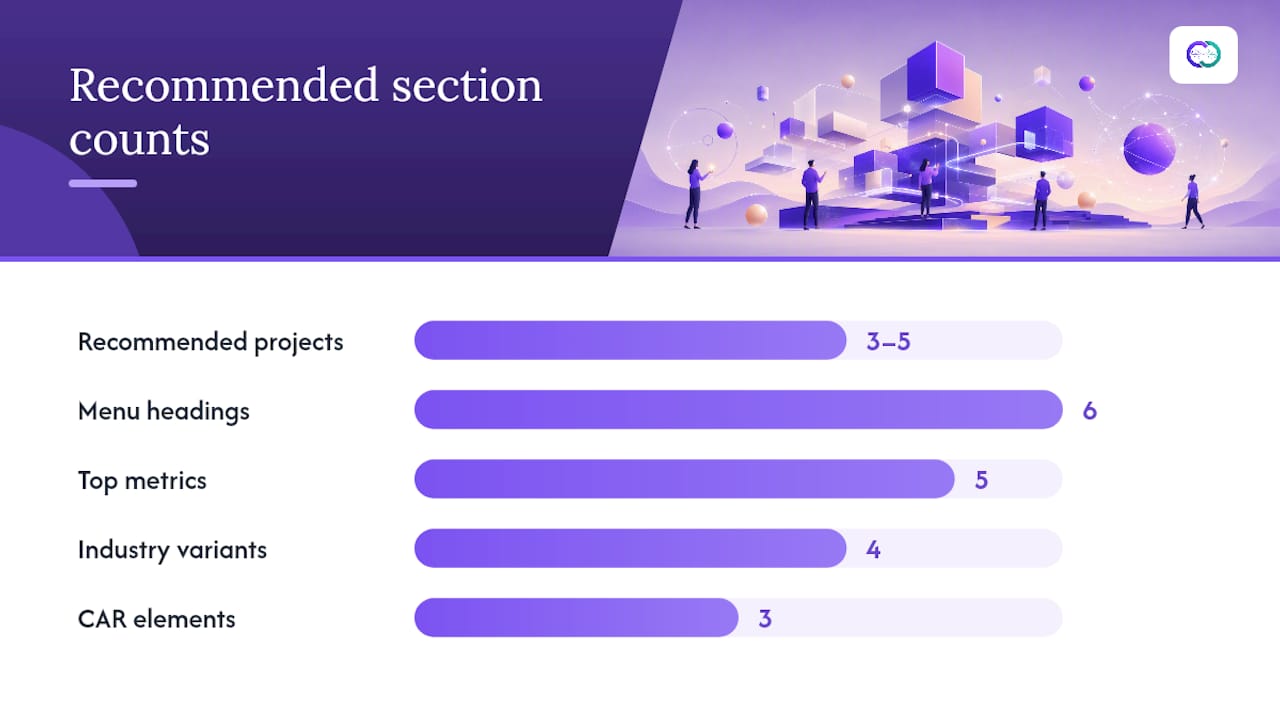
| Curate, don’t archive | 3–5 high-impact projects outperform a complete work history for recruiter review. |
| Mobile-first layout | Single-column layout surfaces title, role, metric, and evidence link without extra clicks. |
| Disclose AI decisions | One-line disclosure per project documents your judgment, not the tool’s output. |
| Alloquy for interactivity | Alloquy’s verified evidence platform lets recruiters query your artifacts directly via AI chat. |
Table of Contents
- What do recruiters actually look for in a portfolio?
- Which custom sections does every portfolio need?
- How to structure a case study recruiters will actually read
- Layout and accessibility rules that maximize recruiter engagement
- How do you make portfolio evidence verifiable and privacy-safe?
- The Alloquy team’s approach to evidence-first portfolio sections
- Alloquy makes your portfolio sections interactive and verifiable
- Sources
- FAQ
What do recruiters actually look for in a portfolio?
Recruiters form a yes/no decision fast. CodeTalentHub’s layout formula recommends placing the primary business outcome in the top-right hero quadrant, where the eye lands first on a standard F-pattern scan. Mobile compounds the pressure: Jobsearch reports that a significant share of portfolio views happen on mobile devices, where a single-column layout must surface title, role, key metric, and a link to the full case without extra clicks.
The signals recruiters read for, in order of weight:
- Measurable outcomes — percentages, time savings, revenue impact, or clearly labeled proxy metrics
- Role clarity — what you owned versus what the team owned
- Reproducible artifacts — a linked demo, a PDF, a GitHub repo, a published report
- Clear contact path — one click to email or LinkedIn, no hunting
Pro Tip: Place your strongest business metric in the top-right hero area of each project section. That quadrant captures attention before a recruiter decides whether to scroll.
Which custom sections does every portfolio need?
Resumly recommends 3–5 curated, high-impact projects rather than an exhaustive archive, using a CAR (Context-Action-Result) structure for each description. Organize sections by relevance to the target role, not by chronology — UXfol confirms that surfacing the most role-relevant work first outperforms a timeline view.
Recommended section menu (copy these headings):
- About / Value Proposition — two sentences: who you are, what problem you solve, and a link to your résumé
- Projects / Case Studies — 3–5 entries, each with role, outcome metric, what you decided, and a proof link
- Metrics Highlights — a scannable table of your top five quantified results across all roles
- Tools & Decisions — the stack you used and why you chose it, not just a logo grid
- How I Used AI — one-line disclosures per project (e.g., “Used AI to generate 30 headline angles; selected and refined two for A/B testing”)
- Contact + Résumé Link — email, LinkedIn profile, and a downloadable PDF
Industry-specific variations:
- Technical: add a runnable demo link and a README excerpt
- Design: include before/after visuals with a one-line rationale
- Marketing: surface A/B test results and channel-level attribution
- Product: lead with adoption KPIs and a retention curve screenshot
Micro-template (paste and fill):
A statement of originality and prominent contact details increase recruiter trust and make follow-up frictionless, per UXfol’s best-practice guidance.
How to structure a case study recruiters will actually read
Jobsearch.page recommends an inverted-pyramid structure: results first, pivotal decisions second, process third. This matches how recruiters scan — they want the outcome before they invest time in the narrative.
Reusable case study template:
- Impact headline — result + timeframe (e.g., “Increased activation 34% in 8 weeks”)
- Project overview block — role, timeline, scope (two to three lines maximum)
- Two or three pivotal decisions — what you chose, why, and what you rejected
- Evidence block — links, screenshots, or attached files with one-line proof captions
- Measured outcome — the metric, with a proxy or relative figure if raw data is confidential
- One-line takeaway — what you would do differently or what this proves about your approach
Filled example (abstracted):
Impact headline: Cut API error rate 62% over 10 weeks Role: Lead backend engineer on a three-person squad Key decision: Chose circuit-breaker pattern over retry logic after load-testing both under simulated peak traffic Evidence: [Grafana dashboard screenshot, view-only] [Post-mortem PDF] Outcome: P99 latency dropped from 840ms to 310ms; zero SEV-1 incidents in the following quarter Takeaway: Observability investment before optimization prevents misdiagnosis
For AI-assisted work, add a single disclosure line in the evidence block: “Used AI to draft the initial error-classification taxonomy; reviewed and revised all categories manually.”
Pro Tip: Move the technical appendix off the main case and link to it. The recruiter sees impact first; the hiring manager or technical interviewer follows the link for reproducibility detail.
Layout and accessibility rules that maximize recruiter engagement
Design for a six-second scan and a 375px-wide screen. The outcome and role must be visible without scrolling on mobile. Jobsearch.page and CodeTalentHub both converge on mobile-first, single-column layouts as the baseline.
Layout and accessibility checklist:
- Hero architecture: metric top-right, role and project title top-left
- Single-column mobile layout; two-column max on desktop
- File size under 2MB per page where possible
- Heading hierarchy: H1 for portfolio name, H2 for section titles, H3 for project names
- Alt text on every image (describe the outcome shown, not just the visual)
- Keyboard-navigable CTAs: “Download PDF,” “View live demo,” “Open evidence”
- Fast-loading images: compress screenshots to WebP before uploading
- Test images, navigation, and broken links before publishing — Robert Half’s pre-publish checklist flags a technical glitch as a direct interview risk
How do you make portfolio evidence verifiable and privacy-safe?
Recruiters trust evidence that is linkable, timestamped, and permissioned. Follow these steps for each artifact:
- Choose the right file type. PDF for reports and case write-ups; PNG or WebP for screenshots; short screen-recorded MP4 (under 60 seconds) for demos. Avoid proprietary formats a recruiter cannot open without software.
- Add a one-line proof caption. State what the artifact shows, your role in creating it, and the approximate date (e.g., “Q2 2025 dashboard — shows 30-day retention cohorts I built in Looker”).
- Set view-only permissions. Share Google Drive files as “Anyone with the link can view.” Never share edit access. For sensitive data, use a confidential sharing approach that protects client details.
- Redact sensitive fields. Remove client names, revenue figures, and PII before screenshotting. Replace with “[Client A]” or “[Redacted per NDA].”
- Include a short statement of originality. One sentence: “All work shown is my own or clearly attributed to collaborators; confidential details have been redacted.”
- Add an NDA/download request flow for highly sensitive artifacts — a simple contact form or email link is sufficient.
When raw data is confidential, use a relative or proxy metric and state the limitation transparently: “Exact revenue figures are under NDA; the 23% improvement reflects internal reporting.” That transparency builds more trust than a vague claim. For a deeper look at protecting sensitive work samples, Alloquy’s blog covers the full range of redaction and permission strategies.
Pro Tip: A sanitized screenshot with a clear limitation note is more credible than an unverifiable claim. Recruiters respect honesty about what you can and cannot share.
The Alloquy team’s approach to evidence-first portfolio sections
Alloquy’s core editorial position is that every custom section should lead with a verified artifact, not a self-assessment. In practice, that means each case study on an Alloquy profile carries a linked Google Drive document or uploaded file as its primary evidence node — the AI assistant can then surface that artifact in response to a recruiter’s specific question, rather than requiring the recruiter to read the entire portfolio linearly.
For AI-assisted work, Alloquy recommends a single disclosure line per project, placed in the evidence block. The platform’s ethical AI disclosure guidance draws a clear line between documenting the decision (what you chose, why, what you validated) and describing the tool’s output. Decision logs get their own section on Alloquy profiles precisely because recruiters in technical and product roles increasingly ask about judgment, not just execution.
Interactive evidence changes the recruiter experience in a measurable way: instead of a static PDF that answers only the questions the candidate anticipated, a recruiter can ask “What was the biggest technical risk on this project?” and receive a verified, contextual answer drawn from the linked artifacts.
Alloquy makes your portfolio sections interactive and verifiable
Static portfolios answer the questions you anticipated. Alloquy answers the ones you didn’t. By linking your Google Drive documents or uploading evidence directly, you create a public profile where recruiters query a custom AI assistant trained on your verified work — not a generic chatbot, but a system grounded in your actual artifacts.

The platform handles the full evidence workflow: Google Drive integration for live document linking, privacy controls for view-only and redacted sharing, customizable section templates aligned with the recruiter-first architecture in this guide, and one-click generation of tailored résumés and cover letters from your verified data. For professionals ready to move beyond a PDF, explore Alloquy’s features or review subscription tiers and evidence storage limits to find the right plan.
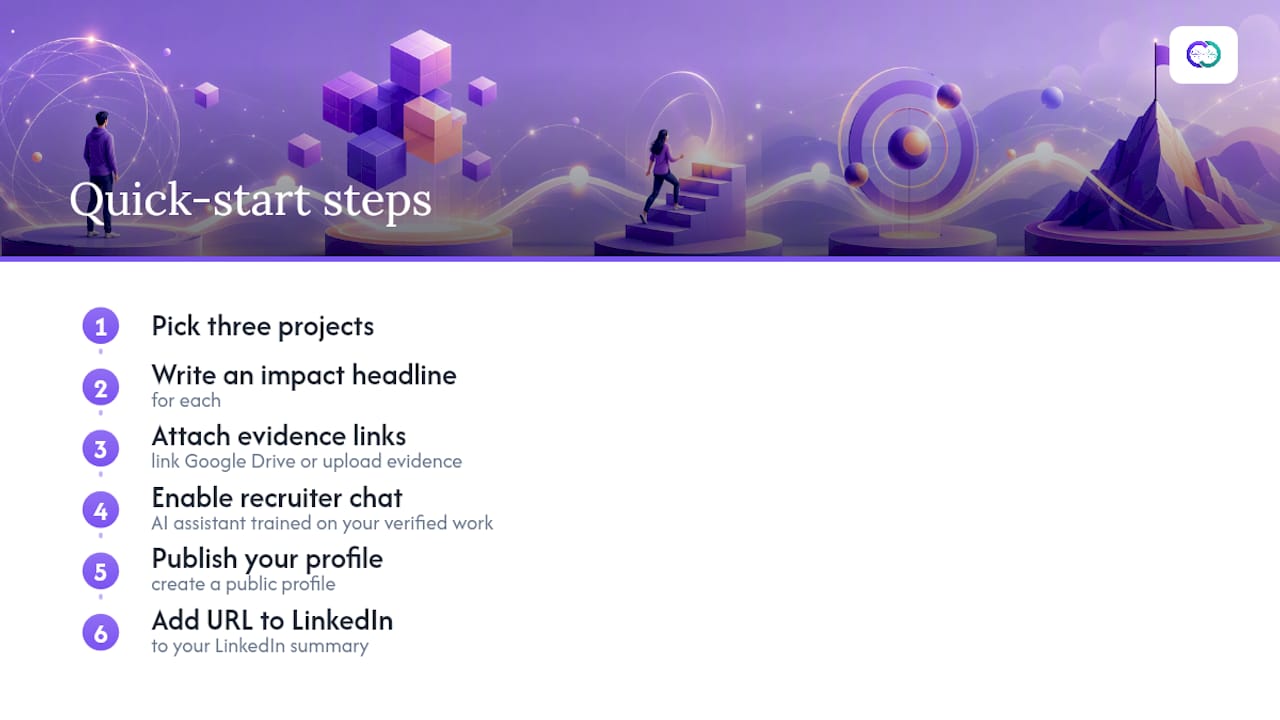
Quick-start steps: pick three projects, write an impact headline for each, attach evidence links, enable recruiter chat, publish your profile, and add the URL to your LinkedIn summary.
Sources
- How to create a digital portfolio that gets you hired
- Digital Portfolio: Examples and Best Practices for Building Yours
- How to Build a Portfolio Recruiters Actually Review - Resumly
- Portfolio Layout Formula: 3 Interviews in 1 Week | Career Guide
- Creating a Portfolio That Shines in 2026
FAQ
What are the core elements of a custom portfolio section?
Every section needs a result-first headline, a quantified metric or proxy, a role statement, one linked or attached evidence artifact, and a contact path. UXfol identifies bio, categorized samples, contact details, and a résumé link as the non-negotiable baseline.
How many projects should a portfolio include?
Resumly recommends 3–5 curated, high-impact projects rather than a complete archive. Fewer, stronger samples with measurable outcomes outperform a long list of undifferentiated work.
How should AI use be disclosed in a portfolio section?
Add a single factual line in the evidence block of each relevant project — for example, “Used AI to generate 30 headline angles; selected and refined two for A/B testing.” Robert Half frames this as documenting your decision-making, not the tool’s capability.
How does Alloquy differ from a standard PDF portfolio?
Alloquy creates an interactive public profile where recruiters query a custom AI assistant trained on your verified, linked artifacts — answering role-specific questions in real time rather than relying on static text the candidate pre-wrote.
What if I can’t share confidential data in my portfolio?
Use a relative or proxy metric and state the limitation clearly (e.g., “Exact figures are under NDA; the 23% improvement reflects internal reporting”). Redact client names and PII from screenshots, and add a short statement of originality confirming the work is yours.