

A portfolio website in 2026 runs from roughly $300 for a DIY build to $12,000 or more for a fully custom, designer-built site, with most working professionals spending a moderate budget for a professional site that actually converts client inquiries or interview callbacks. The price swings on four variables: scope (how many pages and case studies), creative type (a photographer’s storage needs differ wildly from a writer’s), animation or interactivity requirements, and whether you’re paying for ongoing support after launch. If you’re trying to win client work or land interviews rather than just have a placeholder online, budgeting mid-range is the safer bet.
TL;DR:
- Most professionals should plan a mid-range budget of around $1,200 to $5,500 for a portfolio website that effectively wins client inquiries and interviews.
- Building costs include domain registration ($12–$25 annually), hosting ($16–$160 monthly), premium templates ($30–$150), and optional storage upgrades, with ongoing expenses for management and support.
- Time to launch varies from a weekend for DIY projects to several weeks or months for freelancer or agency builds, depending on content readiness and revisions.
- Vet freelancers and agencies by clarifying ownership rights, platform use, support terms, and payment milestones, while avoiding vague quotes or locked-in platforms.
- Interactive, evidence-backed portfolios, like AI-enabled profiles, can provide higher engagement and ROI, often at a lower total cost than custom builds.
Table of Contents
- How Much Does a Portfolio Website Cost by Approach?
- What Are the Real Line-Item Costs of a Portfolio Site?
- What Costs Recur, and How Long Does a Launch Actually Take?
- How Do You Budget for and Vet a Freelancer or Agency?
- What Does a Portfolio Cost by Creative Type?
- How Can You Cut Portfolio Costs Without Hurting Results?
- Why Interactive, Evidence-Backed Portfolios Change the Math
- Get an Interactive Portfolio Without a Custom Build Bill
- Sources
- FAQ
How Much Does a Portfolio Website Cost by Approach?
The three-tier structure for portfolio website cost hasn’t changed much in shape, but the dollar amounts inside each tier have shifted as templates get smarter and freelancer rates climb. Here’s what each route actually buys you.
DIY builder route ($300–$1,500). This covers a subscription-based builder, a premium template, your own time, and maybe a few hours of paid help for polish. A student or early-career creative putting together a first portfolio to accompany job applications typically lands here. You’re trading money for hours, and you’re accepting some design ceiling. Expect somewhere between 15 and 30 hours of your own labor if you’re building from scratch on a platform you haven’t used before.
Freelancer-built route ($1,200–$5,500). This is where most working creatives who need client-winning credibility actually spend their money. A mid-career designer or photographer hiring a freelance developer or designer to build a custom, branded site with a handful of case studies sits in this band. Freelance web developers and designers typically bill $60 to $100 an hour, and a small portfolio site (discovery call, homepage, case-study template, content load, QA, and launch) usually takes 35 to 60 hours of billable work. Do that math and you land close to $2,100 to $6,000, which tracks closely with the freelancer market’s real quotes.
Agency or premium route ($5,500–$14,000+). Established professionals, consultants pitching enterprise clients, or anyone who needs a portfolio that doubles as a brand asset tend to land here. Agencies bundle strategy, custom illustration or motion work, copywriting, and sometimes ongoing retainer support into the fee, which is why the web project cost index puts creative-project agency work at $5,000 to $12,000 with typical timelines of three to six weeks.
Statistic Callout: Across a dataset of more than 60 real portfolio project quotes, medians consistently fall in the freelancer band rather than the DIY or agency extremes, which suggests that a working creative aiming to win client work should plan a mid-range budget rather than the cheapest available option, according to ProjectCostEstimator’s 2026 pricing data.
A quick way to sort yourself into a tier:
- Building your first portfolio to accompany job applications, tight budget, comfortable with templates → DIY.
- Actively pitching clients or interviewing at competitive firms, need a distinct visual identity → freelancer.
- Running a studio, consultancy, or personal brand where the site itself sells you → agency or premium build.
What Are the Real Line-Item Costs of a Portfolio Site?
Beyond the headline build price, a portfolio website carries a stack of smaller charges that rarely make it into a single quote. Knowing each line item lets you build your own budget instead of trusting a vendor’s bundled number.
Domain registration is the smallest and most predictable cost: expect $12 to $25 a year for a standard .com, with renewal pricing usually matching the first-year rate unless you catch an introductory discount. Hosting and platform fees vary far more. A basic builder-based stack costs tens of dollars a month, while a moderate platform stack with hosting and marketing tools costs more; advanced managed setups with premium services can cost significantly higher monthly fees. (https://projectcostestimator.com/blog/portfolio-website-cost-2026).
| Line item | Typical range | Billing cycle |
|---|---|---|
| Domain registration | $12–$25 | Annual |
| Basic builder plan | $16–$27 monthly | Monthly or annual |
| Moderate platform stack (hosting + email + marketing tools) | $35–$47 monthly | Monthly |
| Managed WordPress/premium hosting | $60–$160 monthly | Monthly |
| Premium template or theme | $30–$150 | One time |
| Storage/bandwidth upgrade for photo or video-heavy sites | $10–$40 monthly | Monthly |
| Business email | $6–$12/mo per user | Monthly |
| Stock assets, licensed fonts, or plugins | $20–$200 one time or annual | One time or annual |
Independent builder pricing research confirms that mainstream builder plans commonly land between $16 and $159 a month depending on tier, storage, and feature set, which lines up with the moderate and advanced stacks above.
A few things worth budgeting for that get overlooked until launch week:
- Photographers and videographers need meaningfully more storage and bandwidth than a writer’s text-heavy site, so factor in the upgraded plan tier before you commit to a template.
- A premium plugin for booking, portfolio filtering, or client galleries can add $50 to $150 as a one-time or annual fee.
- Payment processing fees only matter if you’re selling prints, templates, or booking deposits directly through the site. Standard rates run around 2.9% plus a small flat fee per transaction on most processors.
- Business email through a provider like Google Workspace typically runs $6 to $12 per user monthly, and it’s worth the cost the moment your portfolio is doing real business development.
What Costs Recur, and How Long Does a Launch Actually Take?
Separating one-time costs from recurring ones is where most budget surprises come from. The build fee, the template purchase, and any custom development work are one-time expenses. Hosting, your domain renewal, email, premium plugin subscriptions, and any maintenance retainer are recurring, and they don’t stop the day the site goes live.
An annual maintenance budget for a straightforward portfolio varies depending on management style and service level. Timeline expectations vary just as much as cost:
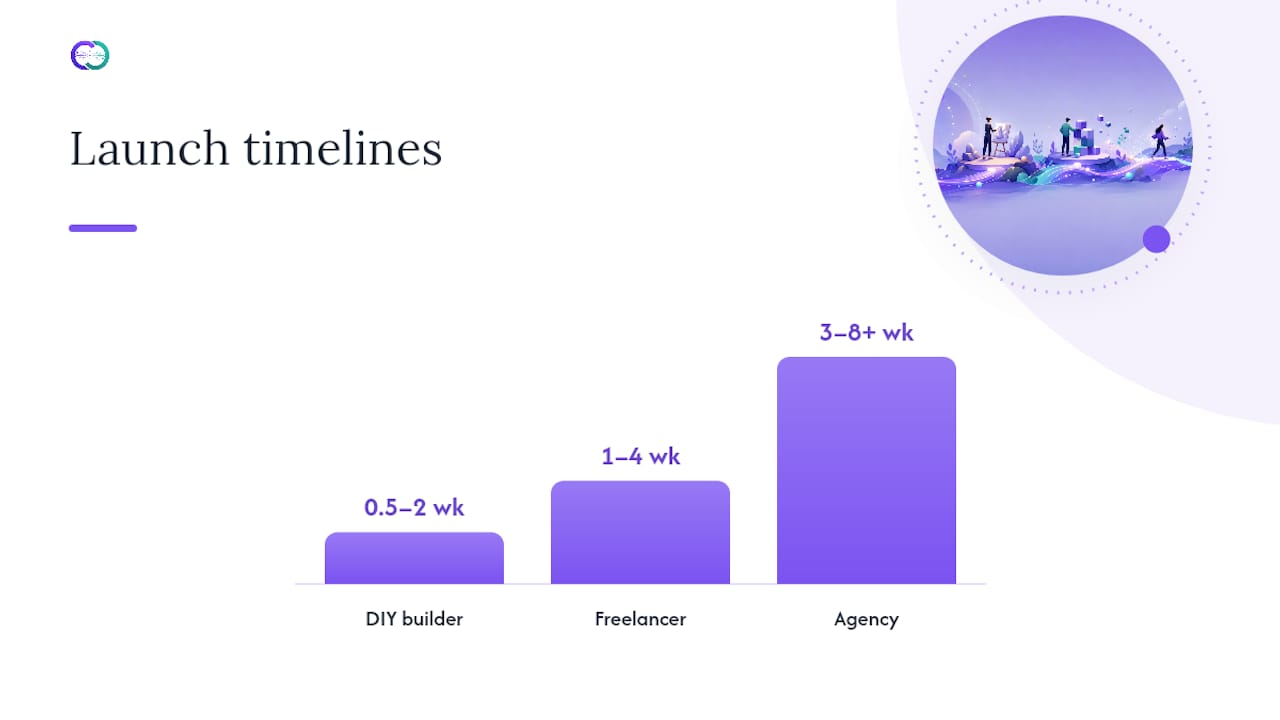
- DIY builder: a focused weekend to two weeks, depending on how much content you already have ready to load.
- Freelancer-built: one to four weeks from kickoff to launch, assuming you deliver assets and copy on schedule.
- Agency: three to eight-plus weeks, reflecting the strategy, design, and revision cycles that larger engagements build in.
Timelines stretch when clients change their minds mid-project, when case-study content isn’t ready at kickoff, or when a “simple” site quietly grows a blog, a shop, or a booking system partway through.
Pro Tip: Send your developer or designer finished case-study copy and final images before the project starts, not during it. Content delays are the single most common reason a two-week build turns into a six-week build.
How Do You Budget for and Vet a Freelancer or Agency?
Before you sign anything, get clear answers on ownership, platform, and support terms. Ambiguity here is what turns a $2,500 project into a $6,000 headache eight months later.
- Who owns the final files, code, and design assets once the invoice is paid in full?
- What content management system will you actually use to update the site yourself afterward?
- What happens after launch: is there a support window, and what does it cover?
- What are the payment milestones, and what triggers each one?
- Can you get a written scope of work listing every deliverable, not just a page count?
Evaluate any quote against three criteria beyond the sticker price. Portability matters most: can you take your content and design elsewhere if the relationship ends, or are you locked into a proprietary builder? Migrating off a locked builder platform is frequently the most expensive step in a portfolio’s entire lifecycle, often costing more than the original build. Editability matters next: will you need to pay someone every time you want to swap a project or update your bio? And long-term cost matters more than the quoted number: a $1,200 site that requires $200 monthly in mandatory retainer fees is not cheaper than a $3,000 site with a $15 monthly hosting bill.
Watch for these red flags before you sign:
- A quote with no itemized breakdown of hours or deliverables.
- Vague or evasive answers about who owns the code after final payment.
- No mention of what platform the site is built on, or resistance when you ask.
- Pressure to pay the full amount upfront rather than in milestones.
- No post-launch support window at all, even a short one.
What Does a Portfolio Cost by Creative Type?
Cost varies more by profession than most budgeting guides admit, mostly because of storage needs, animation complexity, and how much custom code the field expects.
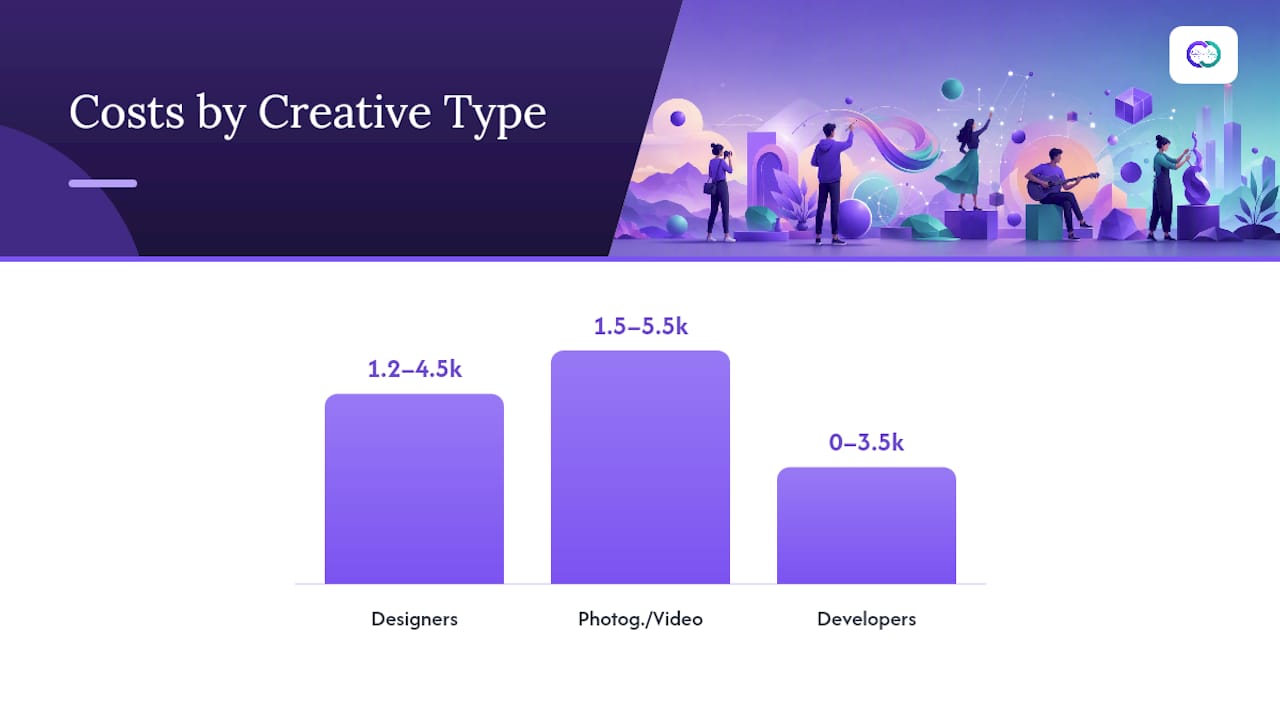
Designers typically spend $1,200 to $4,500, with the range driven by how many interactive case studies and custom layouts they want versus a well-executed template. A strong design portfolio usually leans on visual hierarchy and a handful of deep case studies rather than a dozen thin ones.
Photographers and videographers run $1,500 to $5,500, and the spread comes almost entirely from storage and bandwidth needs, not design complexity. High-resolution galleries and video reels demand upgraded hosting tiers that a text-based site never needs.
Developers have the widest range: $0 to $3,500. Many developers build and host their own portfolio on free or near-free static hosting, since the code itself is the proof of skill. A well-built developer portfolio often prioritizes live project links and clean architecture over expensive design flourishes.
Writers generally spend the least on production, often $300 to $2,000, because the portfolio’s job is showing writing samples clearly, not demonstrating visual design chops.
Multi-discipline professionals (a designer who also codes, a consultant who writes and speaks) tend to land in the freelancer-to-agency range, $3,000 to $7,000, because the site has to organize several distinct skill sets coherently.
Statistic Callout: Freelancer-built photographer portfolios commonly fall in the $1,500 to $5,500 band, while comparable developer builds on code-hosted stacks can run from free to $3,500, showing how much creative type alone shifts the realistic budget.
How Can You Cut Portfolio Costs Without Hurting Results?
A phased launch is the single most effective lever available: build the homepage and your three strongest case studies first, then add depth over the following months instead of paying for every page before launch. Premium templates also close most of the design gap with a custom build for a fraction of the price, provided you’re disciplined about swapping in your own imagery rather than leaving stock photos in place.
Image optimization is a free win that most people skip. Compressing photos before upload can shave real money off hosting and bandwidth tiers over a year, since storage costs scale with file size. Save custom development spend for the one or two features that actually differentiate you (an interactive case study, a filtering system) rather than paying for custom work across the entire site.
- Launch with your three best projects, not all fifteen.
- Compress every image before upload rather than after problems appear.
- Reserve paid developer hours for one standout feature, not general polish.
- Skip a booking or payment integration until you actually need one.
Pro Tip: Spend the money where a recruiter or client actually lingers, your best two or three case studies, and save on everything else. A beautifully designed contact page has never won anyone a job.
Why Interactive, Evidence-Backed Portfolios Change the Math
A static portfolio’s cost buys design and hosting. It doesn’t buy proof. Interactive portfolios that let a recruiter query verified achievements directly change the value equation because engagement, not polish, decides callbacks. Spending more on interactivity tends to pay off when you’re competing for roles or clients where dozens of similar-looking static sites already crowd the field. Alloquy builds this into its platform by turning linked evidence into an AI-queryable profile, which shifts the real ROI question from “how good does it look” to “how much does it prove.”
— Alloquy Team
Get an Interactive Portfolio Without a Custom Build Bill
Alloquy gives you the recruiter engagement of a custom, evidence-backed portfolio without the freelancer-to-agency price tag discussed above. Instead of paying thousands for a bespoke site and then paying again for updates, you connect your Google Drive documents once and let the AI assistant turn verified work into a portfolio recruiters can actually question.

The free tier lets you build a working profile before spending a dollar, and paid subscription tiers unlock expanded storage, more AI generation, and custom branding as your career grows. Rather than a one-time build fee locking you into a static design, you pay only when you need more capability, and you keep the time you’d otherwise spend briefing a freelancer or waiting on agency revisions. If you want a portfolio that answers a recruiter’s questions instead of just sitting there, visit Alloquy and start with the free plan.
Sources
- Portfolio Website Cost in 2026 Real Pricing
- Website Build Cost Research 2026 - Verified Builder, Freelancer and Agency Prices | Web Hosting Services
FAQ
Is $1,000 a Good Price for a Portfolio Website?
The cost for a portfolio site varies depending on scope, with DIY builds and light freelancer projects starting at lower price points. Small scopes like a homepage and a few case studies fall at the lower end of the freelancer range.
Is $1,500 a Good Price for a Portfolio Website?
Yes, $1,500 lands squarely in the freelancer-built range and typically buys a custom template, a handful of case studies, and basic launch support. It’s a fair price for a working creative who needs more polish than a pure DIY build offers.
Is It Worth Making a Portfolio Website?
For most creatives and job seekers, yes: a well-built portfolio demonstrates real work instead of just describing it, and interactive formats can improve recruiter engagement beyond what a static resume achieves. The return depends on how actively you’re using it to pitch clients or apply for roles.
Can I Host a Portfolio Website for Free?
Yes, though free hosting usually means limited storage, a subdomain instead of your own domain, and fewer customization options. Developers building on static hosting and anyone starting on a platform’s free tier, including Alloquy’s free plan, can launch a working portfolio without upfront cost.