

Yes. You should connect a custom domain to your portfolio, and the next move is simple: if you own one already, open your registrar’s DNS settings right now; if you don’t, buy one first. A custom domain builds discoverability, signals professional credibility to anyone vetting you, and lets you run email under your own name instead of a subdomain, as explained in why enhance cross-channel SEO for better brand visibility.
TL;DR:
- Using an exact-match
.comdomain of your name enhances search rankings and professional credibility, especially when potential employers Google you.- When setting up DNS records, ensure an A or ALIAS/ANAME record is used at the domain apex, and a CNAME points
wwwto your host, avoiding common configuration errors.- Propagation of DNS changes usually takes minutes to hours, but CAA records can block automatic SSL issuance if misconfigured, so verify certificate settings after setup.
- Owning your own domain allows better discoverability and portability of your portfolio, enabling updates to platform hosting without losing your professional identity.
- Platforms like Alloquy support custom domains and provide tools for linking verified evidence, making your portfolio more trustworthy and easier for recruiters to evaluate.
Table of Contents
- How Do You Choose and Buy a Custom Domain for a Portfolio?
- What DNS Records Do You Actually Need to Edit?
- Step-by-Step: Connecting Your Domain to Your Portfolio
- SSL, Propagation Timelines, and Fixing Common Failures
- Why a Custom Domain Helps Recruiters Find and Trust Your Work
- What This Trade-Off Actually Comes Down To
- Get a Recruiter-Ready Portfolio With Your Own Domain on Alloquy
- Where to Check DNS and TLS Details Yourself
- Sources
- FAQ
How Do You Choose and Buy a Custom Domain for a Portfolio?
The name matters more than the extension. Exact-match name domains, like FirstLast.com, tend to rank especially well when someone searches your name directly, which is exactly the query a recruiter or hiring manager runs before a call. That’s the core finding behind most personal website guidance: your own name, in a clean domain, outperforms a stylized handle or a link-in-bio page nearly every time.
A few naming rules keep you out of trouble later:
- Skip hyphens and numbers. “Jane-Doe23.com” reads like a scraped domain, not a professional’s.
- Favor
.comwhen it’s available..me,.io, and.coare solid fallbacks for designers, developers, and consultants when the exact.comis taken. - Avoid novelty extensions unless they reinforce your field (a
.devfor engineers is fine; a.wtfis not).
When you shop for a registrar, check four things: a DNS management panel that doesn’t bury advanced record types, free WHOIS privacy, straightforward name server control, and transparent renewal pricing (some registrars quote a low first year, then double the renewal rate). Expect to pay somewhere in the range of $10 to $20 a year for a standard .com, more for niche extensions.
Pro Tip: Set a calendar reminder 30 days before renewal. Expired domains sometimes get parked by squatters within days, and buying your own name back can cost far more than the renewal itself.
If you already own a domain from an old blog or freelance business, reusing it works fine, as long as the name still fits your current brand. Otherwise, buying a fresh domain beats bolting your portfolio onto a subdomain of someone else’s platform.
What DNS Records Do You Actually Need to Edit?
Four record types matter for a portfolio, and mixing them up is the single most common reason connections fail.
- A record: points a domain to an IPv4 address. This is usually what you set at the apex (the bare domain, like
janedoe.com, with nowww). - AAAA record: the IPv6 equivalent of an A record, used when your host supports it.
- CNAME record: points a hostname to another hostname, not an IP address. CNAMEs work well for
www.janedoe.combut cannot legally sit at the apex domain alongside other records, a restriction baked into the DNS specification. - ALIAS/ANAME: a workaround some registrars and DNS providers offer so you get CNAME-like flexibility at the root domain, since a real CNAME can’t go there.
That apex restriction trips up more portfolio owners than any other step. GitHub Pages’ own documentation warns against setting a CNAME at the apex explicitly, because a CNAME can’t coexist with other record types on the same hostname, including the NS and SOA records every domain needs. If your apex domain needs to point directly at your host, you generally want an A record (or ALIAS/ANAME if your provider supports it), while the www version takes a CNAME.
DNS providers document this cleanly: Cloudflare’s reference on record types notes that CNAMEs map names to other names while A records map directly to IP addresses, and it flags the trailing-dot convention some tools expect in a fully qualified hostname (janedoe.com. instead of janedoe.com). Miss that trailing dot in a manual configuration file and a record can silently fail to resolve.
Two more basics worth knowing:
- TTL (Time to Live) controls how long resolvers cache a record before rechecking it. Lower TTL during setup (300 seconds is common) so changes propagate faster; raise it once things are stable.
- NS records control which name servers manage your domain’s DNS overall. That’s a different, higher-level change than editing individual records, and you’d only touch it if you’re switching DNS providers entirely.
Step-by-Step: Connecting Your Domain to Your Portfolio
Follow this order, and don’t skip the verification step at the end.
- Gather the exact values from your portfolio platform’s domain settings page. Most platforms display the specific IP address (for an A record) or hostname target (for a CNAME) you need to enter. Framer’s connection documentation shows this pattern clearly: enter the domain in your site’s admin panel, then use the values it generates to build your DNS records.
- Log into your registrar’s DNS panel and add the record. Use an A or ALIAS/ANAME record for the apex domain, and a CNAME for
www. Set TTL to a short interval during setup, then save. - Add the domain inside your portfolio site’s settings, if you haven’t already. Some platforms want the domain entered first, others want DNS live first. Check your specific platform’s help docs, since the sequence varies.
- Verify the connection. Use a terminal command like
dig janedoe.comor a free online DNS checker to confirm the record resolves to the right target. Your site’s admin panel should then show a “connected” status and issue an SSL certificate automatically.
Pro Tip: Screenshot your DNS panel before making changes. If something breaks, you’ll want a clear before-and-after to hand to support instead of trying to remember what the old values were.
SSL, Propagation Timelines, and Fixing Common Failures
Once your DNS record resolves correctly, most portfolio platforms provision a TLS certificate automatically through Let’s Encrypt, typically within minutes. If issuance stalls, check for a CAA record on your domain. CAA records restrict which certificate authorities are allowed to issue certificates for your domain, and a misconfigured one can block Let’s Encrypt from completing the process.
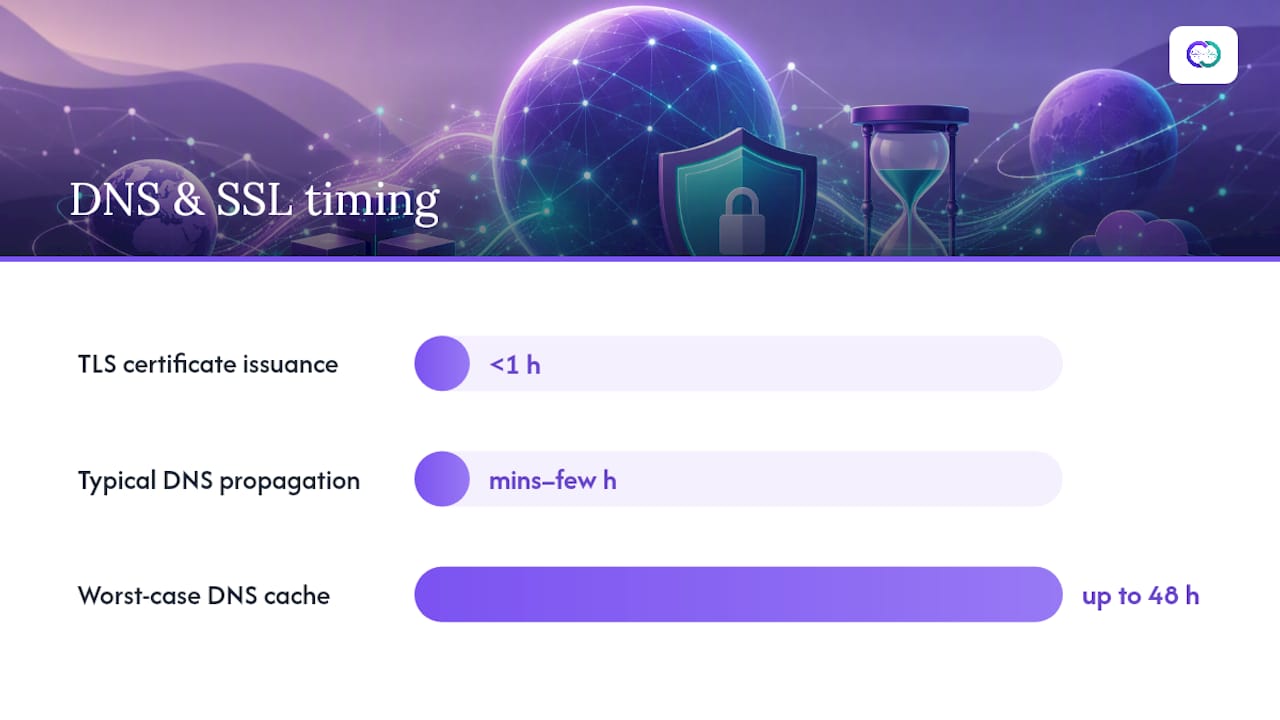
Propagation, meanwhile, is often quick but not guaranteed to be. Most changes take effect within minutes to a few hours, though the DNS specification allows caches to hold old records for up to 48 hours in edge cases.
When a connection isn’t working, check these in order:
- Confirm you used the correct record type (A/ALIAS at the apex, CNAME for
www), not the reverse. - Look for a CNAME sitting at the apex domain. It’s the single most common configuration error.
- Clear your local DNS cache and try a different network before assuming the record itself is wrong.
- Check for conflicting or duplicate records at the same hostname.
If none of that resolves it, contact your platform’s support with your dig output and a screenshot of your DNS panel. That’s the information support teams ask for first, and providing it upfront skips a full round of back-and-forth.
Why a Custom Domain Helps Recruiters Find and Trust Your Work
A portfolio living on its own domain is far easier for search engines and recruiter-facing AI tools to parse than a link-in-bio page. Link hubs are convenient for sharing but they’re thin by design. There’s little structured content underneath for anything to crawl or index. A real, server-rendered personal website gives search engines and AI tools actual content to index: project pages, case studies, verifiable achievements.

That distinction compounds when your portfolio connects to evidence rather than just claims. Alloquy’s interactive portfolio examples show how linking real documents to specific achievements gives recruiters something to query rather than take on faith. A custom domain makes that content discoverable in the first place.
Three practical moves extend that advantage:
- Make every project page crawlable text, not just images or embedded PDFs.
- Add basic structured data (Person or CreativeWork markup) so search engines understand who and what the page describes.
- Point your primary professional links, LinkedIn, email signature, resume header, at your custom domain instead of a generic subdomain.
What This Trade-Off Actually Comes Down To
A domain’s cost typically ranges in the low tens of dollars annually. That’s a rounding error against what a strong, discoverable portfolio can do for a job search or freelance pipeline. The credibility gap between “janedoe.com” and a platform subdomain is real, and it shows up the moment someone Googles your name.
The bigger payoff is portability. Own the domain, and you can swap platforms without losing your professional identity or breaking every link on your resume. That flexibility is worth more than the renewal fee ever will be.
— Alloquy Team
Get a Recruiter-Ready Portfolio With Your Own Domain on Alloquy
Alloquy gives you the piece a plain custom domain can’t provide on its own: evidence recruiters can actually interrogate. Instead of a static page under your name, you link your Google Drive documents to specific achievements. A custom AI assistant answers recruiter questions with grounded, contextual detail pulled from those verified sources.

You get customizable branding and support for a custom domain so your portfolio lives at your own name rather than a generic subdomain. The platform also supports generating tailored resumes and cover letters from your portfolio data, so your application materials trace back to evidence rather than unverified claims. Start with a free profile to see how it works, then check Alloquy’s plans if you want expanded evidence storage or generation limits. Head to Alloquy to set up your profile today.
Where to Check DNS and TLS Details Yourself
For record-level specifics, Cloudflare’s DNS record types reference and Let’s Encrypt’s CAA documentation cover the technical edge cases this guide simplifies. Registrar interfaces vary, so confirm exact steps in your own provider’s help docs before making changes.
Sources
- Personal Website Guide | Discoverability Co
- Managing a custom domain for your GitHub Pages site
- DNS record types reference | Cloudflare
- CAA and certificate issuance | Let’s Encrypt
FAQ
Which Domain Is Best for a Portfolio?
An exact-match .com with your first and last name is the strongest option for discoverability, since it matches the query most people run when searching for you by name. If that’s taken, .me, .io, or .co are reasonable substitutes depending on your field.
Can I Use a Custom Domain With Adobe Portfolio?
Portfolio builders that support custom domains typically require the same DNS steps covered here: an A or ALIAS/ANAME record at the apex, and a CNAME for www. Check your specific platform’s domain settings page for the exact values it wants you to enter, since interfaces and requirements vary by provider.
Is Domain Flipping Illegal?
Buying and reselling domains isn’t illegal on its own, but registering a domain that infringes on someone else’s trademark to resell it can expose you to legal claims and forced transfer through dispute processes. For a personal portfolio, this doesn’t apply. You’re registering your own name, not someone else’s brand.
Can I Get a Free Domain for My Portfolio Website?
Some portfolio platforms, including Alloquy’s free profile, let you build and publish a portfolio without paying for a custom domain right away, typically on a platform subdomain. A true custom domain with your own name generally requires a small annual registration fee from a registrar, usually in the $10 to $20 range for a standard .com.