

A case study slide deck, in its modern form, is not a PowerPoint file at all. It’s an interactive, evidence-backed case study hosted in an online portfolio, where every claim links to a verifiable artifact and a recruiter (or their AI assistant) can query the details directly. Platforms like this build this format around one goal: turning a static bullet point on a resume into a project a recruiter can inspect and interrogate in minutes, not skim in seconds.
TL;DR:
- Verifiable artifacts like live demos, code repositories, and signed deliverables significantly boost recruiter trust compared to static screenshots or vague descriptions.
- Incorporating structured metadata and concise captions for each artifact ensures AI assistants can accurately cite project details during queries.
- Prioritizing a small number of high-quality case studies (three to six) with clear ownership and measurable results outperforms larger, shallow portfolios.
- Using interactive elements such as playable artifacts and responsive design increases recruiter engagement and trustworthiness.
- Platforms like Alloquy automate linking verified evidence and enable AI-driven querying, making verified case studies faster and easier to produce.
Table of Contents
- What Should an Interactive Case Study Include?
- How Do You Make a Case Study Verifiable and AI-Queryable?
- What Design Patterns Actually Hold a Recruiter’s Attention?
- How Do Recruiters Actually Scan and Query These Portfolios?
- How Do You Convert a Resume Bullet Into a Queryable Case Study?
- How Should You Tailor a Case Study for Different Hiring Managers?
- What Mistakes Undermine an Interactive Case Study?
- What Do Strong Case Study Examples Look Like?
- Which Tools Help You Build an Interactive Case Study?
- Why Evidence-Backed, Queryable Case Studies Are the Standard Now
- Publish a Queryable Case Study With Alloquy
- Sources
- FAQ
What Should an Interactive Case Study Include?
A recruiter reading a case study is really asking one question repeatedly: did this person cause the result, and can I check it? The structure below answers that question at every stage, borrowing the problem, approach, process, and result framework that Toptal recommends to UX candidates, but it applies just as cleanly to engineers, product managers, and consultants.
Each element earns its place because it closes a specific gap recruiters flag when a case study reads like marketing copy instead of documentation:
- Problem statement and constraints: the actual business pressure, deadline, or technical limit, not a generic pain point.
- Role, scope, and contributions: what you owned versus what the team owned, stated plainly.
- Methods considered and decisions made: the trade-offs you weighed, including options you rejected.
- Process artifacts: wireframes, failed prototypes, research notes, or pull requests that show the work in motion.
- Results: metrics with attribution, plus what happened next.
- **A one-line hero and compact project card for readers who only have ten seconds.
Recruiters specifically look for the “messy” middle. UX hiring research from HubSpot’s design recruiting team found that wireframes, pivots, and dead-end prototypes demonstrate judgment far better than a polished final screenshot ever could.
How Do You Make a Case Study Verifiable and AI-Queryable?
Evidence only counts if it’s checkable, and checkable means stable, labeled, and structured in a way an AI assistant can parse without guessing. A screenshot proves nothing on its own. A live link, dated and captioned, proves quite a lot.
Follow this sequence when attaching evidence to a case study:
- Prioritize stable artifacts first. Live demos, canonical GitHub repositories, analytics snapshots, and signed client deliverables outrank slide exports or one-off screenshots every time.
- Fix your link hygiene. Use permanent URLs instead of expiring share links. If you’re pulling from Google Drive, set public “anyone with the link can view” permissions rather than short-lived tokens that die after a session.
- Label every artifact with metadata. Note your role, the artifact’s date, and a one-sentence caption stating exactly what it proves. “Q3 dashboard, my role: sole analyst, proves: 34% drop in churn after redesign” tells an AI assistant precisely what to cite.
- Add short Q&A anchors. Structured microcopy, phrased as the questions recruiters actually ask, lets an AI assistant return exact citations instead of vague paraphrases.
Pro Tip: Write your artifact captions as if you’re answering a recruiter’s question directly. “This dashboard shows the churn metric I owned” gets cited by an AI assistant far more reliably than “Project dashboard screenshot.”
Getting this right is what separates a portfolio that reads well from one that actually gets verified. A recruiter, or the AI layer standing in for one, shouldn’t have to guess what a linked document is supposed to prove.
What Design Patterns Actually Hold a Recruiter’s Attention?
Interactive charts and evidence-linked case studies get meaningfully more recruiter engagement than static resume bullets describing the same project, according to portfolio benchmarking research. Design decisions determine whether that attention converts into a deeper read or a closed tab.
Start with the hero and project card, since that’s the only part guaranteed to get read. One sentence stating the impact, two key metrics, and a role tag. Nothing more, because recruiters scanning a portfolio list want proof of fit before they commit to reading process details, per hiring manager scanning research.
From there, layer information with progressive disclosure:
- Quick facts visible immediately (role, timeline, outcome).
- Expandable sections for artifacts and methodology, opened on demand.
- Playable demos or short walkthrough videos reserved for readers who click through.
A performance and accessibility checklist matters just as much as the content itself: mobile-first layout, fast load times, and full keyboard navigation. A case study that takes eight seconds to load on a phone loses the recruiter before the hero sentence even renders. And resist decorative interactions, parallax scroll, animated counters, anything that hides substance behind motion. Live, playable artifacts build trust because they let a reviewer verify behavior in real time. A spinning graphic does not.
How Do Recruiters Actually Scan and Query These Portfolios?
Recruiters move through a predictable path: project cards first, then the hero statement, then a fast check of one or two evidence links, and only then a deep artifact review if something holds up. Understanding that sequence tells you exactly where to front-load your strongest proof.
What gets checked first, almost without exception:
- The live demo or working product link.
- A code repository, if the role is technical.
- An analytics snapshot or dashboard screenshot with real numbers attached.
- Any delivered artifact a client or manager can confirm exists.
Recruiters also come with a predictable set of questions: who owned this, what trade-offs did you make, what failed along the way, and what changed because of your work. Case study copy that answers those four questions in plain, short sentences, each tied to a linked artifact, gives both a human recruiter and an AI assistant something precise to cite instead of a vague summary to paraphrase.
How Do You Convert a Resume Bullet Into a Queryable Case Study?
Turning one line from a resume into a full interactive case study takes less time than most people expect, usually an afternoon once the artifacts are gathered.
- Pick the right project. Choose something finished, measurable, and backed by evidence you can actually link, not a project still in flux.
- Gather three to six artifacts. More than that dilutes attention. Portfolio guidance consistently favors a small number of high-quality projects over a long, shallow list. Write a one-line caption for each.
- Write the hero and narrative. Two lines for the hero, then 200 to 500 words covering the problem, your approach, and the result.
- Attach stable links and metadata, then add one playable demo or a short walkthrough video.
- Build short Q&A anchors for AI consumption, then test them by asking the questions yourself.
- Preview on mobile and confirm load times before publishing.
Pro Tip: Test your Q&A anchors by typing the exact question a skeptical hiring manager would ask. If the answer that comes back doesn’t cite a specific artifact, rewrite the anchor before you publish.
How Should You Tailor a Case Study for Different Hiring Managers?
A technical hiring manager and a non-technical stakeholder are reading the same case study for different reasons, and a single fixed narrative rarely serves both well. The fix isn’t writing two versions. It’s structuring one case study so each reader can self-select the depth they need.
For a technical reviewer, lead the expandable evidence section with the repository link, the architecture decision, or the specific trade-off you made under a technical constraint. They want to see the reasoning, not just the outcome. For a hiring manager or recruiter without deep technical context, the hero statement and the two headline metrics need to carry the entire argument, since they may never click into the artifact layer at all.
Industry matters too. A design hiring manager, per recruiter scanning behavior research, wants to see decisions and trade-offs over polished visuals alone. A product or engineering manager tends to weight the results section and the measurable business impact more heavily than process artifacts. If you know who is likely to review your portfolio, order your evidence accordingly: decisions first for design reviewers, numbers first for operators and executives.
Where the platform allows it, use tagging or filtering so a reviewer can jump straight to the projects relevant to the role they’re hiring for. A recruiter evaluating you for a data-heavy role shouldn’t have to wade through three unrelated marketing case studies to find the one dashboard project that matters to them.
What Mistakes Undermine an Interactive Case Study?
The most common failure is volume over verification: ten shallow case studies instead of three that actually hold up under scrutiny. Recruiters notice quantity fast and lose interest just as fast when none of it is backed by anything checkable.
Watch for these specific traps:
- Screenshots standing in for live proof. A static image of a dashboard proves far less than a link to the dashboard itself, and reviewers know the difference.
- Missing role clarity. If a case study doesn’t state clearly what you owned versus what the team owned, a recruiter will assume the smaller contribution.
- Broken or expiring links. Google Drive files shared with short-lived tokens die quietly, and a dead link during a recruiter’s review is worse than no link at all.
- Process-template language. Headings like “Discovery,” “Ideation,” and “Delivery” with no specific decisions underneath read as generic and get skimmed past.
- Decorative interaction without substance. Animated transitions and hover effects that add nothing to comprehension slow down the scan without adding proof.
- No measurable result. A case study that ends on “the client was happy” instead of a number leaves the recruiter’s core question unanswered.
Every one of these mistakes shares a root cause: prioritizing how the case study looks over whether it can be verified.
What Do Strong Case Study Examples Look Like?
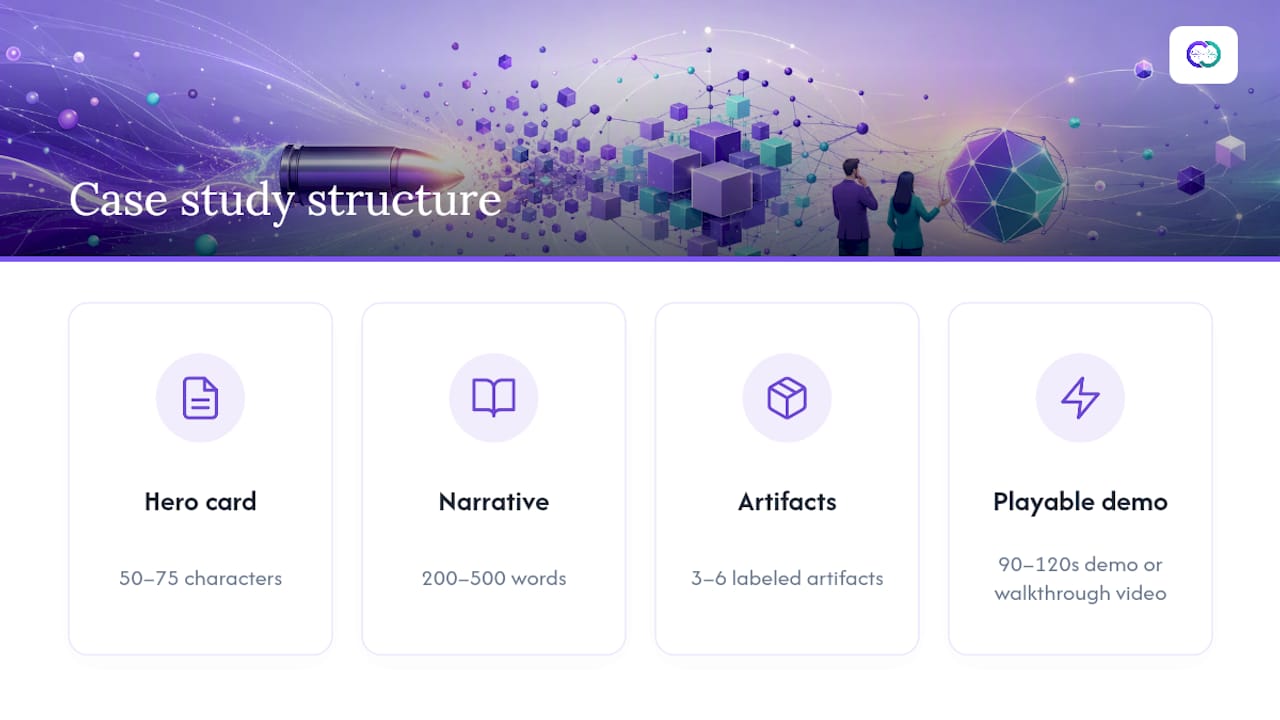
The strongest interactive case studies share a repeatable pattern rather than a single visual style. A hero card of 50 to 75 characters, a narrative running 200 to 500 words, three to six labeled artifacts, and one playable demo or a walkthrough video lasting 90 to 120 seconds. That structure, documented in Alloquy’s own portfolio guidance, consistently produces the highest recruiter engagement across roles.
For design-heavy roles, the strongest examples show the “messy” journey explicitly: a rejected wireframe next to the final one, a note explaining why an earlier direction failed. UX portfolio examples built this way tend to outperform polished-only presentations because they demonstrate judgment, not just output.
For technical roles, the pattern shifts toward proof of execution: a live repository, a deployed environment, or a before-and-after performance metric pulled straight from monitoring data. For product or strategy roles, the pattern leans on the decision trail, documenting what was considered, what was rejected, and why, alongside the business metric that resulted.
Some creators go a step further with playable or simulation-style case studies, letting a reviewer walk through a decision tree the way the candidate actually experienced it. Interactive, choose-your-path formats work particularly well for designers and product people whose core skill is decision-making itself. The common thread across every strong example is that a reviewer never has to take a claim on faith. Something is always one click away.
Which Tools Help You Build an Interactive Case Study?
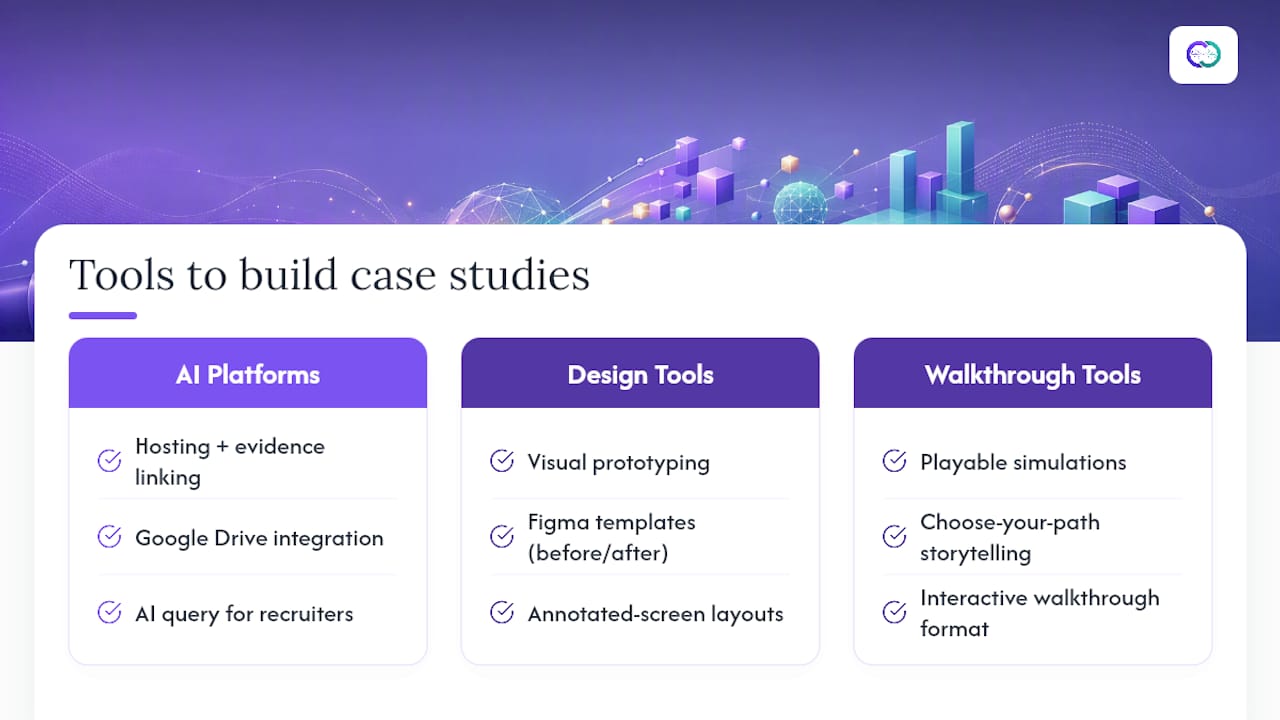
Building this format from scratch, with custom code, a headless CMS, and a manually wired evidence layer, is possible but slow, and most job seekers don’t have the spare weeks for it. Purpose-built portfolio platforms close that gap by handling hosting, evidence linking, and layout out of the box.
Some platforms occupy a distinct niche in that category: rather than just hosting static pages, they connect directly to a candidate’s Google Drive documents and generate a public profile with a custom AI assistant that recruiters can query for verified specifics. That’s a meaningfully different proposition than a portfolio template, since the AI layer answers questions in real time instead of requiring a recruiter to dig through pages manually.
For designers building visually rich narratives, general design tools like Figma remain useful for prototyping the visual layer of a case study, particularly a Figma-based case study template for laying out before-and-after comparisons or annotated screens. For candidates who want simulation-style, playable case studies, dedicated tools built around interactive walkthroughs (of the kind referenced earlier for choose-your-path storytelling) offer that specific format. For visual composition and narrative clarity beyond raw layout, general visual storytelling guidance helps candidates without a design background present artifacts in a way non-technical stakeholders can follow.
The right tool depends on what you’re optimizing for: fast recruiter verification through AI query, or a bespoke visual narrative built by hand.
Why Evidence-Backed, Queryable Case Studies Are the Standard Now
Static portfolios ask a recruiter to trust a claim. Queryable ones let a recruiter check it. That shift matters more than most job seekers realize, because the burden of proof has quietly moved from the candidate’s word to the candidate’s linked evidence, and candidates who haven’t adjusted are still writing case studies for a reading style recruiters abandoned years ago.
The teams building interactive case study guidance at Alloquy see the same pattern across roles and industries: candidates who attach a live demo, a dated artifact, and a one-sentence proof caption get faster, more specific recruiter responses than candidates who submit a polished narrative with nothing to click. Verification, not polish, is what closes the gap between a resume glance and a callback. That’s also why an AI assistant sitting on top of verified evidence changes the equation for hiring managers, not just for candidates. A recruiter querying a portfolio directly, instead of reading it end to end, gets an answer sourced from an actual document rather than a paraphrase of a bullet point.
The candidates who benefit most aren’t necessarily the most accomplished ones. They’re the ones who documented their work in a form someone else could check.
**
Publish a Queryable Case Study With Alloquy
Certain platforms turn the case study structure covered in this article into something you can actually publish this week, without hand-building a website or a custom database of links. By connecting Google Drive documents, these services assemble verified artifacts, dashboards, and deliverables into an interactive profile with a custom AI assistant that answers recruiter questions directly from evidence.

That means a recruiter asking “what was your role in this project” or “what changed after this redesign” gets a specific, sourced answer instead of a guess based on a resume line. Customizable branding options may let the profile match personal presentation, and platforms can generate tailored resumes and cover letters pulled from verified data, so application documents and portfolios do not contradict each other. If you’re ready to convert a resume bullet into a case study recruiters can actually query, check Alloquy’s pricing plans and publish your first profile.
Sources
- Revolutionize case study in resume vs portfolio: What You Need to Know
- Craft an outstanding UX portfolio with these recruiter tips (Toptal)
- Building a portfolio site that actually gets you hired
FAQ
What Is a Case Study Slide Deck in a Modern Job Search?
It’s an interactive, evidence-backed case study hosted in an online portfolio, where recruiters can click through to verified artifacts and query an AI assistant for specific project details, rather than a static PowerPoint presentation.
How Many Case Studies Should a Portfolio Include?
Most portfolio guidance recommends three to six high-quality, evidence-backed case studies over a longer list of shallow ones, since depth of verification matters more to recruiters than volume.
What Artifacts Should I Link in a Case Study?
Prioritize live demos, canonical code repositories, analytics snapshots, and signed deliverables. Each artifact needs a one-sentence caption stating your role and exactly what it proves.
How Do I Make My Case Study Readable by AI Assistants?
Add short Q&A anchors and structured metadata (role, date, artifact type) so an AI assistant can return an exact, cited answer instead of a paraphrased guess, a practice detailed in Alloquy’s interactive case study guide.
Does Alloquy Help Build This Kind of Case Study?
Yes. Alloquy links directly to your Google Drive documents and builds an interactive profile with a custom AI assistant that recruiters can query for verified specifics about your projects.