

You can turn a resume into a live, shareable portfolio in minutes using an AI-driven converter or an interactive platform like Alloquy. Upload your resume, let the parser structure your experience, and publish a link you can add to LinkedIn today. The sections below cover exactly what to keep, which projects to feature, and how to make the finished site hold up under recruiter scrutiny.
TL;DR:
- Converting a resume into a portfolio typically takes minutes using AI parsers that structure experience, projects, and skills for quick customization and publication.
- A strong portfolio should include curated projects with case studies that detail the problem, your role, process, and outcomes, ideally with measurable results.
- Mobile-friendly design, a clear headline, and prominent call-to-action buttons like an email or booking link significantly increase recruiter engagement.
- Publishing on a custom domain and embedding the link in your resume, LinkedIn, and email signature ensures maximum visibility during job searches.
- Interactive portfolios that link source documents and enable recruiter queries build trust and can expedite technical validations or interview discussions.
Table of Contents
- How to Convert a Resume to Portfolio in Minutes
- What Belongs in Your Converted Portfolio?
- Which Portfolio Design Choices Actually Matter?
- Where to Publish Your Portfolio and How to Share It
- Best Practices and Mistakes to Avoid
- Why Interactive, Evidence-Backed Portfolios Win Trust
- When Should You Convert Your Resume Right Now?
- Try Alloquy’s Interactive Portfolio Platform
- Sources
- FAQ
How to Convert a Resume to Portfolio in Minutes
Most AI converters accept a PDF or DOCX and extract structured data: job titles, employment dates, bullet points, skills, and education. The parser then maps that content into portfolio sections instead of a plain document layout. This is the core mechanic behind the resume to portfolio process, and it works the same way across most tools on the market, including the quick-convert pattern that has become the standard entry point for turning static documents into websites.
The typical flow looks like this:
- Upload your resume file (PDF or DOCX both work with most parsers).
- Review the auto-structured draft the AI generates from your roles, dates, projects, and skills.
- Select a template that fits your field, whether that’s a visual grid for design work or a text-forward layout for consulting or engineering.
- Make quick edits — swap in project details the resume compressed into one line, add metrics, fix parsing errors.
- Publish to a live link.
Most platforms get you from upload to a working URL quickly. Free tiers typically cap the number of projects or evidence files you can add, while paid plans unlock more storage, customization options, and advanced features for tailored resumes or cover letters.
What Belongs in Your Converted Portfolio?
Not everything on your resume needs a home on your portfolio, and not everything your portfolio needs lives on your resume. A career portfolio should function as a curated companion to a résumé, not a replacement, which means the strongest sites blend both.
Carry over from your resume:
- Your headline and a short professional summary
- Key experience bullets, rewritten with more room to breathe
- A skills section organized by relevance, not just alphabetically
- Education and certifications
Add on top of that:
- Three to eight curated projects with real context, not just titles
- A downloadable version of your resume for recruiters who still want the PDF
- A visible contact method and links to LinkedIn or GitHub where relevant
For each project, write a short case study using a problem, role, process, and outcome structure. State what you were solving, what you specifically did, how you approached it, and what changed as a result, ideally with a number attached. Employers frequently request both formats because portfolios provide the deeper proof of work that a bullet list can’t show, and showing process alongside outcomes is what separates a convincing case study from a vague project summary. You can see this format applied to technical roles in these developer portfolio examples.
Pro Tip: Write your one-line value statement before anything else — something like “Product designer helping B2B SaaS teams reduce onboarding time” — and put it in your headline. Recruiters scan the top of the page first, so that sentence carries more weight than any bullet below it.
Which Portfolio Design Choices Actually Matter?
Templates exist to translate resume sections into visual blocks: your summary becomes a hero statement, your experience becomes a timeline or grid, and your top projects get dedicated modules with images or screenshots. The template you pick does the structural work, but a handful of small edits determine whether the site reads as intentional or as a rough draft.
Mobile matters more than most people assume, since a large share of recruiter traffic to portfolio links happens on a phone between meetings. That means readable type, clear thumbnails instead of dense screenshots, and enough whitespace that the page doesn’t feel cramped on a small screen.
Three edits move the needle more than any others:
- Sharpen the headline so it states your role and specialty, not just your job title.
- Lead with your strongest project, not your most recent one.
- Make the CTA visible without scrolling, whether it’s an email link or a “book a call” button.
Where to Publish Your Portfolio and How to Share It
Publishing is the easy part. Many platforms give you a free subdomain by default, which works fine for early sharing and job applications. A custom domain can add a more permanent and professional touch once you’re actively networking or attaching the link to business cards.
Once it’s live:
- Add the link to the header of your resume, not buried in a footer.
- Update your LinkedIn headline and featured section with the same URL.
- Drop it into your email signature and any online application forms that accept a portfolio field.
- Turn on view tracking if your platform offers it, and write a descriptive page title and meta description so the link previews cleanly when shared.
A portfolio only helps if it’s visible everywhere you’re already being evaluated, and building any kind of discoverable online presence benefits from the same fundamentals covered in this practical playbook on building authority online.
Best Practices and Mistakes to Avoid
The strongest portfolios do less, not more. Recruiter attention drops fast, so leading with three to five strong projects beats padding the page with ten uneven ones. Keep each case study tight and outcome-focused rather than narrating every step of the process.
Avoid these common mistakes:
- Publishing every minor project you’ve touched instead of curating for relevance
- Hiding your contact information behind a separate page or a buried footer link
- Writing dense paragraphs with no headers, images, or spacing to break them up
- Skipping a CTA on the page entirely, which wastes the recruiter visits you worked to get
Before you call it done, run through a short polish pass: click every external link to confirm it works, test the layout on your phone, verify the resume download actually downloads, and confirm your CTA is visible without scrolling.
Pro Tip: An imperfect, live portfolio beats a flawless one still sitting unpublished. Get a working version up first, then iterate once you have real feedback from recruiters or peers.
Why Interactive, Evidence-Backed Portfolios Win Trust
A static portfolio still asks recruiters to take your claims at face value. An interactive one lets them check. When you link source documents, such as Google Drive files, to specific projects, a recruiter reading your case study can ask a follow-up question and get an answer grounded in the actual artifact, not a paraphrase.
Say a recruiter wants more detail on a project’s impact. Instead of emailing you and waiting a day, they ask your portfolio’s AI assistant directly and get a response tied to the linked document, whether that’s a project brief, a performance report, or an annotated screenshot showing the metric it produced. Linking source documents and providing verified context removes a layer of verification friction that traditional resumes and static portfolios both leave for the interview stage. That kind of annotated evidence is often what moves a technical validation conversation faster than any written explanation could.

When Should You Convert Your Resume Right Now?
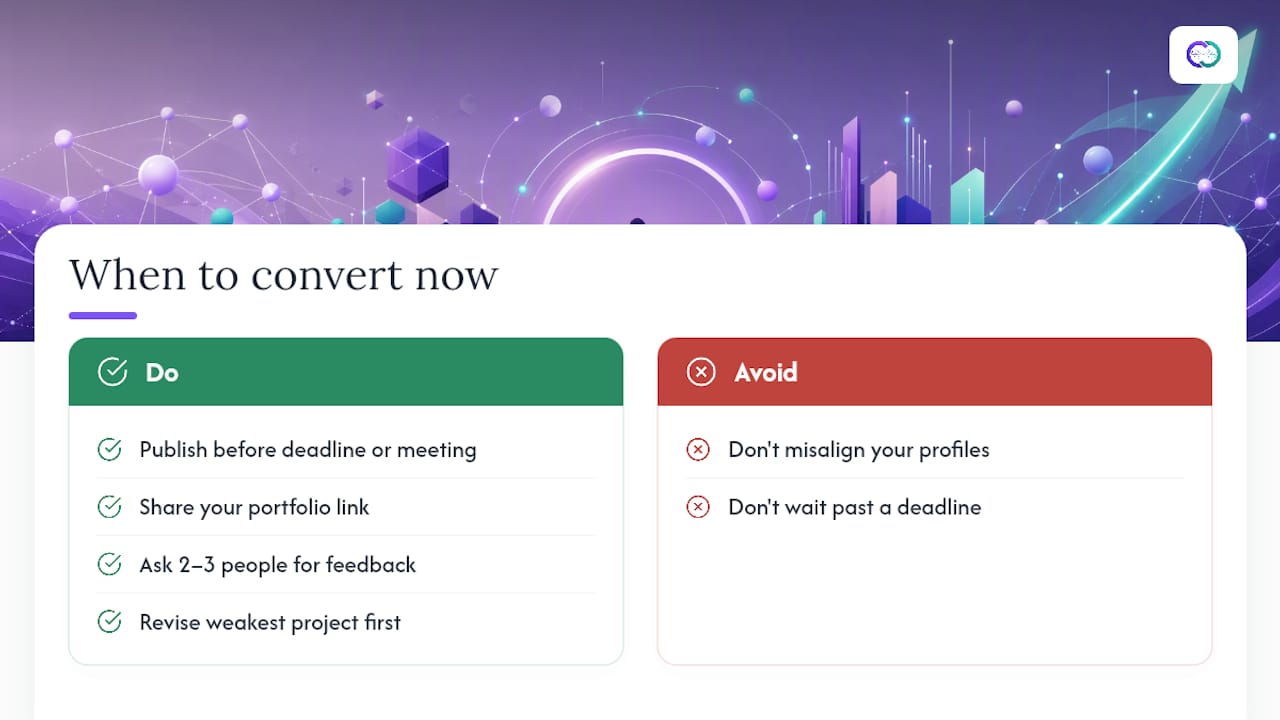
A fast conversion is the right move when you need something live before a specific deadline, an application, a networking event, or a recruiter conversation already on the calendar. Deeper investment in custom case studies and design polish makes more sense once you’ve confirmed the portfolio actually gets viewed and you know which projects land.
After publishing, share the link, ask two or three people for honest feedback, and revise the weakest project first. Keep your resume, LinkedIn profile, and portfolio saying the same thing about your role and specialty. Misalignment across those three is more noticeable to recruiters than a rough template.
— Alloquy Team
Try Alloquy’s Interactive Portfolio Platform
Alloquy is built for professionals who want more than a static page of parsed bullet points. It gives you an interactive public profile with a custom AI assistant that recruiters can query directly, answers backed by the actual documents you link from Google Drive, not just claims you typed in yourself.

The platform includes customizable themes and branding, interactive case studies, and the ability to generate tailored resumes and cover letters from the same verified data behind your profile. That means one evidence base powers your portfolio, your resume, and your application materials, instead of three separate documents drifting out of sync.
Getting started costs nothing: the free tier lets you build a working profile and test the AI assistant before you decide whether you need more storage or advanced customization. If you’re ready to see how your existing experience holds up as an interactive site, check the pricing and plan details or browse the full feature breakdown to see what upgrading unlocks.
Sources
- Build a digital portfolio | CareerLaunch (UNLV)
- Why do I need a portfolio? | KSU College of Business
- Portfolio vs resume | Indeed Career Guide
FAQ
How Can I Convert My Resume Into a Portfolio?
Upload your resume file to an AI converter or a platform like Alloquy, let it parse your roles and skills into structured sections, pick a template, then add project details and publish. Most people go from upload to a live link quickly.
What Is a Resume Portfolio?
A resume portfolio is a curated online site that includes your resume alongside a short bio, contact details, and work samples that show evidence behind your claims. It’s meant to complement your resume, not replace it.
How Do I Make a Resume Portfolio?
Start with your existing resume content, then add three to eight strong projects written as short case studies covering the problem, your role, your process, and the outcome. Choose a template that fits your field and publish to a shareable link.
What Is the 7-Second Rule in Resumes?
The idea is that recruiters form a first impression of a resume in roughly the first few seconds of scanning it, which is why a sharp headline and your strongest work need to sit at the top rather than buried lower on the page. The same principle applies to portfolios: lead with your best project, not your most recent one.
Can an Interactive Portfolio Replace a Traditional Resume?
Not entirely. Employers still often request a resume alongside a portfolio, but an interactive, evidence-backed portfolio like Alloquy adds verification that a static resume can’t, letting recruiters query specifics and get answers grounded in real documents.