

A job application portfolio is a curated collection of your best work, project summaries, and measurable outcomes that gives hiring managers evidence a resume alone cannot deliver. Build one now by selecting 3 to 10 pieces that directly match your target role, then organize them with brief context so a reviewer understands the problem, your role, and the result.
- Pick 3 to 10 strongest work samples relevant to the job you want
- Add an About section and a way to contact you
- Write a one or two-sentence summary for each project
- Host it as a simple website or a clean PDF
- Test every link and image on your phone before sending it
Key Takeaways
A job application portfolio works because it replaces resume claims with inspectable evidence, and 3 to 10 well-documented projects consistently outperform a long, unfiltered archive.
| Point | Details |
|---|---|
| Select tightly | Choose 3 to 10 pieces that directly match your target role, not everything you’ve ever made. |
| Use the case format | Write each project as problem, role, outcome in two to three sentences. |
| Match format to context | Use a website link by default, a PDF for uploads, and a physical leave-behind for in-person interviews. |
| Protect what needs protecting | Get permission for client work and strip sensitive details before publishing. |
| Update on a schedule | Review every three to six months and after any major project. |
| Consider an evidence-backed platform | Alloquy links verified documents to a public profile with an AI assistant for recruiter questions and tailored resume generation. |
Table of Contents
- What Is a Job Application Portfolio?
- Why Does a Portfolio Improve Your Job Search?
- Which Portfolio Format Fits Your Field?
- What Should You Include in a Portfolio?
- How Do You Build a Portfolio Step by Step?
- What Do Sample Portfolio Entries Look Like?
- Where Should You Share Your Portfolio Link?
- What Do Interactive, Evidence-Backed Portfolios Offer?
- How Often Should You Update Your Portfolio?
- What Copyright and Privacy Rules Apply to Work Samples?
- How Do You Make a Digital Portfolio Accessible?
- Sources
- FAQ
What Is a Job Application Portfolio?
A job application portfolio is a curated set of work samples, project write-ups, and supporting evidence that shows what you have actually built or delivered, not just what you claim on paper. A resume compresses your career into a one or two-page summary built for scanning. A CV documents your full academic and professional history. A portfolio does neither. It shows the work itself, with context.
That distinction carries real weight because recruiters often spend less than 10 seconds reviewing a resume, which leaves almost no room for nuance or proof.
- Digital website: best for ongoing visibility and easy sharing via a single link
- PDF document: best as an email attachment or a leave-behind after an interview
- Physical binder: still useful for design, architecture, or trade roles with in-person reviews
Statistic: Recruiters spend under 10 seconds on a first resume pass, according to Twine’s comparison of CVs, resumes, and portfolios. A portfolio gives them something worth a second look.
Why Does a Portfolio Improve Your Job Search?
A portfolio does the convincing that a resume can only claim to do. It proves you can execute, gives you material to talk through in interviews, and often generates inbound interest from recruiters browsing outside a formal application. For roles in design, engineering, product, writing, and marketing, a portfolio has shifted from a nice extra to something close to expected.
- Proves specific skills with real, inspectable evidence
- Demonstrates measurable impact rather than a list of duties
- Gives you a structured way to walk through your work in an interview
- Attracts recruiters who find you before you apply anywhere
A portfolio “provides tangible evidence to complement claims on a resume,” and experts generally recommend 5 to 10 high-quality projects rather than a long, unfiltered archive.
Design and product roles usually require a portfolio outright. Engineering and data roles increasingly expect one, often as a GitHub repository or a project write-up. Sales, operations, and many corporate roles treat it as optional but differentiating.
Which Portfolio Format Fits Your Field?
Format choice depends on your industry, your audience, and how the application gets delivered. A work portfolio organizes your resume, samples, testimonials, and certificates into one coherent package, but the container you choose changes how well that package lands.
- Digital website: shareable, easy to update, best default for most job seekers
- PDF: portable, works as an attachment, but harder to revise quickly
- Physical binder or leave-behind: strong for in-person interviews in design, architecture, or craft trades
- Hybrid: a website for ongoing sharing plus a tailored PDF for specific applications
Designers and product managers tend to favor websites with visual case studies. Engineers often lean on code repositories paired with a short write-up. Writers and marketers frequently do well with a simple PDF or a lightweight site built around published samples.
Pro Tip: Send a link when the process allows it, and reserve a PDF for applications that only accept file uploads or for interviewers who ask for something they can print.
What Should You Include in a Portfolio?
Every strong portfolio, regardless of field, contains the same core structure. What changes is the content inside each piece.
Master checklist:
- About section with a short professional summary
- Contact information (email, LinkedIn, and portfolio link)
- 3 to 10 curated work samples matched to your target role
- A concise case study for each project
- Link to your resume
- Skills and tech stack list
- Testimonials or references, if available
- Relevant certifications
The case study is where most portfolios fall short. KSU’s College of Business career guidance recommends a tight two to three-sentence format covering the problem, your role, and the outcome. That structure works across every field:
- Problem: “The client’s checkout flow had a 38% cart abandonment rate.”
- Your role: “I led the redesign of the payment screen and ran two rounds of user testing.”
- Outcome: “Abandonment dropped by double digits within the first month post-launch.”
Quantify results wherever you honestly can. “Reduced load time” says less than “cut load time from 4.2 seconds to 1.1 seconds.” If you cannot attach a hard number, describe the scope and the qualitative shift instead of inventing a figure.
If you lack paid client work, coursework, volunteer projects, hackathons, and self-initiated side projects all count as legitimate portfolio pieces. Frame them the same way: problem, role, outcome. Reviewers care more about your thinking than the source of the paycheck.
How Do You Build a Portfolio Step by Step?
Building a portfolio is faster than most people expect once you have a template and a clear target role in mind.
- Define your goal and audience (15 minutes): decide which role or industry this portfolio serves.
- Select 3 to 10 pieces (30 to 60 minutes): choose work that matches the job description, not just your favorite projects.
- Write case-style descriptions (1 to 2 hours): apply the problem, role, outcome format to each piece.
- Choose a platform or template (30 minutes): pick something that lets you focus on content over design.
- Add About and Contact sections (20 minutes): keep both short and easy to scan.
- Test on mobile (15 minutes): check load times, image sizes, and tappable links.
- Publish and share (ongoing): add the link to your resume, LinkedIn, and email signature.
A working first draft is realistically a weekend project, not a month-long redesign.
Pro Tip: Lead with your strongest piece, not your most recent one. Reviewers often stop scrolling after the first two or three projects, so put your best evidence up front.
What Do Sample Portfolio Entries Look Like?
Here are three project entries built on the problem, role, outcome template, adapted to different fields.
- Product redesign: “Our onboarding flow had a 45% drop-off rate. I redesigned the signup sequence and simplified form fields. Drop-off fell significantly within six weeks of launch.”
- Data analysis: “Marketing couldn’t tell which channels drove retention. I built a cohort analysis dashboard tracking 90-day retention by acquisition source. The team reallocated budget toward the two highest-performing channels.”
- Marketing campaign: “A regional retailer needed more foot traffic during a slow season. I planned and ran a four-week local social campaign. Store visits rose noticeably against the same period the prior year.”
For layout inspiration, university career centers like Florida State’s sample portfolio collection show real structures across design, writing, and technical fields. Data professionals can also draw project ideas from applied guides like ChristianSteven’s overview of self-service analytics tools, and designers can pull layout principles from Monstrous Media Group’s piece on minimalist UI design.
Pro Tip: Use a template first and worry about custom design later. A clean template with strong project content beats a beautiful site with thin case studies.
Where Should You Share Your Portfolio Link?
Placement determines whether your portfolio ever gets opened. Put the link in your resume header, your LinkedIn profile, your email signature, and directly in your cover letter where you reference a specific project.
- Resume header: a short, direct URL next to your contact information
- Cover letter: name one relevant project and link straight to that case study
- Email signature: a persistent, low-effort touchpoint for every message you send
- Interviews: mention two or three pieces you can walk through in detail
Interactive or richly designed portfolios work best for human reviewers, but automated applicant tracking systems still need a plain, ATS-friendly resume. Keep both: a simple resume for the system, a fuller portfolio link for the person who eventually reads it.
For applications that only accept file uploads, attach a PDF version and include a short URL or QR code inside it pointing back to your live site.
What Do Interactive, Evidence-Backed Portfolios Offer?
Static PDFs and slide decks show finished work but rarely prove it happened the way you describe. Interactive portfolios close that gap by linking claims to underlying evidence and letting recruiters ask questions directly.
- Evidence linking ties specific claims to supporting documents rather than a bare assertion
- Recruiter Q&A through an AI assistant answers follow-up questions without waiting on email
- Interactive case studies let a reviewer explore depth on the pieces they care about
- Customizable branding keeps the portfolio consistent with your personal presentation
Alloquy builds on this model by linking Google Drive documents to a public profile and generating tailored resumes and cover letters from that verified evidence. Privacy stays manageable because you control which documents get referenced. Full files never need to sit exposed in a public folder.
Pro Tip: Share summaries and outcomes publicly, and keep sensitive originals like signed contracts or internal reports available only through selective, permission-based access, as covered in Alloquy’s guidance on showcasing work without compromising privacy.
How Often Should You Update Your Portfolio?
Review your portfolio every three to six months, or immediately after finishing a project strong enough to replace a weaker one. A portfolio built two years ago and never touched again reads like an archive, not a marketing tool.
- Swap out your weakest piece for stronger recent work
- Recheck every link and confirm images still load quickly
- Update your resume link and contact details
- Remove projects that no longer represent your target role
The most common mistakes are treating a portfolio as a static archive, cramming in too many mediocre pieces instead of a few strong ones, skipping mobile testing, and forgetting basic contact information. Reviewers notice slow pages, broken links, and projects with zero context almost immediately, according to KSU’s career development guidance on portfolio building. Senior technical candidates run into a related set of missteps covered in Alloquy’s breakdown of engineering portfolio pitfalls.
Pro Tip: Set a recurring calendar reminder every quarter to click through your own portfolio like a stranger would. You’ll catch dead links and stale projects faster than waiting for a recruiter to find them first.

What Copyright and Privacy Rules Apply to Work Samples?
Work you produced as an employee usually belongs to your employer under standard work-for-hire terms, even though you did the labor. Before publishing a project publicly, check your former employment agreement or ask your previous manager whether sharing a redacted version is acceptable. Most companies are comfortable with general descriptions of your contribution but not with proprietary code, unreleased designs, internal financial data, or client-identifiable information.
A practical workaround: describe the problem and your approach in detail, then show a sanitized or partial output rather than the full deliverable. A marketing case study can reference campaign strategy and results without reproducing an internal client contract. A software project can show your own code contributions from a personal repository rather than a company’s private codebase.
Client work carries an added layer. Freelancers and consultants should get explicit written permission before featuring client projects, even when the relationship ended amicably. Some contracts include non-disclosure clauses that outlast the engagement itself, so check the agreement before you publish anything from that period.
For personal or sensitive information, strip names, financial figures, and identifying details unless you have direct consent to include them. Screenshots of dashboards, emails, or internal tools often contain more identifying data than they appear to at first glance, so review every image closely before uploading it.
Platforms built around verified but selective evidence sharing solve part of this problem structurally. Instead of publishing a raw document, you can reference it as supporting evidence while keeping the underlying file access-controlled, which limits exposure without weakening your credibility.
How Do You Make a Digital Portfolio Accessible?
An inaccessible portfolio quietly loses candidates points before a reviewer even reaches your work. Simple structural choices fix most of the common problems.
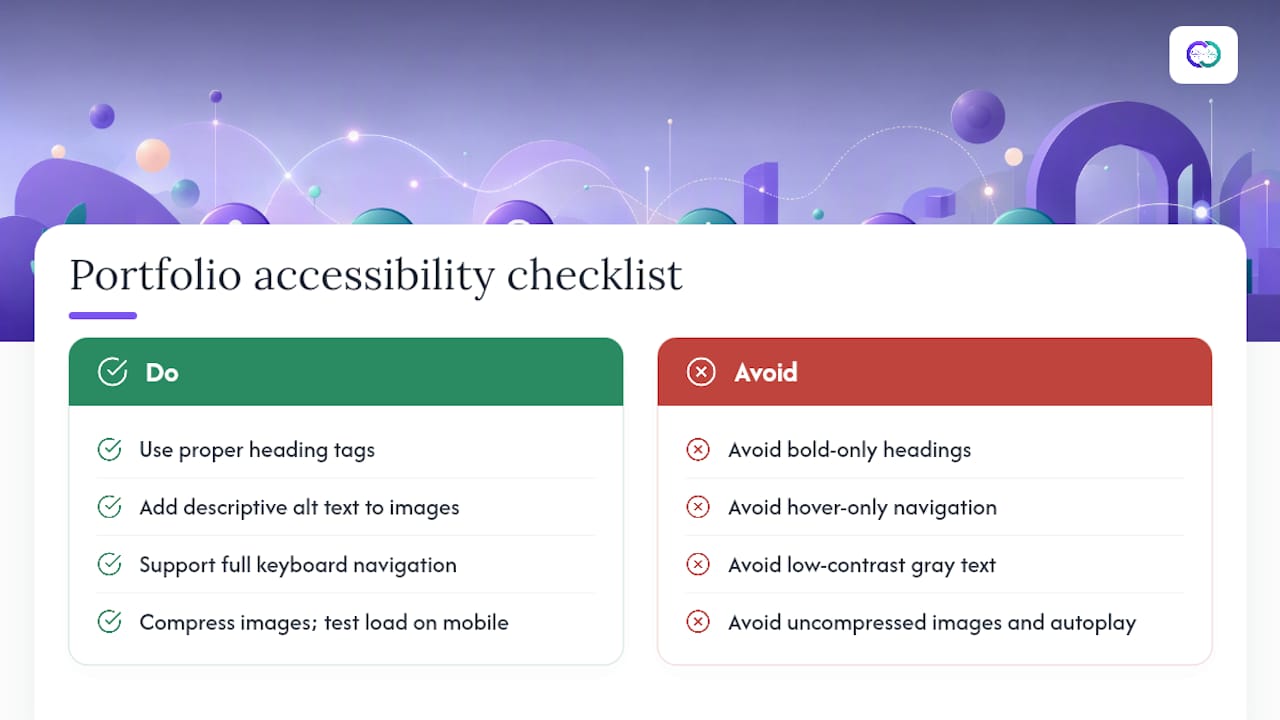
Use real heading tags in the correct order, not just bold text that looks like a heading. Screen readers rely on that structure to let visually impaired reviewers jump between sections. Add descriptive alt text to every image, especially design mockups and data visualizations, since alt text is often the only way a screen reader user understands what a chart or screenshot actually shows.
Keep navigation simple and consistent. A visitor should reach any project from your homepage within two clicks. Avoid navigation menus that only trigger on hover, since they fail on touchscreens and for users navigating by keyboard alone.
Color contrast matters more than most portfolio builders realize. Light gray text on a white background looks clean but is difficult for many readers to parse, including anyone with low vision. Stick to contrast ratios that remain readable in bright light, since plenty of reviewers open portfolio links on a phone outdoors or during a commute.
Page speed is itself an accessibility issue. Large, uncompressed images slow load times and frustrate reviewers on mobile data, which pushes some to abandon the page before it finishes loading. Compress images, avoid autoplay video, and test load times on a phone using a standard mobile connection rather than office WiFi.
Finally, make sure every interactive element, buttons, expandable case studies, contact forms, works without a mouse. A reviewer using keyboard navigation or a screen reader should be able to complete every action a sighted mouse user can.
Why Evidence-Backed Portfolios Matter
The gap between what candidates claim and what they can actually prove has always shaped hiring outcomes. Alloquy exists because static resumes and generic slide decks rarely close that gap, and verified evidence changes the conversation recruiters can have with a candidate.
A Faster Way to Prove Your Work
Building a traditional portfolio site, then keeping it updated by hand, eats hours you could spend applying or preparing for interviews. Alloquy removes that maintenance burden by linking your Google Drive documents directly to a public profile, so your evidence stays current without a rebuild every time you finish a new project.

The platform gives recruiters a way to ask direct questions about your background through a custom AI assistant trained on your verified documents, so follow-up questions get answered even when you are not available. Customizable branding keeps the profile visually consistent with how you present yourself elsewhere, and the system can generate tailored resumes and cover letters pulled straight from your verified evidence rather than a generic template. Sensitive files stay under your control since you choose what the assistant can reference.
Start by checking Alloquy’s pricing plans to see which tier fits your job search, including the free tier for building your first verified profile.
Sources
- CV vs. Resume vs. Portfolio: What’s the Difference?
- How to Make a Professional Portfolio That Stands – KSU College of Business | Career Development
- Indeed
- How to Build a Job Search Portfolio in 2026 (Website, Case Studies, and What to Include) - Mokaru
FAQ
What Is a Portfolio on a Job Application?
A portfolio is a curated collection of your best work samples and project write-ups that provides evidence for the skills and achievements listed on your resume.
How Do You Make a Portfolio for a Job Application?
Define your target role, select 3 to 10 relevant projects, write a short problem-role-outcome summary for each, and publish it as a website or PDF optimized for mobile viewing.
Is a CV the Same as a Portfolio?
No. A CV documents your full academic and professional history, while a portfolio shows actual work samples and project evidence rather than a career timeline.
What Is an Example of a Portfolio?
A design portfolio might show five case studies with before-and-after mockups, while a data portfolio might link to dashboards and analysis write-ups; platforms like Alloquy build this as an interactive profile with verified evidence attached to each project.