

A Google Drive portfolio is an interactive, AI-powered public profile that links your Google Drive documents as verifiable evidence and lets recruiters query a grounded AI assistant instead of skimming a static resume. Alloquy builds this exact model: connect your Drive, attach evidence to claims, and hiring teams get answers backed by real documents rather than assumptions.
TL;DR:
- Only include 3 to 5 projects with measurable outcomes to maintain credibility and avoid overwhelming recruiters with weak or irrelevant evidence.
- Link specific file types to corresponding claim types, such as Sheets for metrics or Docs for reasoning, and add clear summaries for easier citation.
- Follow a strict five-gate checklist—covering privacy, facts, IP, voice, and sign-off—before publishing to prevent oversharing or misinformation.
- Use minimal, targeted Drive permissions to prevent unauthorized edits and ensure the assistant only indexes approved documents.
- Regularly update and review your portfolio after each major project, ensuring all information remains accurate, relevant, and compliant.
Table of Contents
- What Is a Google Drive Portfolio, Exactly?
- Why Recruiters Respond Better to Grounded Portfolios
- How an AI-Powered Google Drive Portfolio Actually Works
- Which Drive Files Actually Make Strong Evidence?
- The Five-Gate Checklist Before You Publish Anything
- How Do You Actually Build and Publish One?
- What Mistakes Actually Sink a Portfolio Before It Helps You
- Build Your Verified Portfolio Without the Guesswork
- Sources
- FAQ
What Is a Google Drive Portfolio, Exactly?
A Google Drive portfolio, in the sense that matters for hiring, is a public profile powered by an AI assistant that cites your actual Drive files as proof of what you claim. It is not a shared folder or a Google Sites page stitched together from documents. That DIY approach still requires a recruiter to open every file, guess at context, and trust your framing on faith.
The version Alloquy builds works differently. You link specific Docs, Sheets, Slides, or PDFs to specific claims, an AI assistant indexes that content, and recruiters can ask direct questions and get grounded answers, sourced from your evidence, not your self-description.
The outcome for hiring teams is a queryable, evidence-backed profile. A hiring manager can ask “What was your role in the Q3 launch?” and receive an answer pulled from the actual project brief you linked, with the source document referenced. That is a fundamentally different trust model than a bullet point on a resume.
Why Recruiters Respond Better to Grounded Portfolios
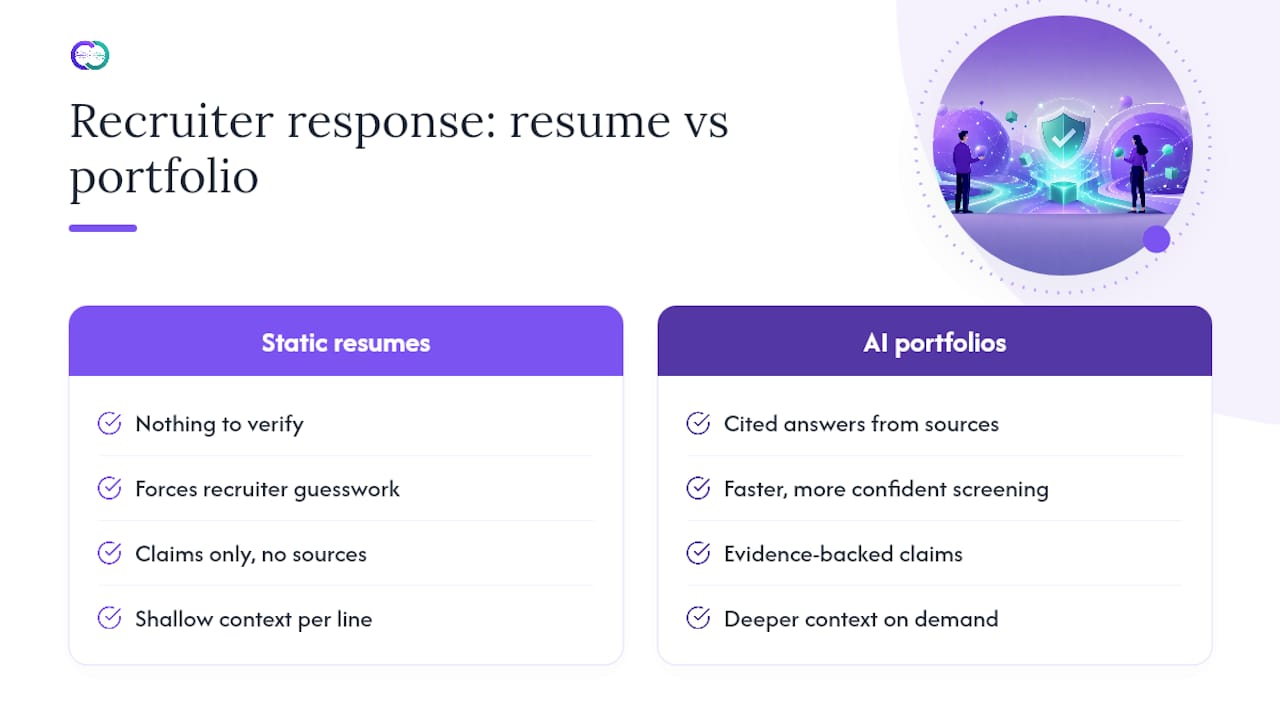
Recruiters spend limited time per candidate, and most resumes give them nothing to verify beyond a claim and a job title. Interactive, AI-powered portfolios change that dynamic: a visitor asks a question, the assistant searches indexed content, and it generates a personalized, grounded answer instead of a generic summary.
That matters because screening is often a speed problem disguised as a judgment problem. A recruiter who can ask “Show me evidence of budget ownership” and get a cited answer moves faster and with more confidence than one guessing whether a bullet point is exaggerated.
The core shift: static resumes ask recruiters to trust your claims. Evidence-backed portfolios let them verify claims in seconds, against source documents you chose to link.
The practical benefits stack up. Claims become defensible because they point to a real document. Recruiters get deeper context than a resume line allows. And decisions move faster because verification happens inside the conversation, not after a follow-up email requesting “more detail.”
How an AI-Powered Google Drive Portfolio Actually Works
Understanding the mechanics helps you trust the output, even if you never touch a line of code. The flow behind an Alloquy profile has five moving parts.
- Connection and permissions. You grant read access to specific Drive files or folders, not your entire account. Alloquy never gains edit rights, and you choose exactly what gets linked.
- Ingestion and indexing. Linked documents get broken into smaller chunks and tagged with metadata (project name, date, role) so the assistant can retrieve the right passage instead of returning an entire file.
- Grounding, not guessing. The assistant answers by retrieving indexed content and citing it, a method that keeps responses tied to portfolio content instead of invented detail. Chunking and metadata tagging are what let the model return short, checkable answers instead of long, unverifiable ones.
- The recruiter chat flow. A recruiter types “What measurable impact did you have on retention?” The assistant searches your linked evidence, finds the relevant metric in a project report, and answers with a citation back to that file.
- Public surfacing. Your published profile displays case studies alongside an embedded assistant, with evidence links visible so a recruiter can open the source document directly.
Developers building similar tools have shown this works by feeding a model an initial context document and letting it answer recruiter questions from that grounded content, often with prebuilt question chips that prompt the recruiter toward the strongest evidence first.
Which Drive Files Actually Make Strong Evidence?
Not every file in your Drive deserves a spot in your portfolio. Volume is not the goal. Verifiable impact is.
- Pick 3 to 5 projects with measurable outcomes. A project that moved a number (revenue, retention, load time, adoption rate) beats five projects with no measurable result.
- Match artifact type to claim type. A Sheet proves a metric. A Slide deck proves how you presented a decision. A Doc proves the reasoning behind a choice. A code snippet proves technical ownership. A PDF report proves an external-facing deliverable.
- Write a compact case study for each project. Structure it as context, action, result, with the underlying evidence linked directly to the result claim.
- Prepare long or technical files before linking them. Add a short summary at the top of dense documents so the assistant can cite the right section instead of surfacing an irrelevant paragraph.
This approach echoes standard career-portfolio guidance: tailor content to your audience, highlight relevant work, and include role and impact context rather than dumping everything you have ever produced. For formatting specifics inside individual documents, Alloquy’s guide on structuring case studies in Google Docs walks through layout choices that make files easier for both humans and AI assistants to parse.
Pro Tip: Add a one-line “impact summary” at the top of every linked document, even ones you think are self-explanatory. The AI assistant retrieves chunks, and a clear summary line dramatically increases the odds it cites the right one.
The Five-Gate Checklist Before You Publish Anything
Publishing evidence publicly carries real risk if you skip verification. A structured, staged workflow is what separates a safe portfolio from a liability.
A five-gate process covering privacy integrity, fact-grounding, IP protection, voice authenticity, and human sign-off gives you a repeatable pre-flight check:
- Gate 1, privacy integrity: strip names, emails, and identifiers of anyone who did not consent to appear in your evidence.
- Gate 2, fact-grounding: confirm every date, title, and metric in your case study matches the source document exactly.
- Gate 3, IP protection: remove proprietary client data, internal pricing, or anything covered by a nondisclosure agreement.
- Gate 4, voice authenticity: cut generic AI-sounding filler and keep language that actually sounds like you.
- Gate 5, human sign-off: review the final published version yourself before it goes live, and keep a record of what you approved and when.
A staged, component-by-component workflow like this reduces both workload and risk compared to reviewing an entire portfolio at once. For a deeper walkthrough of redaction and IP boundaries specifically, Alloquy’s guide on protecting privacy while proving your work covers edge cases this checklist only summarizes.
How Do You Actually Build and Publish One?
Getting your first portfolio live is a sequential process, not a redesign project. Gather your resume and pick your 3 strongest case studies before you touch any settings.
- Connect Google Drive with minimal scopes. Grant access only to the specific files or folders you plan to link, documented and reversible at any time.
- Add case-study narratives and metadata. Write your context-action-result summaries and tag each one so the assistant indexes it correctly.
- Run the five-gate checklist, then publish. Work through privacy, fact-grounding, IP protection, voice, and sign-off before the profile goes live.
- Test it with real recruiter-style questions. Ask your own assistant “What was your biggest measurable win?” or “Describe a time you managed conflicting priorities” and confirm the answers cite the right evidence.
Both no-code platforms and custom-built projects have proven this model works at very different levels of technical effort, ranging from guided builders to open-source prototypes, so you do not need engineering skills to get a working profile live. If you want a template mapped specifically to job applications, Alloquy’s guide on building a portfolio around specific roles walks through matching evidence to the jobs you’re targeting.
What Mistakes Actually Sink a Portfolio Before It Helps You
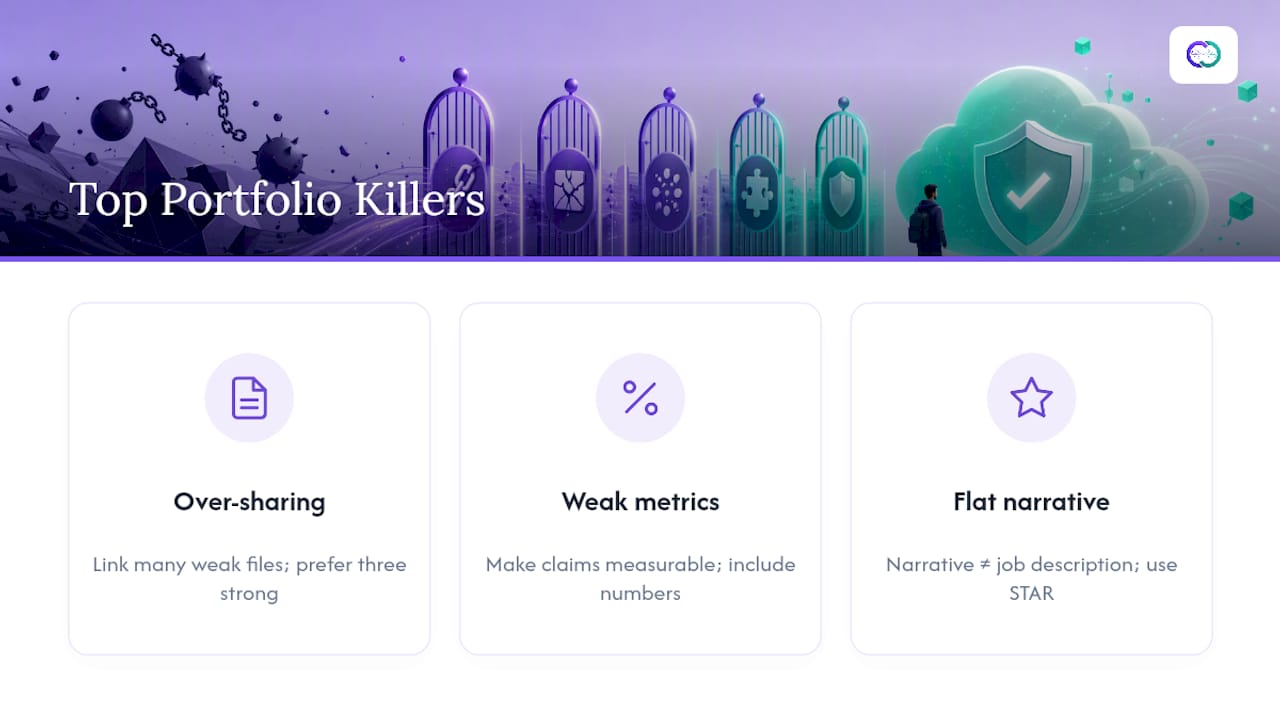
The most common failure Alloquy sees is over-sharing: candidates link every file in their Drive instead of the handful that prove real impact. A recruiter faced with fifteen mediocre projects trusts the portfolio less than one with three strong ones. The second most common mistake is weak metrics. “Improved the process” means nothing without a number attached to it. The third is narrative that reads like a job description instead of a story with a beginning, an action, and a measurable outcome.
Use the AI assistant during actual interviews, not just before them. Prompting it live with a STAR-style question (“Tell me about a time you handled ambiguity”) surfaces a grounded story faster than you can recall it yourself under pressure.
Treat your portfolio as a living document. Revisit it after every major project, and re-run the five-gate checklist on anything new before it goes public. Portfolios that go stale for a year lose their edge fast. Engineers in particular tend to make specific errors worth avoiding, covered in Alloquy’s breakdown of technical portfolio pitfalls.
— Alloquy Team
Build Your Verified Portfolio Without the Guesswork
Alloquy gives you the direct path to everything this guide describes, without stitching together separate tools for hosting, verification, and AI chat. You connect Google Drive with the same minimal-scope permissions covered above, attach evidence to specific claims, and Alloquy’s AI assistant answers recruiter questions using only what you have linked and approved.

Every feature maps back to the five-gate process: privacy controls that let you decide exactly what stays private, fact-grounding that ties every answer to a source document, and a human sign-off step before anything publishes. Customizable branding and themes let your profile look like yours, not a template. Alloquy can also generate tailored resumes and cover letters directly from your verified evidence, so the same proof that powers your public profile powers your applications too. Check the free tier and paid plans to see which fits your current job search, or explore the full feature set before you connect your first document.
Sources
For deeper guidance on selecting evidence and organizing complex project files, the career-portfolio best practices from UMGC and asset-organization workflows from DBLScanner offer useful outside perspective beyond this guide.
- Why Your 2026 Job Search Needs an Interactive Portfolio Chatbot - Knak Digital
- Building a Truthful, AI-Assisted Career Portfolio - 4AIWorld
- How I Built an AI-Powered Portfolio That Talks to Recruiters — DEV Community
- Using a professional portfolio in your job search - UMGC Career Connection
FAQ
What Makes a Google Drive Portfolio Different From a Shared Folder?
A shared Drive folder requires a recruiter to open and interpret every file manually. An AI-powered portfolio like Alloquy indexes those files so a recruiter can ask a direct question and get a grounded, cited answer instantly.
Do I Need Coding Skills to Build One?
No. Both guided, no-code builders and developer-built prototypes prove this model works at different technical levels, so a professional with no engineering background can publish a working profile.
How Many Projects Should I Include?
Select a few projects with clear, measurable outcomes rather than listing everything you have worked on; recruiters trust a focused set of strong, verified case studies more than a large, unfiltered list.
What Should I Never Link in a Public Portfolio?
Never link files containing unredacted personal identifiers of others, proprietary client data, or anything covered by a nondisclosure agreement; the five-gate checklist exists specifically to catch these before publication.
How Often Should I Update My Portfolio?
Update it after every major project or role change, and re-run your privacy and fact-grounding checks each time, since regularly updated portfolios reflect your current skills more accurately than one built once and forgotten.