

The most effective resume prompts produce recruiter-ready professional summaries, quantified achievement bullets, and ATS-calibrated keyword placement in a single pass. Use them as your starting point, not your final draft. According to Jobscan’s empirical testing, prompts that place the exact job title and ranked keywords where an ATS expects them can raise match scores by up to 24 points. Harvard FAS Career Services is equally direct: AI belongs in a supporting role for brainstorming and keyword extraction, not as the primary author of your resume.
Paste these three prompts first:
- Professional summary rewrite: “You are a senior resume writer. I am a [job title] with [X] years of experience targeting a [target role] at a [company type]. Here is my current summary: [paste summary]. Here is the job description: [paste JD]. Rewrite my summary in three to four sentences, mirroring the job description’s language and placing the exact job title in sentence one. If you need specific metrics or outcomes, ask me for them — do not invent numbers.”
- Achievement bullet transformer: “Convert the following raw accomplishment into a single, quantified resume bullet using the format Action Verb + Task + Result. Raw input: [paste your notes]. Job description: [paste JD]. If you cannot find a metric in my input, insert [confirm metric] as a placeholder and ask me for the number.”
- Job-tailoring opener: “I am applying for [exact job title] at [company name]. Paste my resume: [paste resume]. Paste the job description: [paste JD]. Identify the five most critical keywords missing from my resume and suggest where to place each one without fabricating any experience.”
Use prompts when you need to generate first-draft text quickly or tailor an existing resume to a new posting. Stick to manual rewrites when the role requires a highly personal narrative or when you have no real metrics to supply — AI cannot invent credibility.
Table of Contents
- How to craft effective resume prompts for ChatGPT and other models
- Copyable prompts organized by resume section
- How to tailor your resume to a specific job posting
- Which prompts actually move your ATS match score?
- Prompts to proofread, humanize, and verify AI output
- A QA checklist to verify AI output before you apply
- A copy-paste library of 25+ resume prompts
- When prompts aren’t enough: evidence-backed portfolios
- Key Takeaways
- The workflow that actually produces a submission-ready resume
- Alloquy turns prompt-generated bullets into verified, recruiter-queryable evidence
- Authoritative sources and further reading
How to craft effective resume prompts for ChatGPT and other models
Prompt quality is the primary determinant of AI output quality. CareerBldr’s tested library of 50+ prompts confirms that specifying role, seniority, target company type, and desired output format consistently yields stronger results across models. Generic requests like “write me a resume” produce generic output because the model has no signal to work with.
The first sentence of any effective prompt should establish four things: your current role and seniority level, the exact title of the position you are targeting, the type of organization (startup, Fortune 500, federal agency), and an explicit instruction to use the job description you are about to paste. That single sentence eliminates most of the ambiguity that produces boilerplate AI text.
Beyond the opening context, the variables that move output quality most are metrics, scope, tools, and audience. A bullet that reads “managed a team” is useless. A bullet that reads “managed a six-person engineering team delivering a $2.4M SaaS migration for a healthcare client” gives the model enough signal to produce something defensible. Supply those details in your prompt, or instruct the model to ask for them before drafting.
The structural pattern that works across every resume section follows this sequence: role context + raw background notes + pasted job description + explicit output constraints + format specification. Constraints matter as much as context. Tell the model the maximum word count per bullet, whether to use first-person or omit pronouns entirely, and which section of the resume the output belongs in.
Pro Tip: Force the model to request missing numbers rather than inventing them. Add this line to every prompt: “If any metric, date, or outcome is missing from my input, insert [confirm metric] as a placeholder and ask me for the real figure before finalizing the output.” This single instruction prevents the most common and most damaging form of AI hallucination in resume writing.
Coursera’s guidance on using ChatGPT for resumes reinforces this: paste your full resume and the complete job description, demand specificity, and require the model to ask for real numbers rather than generating plausible-sounding ones.
Copyable prompts organized by resume section
The prompts below are organized by section. Each includes placeholders you replace with your own content, a note on expected output, and a flag for which prompts tend to move ATS match rates most.
Professional summary
-
Standard summary rewrite (high ATS impact): “Act as a professional resume writer. I am a [current title] with [X] years of experience in [industry]. I am targeting the role of [exact job title] at a [company type]. Here is my current summary: [paste]. Here is the job description: [paste]. Rewrite my summary in three to four sentences. Place the exact job title in sentence one. Mirror the top three keywords from the JD. Do not invent metrics — ask me if you need numbers.”
-
Summary from scratch: “I have no existing summary. My background: [paste raw notes — titles, years, industries, key skills]. Target role: [exact title]. JD: [paste]. Write a four-sentence professional summary. Omit personal pronouns. Ask me for any metric you cannot find in my notes.”
Expected output: A tight, keyword-dense paragraph that opens with the exact job title and closes with a value proposition tied to the employer’s stated priorities. Summaries tuned to the exact job title are among the highest-impact ATS moves, per Jobscan testing.
Experience bullets
-
Single bullet transformer: “Convert this raw accomplishment into one resume bullet: [paste notes]. Format: Action Verb + Task + Quantified Result. Target role: [title]. If a metric is missing, insert [confirm metric] and ask me.”
-
Role-by-role bullet generator: “Here is my full work history for the role of [title] at [company], [start date] to [end date]: [paste raw notes]. JD: [paste]. Generate five achievement bullets for this role. Each bullet must start with a past-tense action verb, include at least one metric, and stay under 20 words. Ask me for any number you cannot find.”
-
STAR expansion: “Expand this brief accomplishment into a STAR-format resume bullet (Situation, Task, Action, Result compressed into one sentence): [paste]. Keep it under 25 words. Target role: [title].”
Usage note: Prompts 3 and 5 are best for recruiter-readability. Prompt 4 is best when you need a full set of bullets for a single role and want ATS coverage across multiple keywords.
Skills section
-
Skills extraction from JD: “Extract the technical and soft skills from this job description and rank them by frequency and prominence: [paste JD]. Then compare them to my current skills section: [paste skills]. List the skills I am missing that I actually possess but have not listed.”
-
Skills section rewrite: “Rewrite my skills section to match the terminology used in this JD: [paste JD]. My current skills: [paste]. Group skills into three categories: Technical, Tools, and Domain Expertise. Do not add skills I have not listed.”
Education section
-
Education entry formatter: “Format my education entry for a resume. Degree: [degree]. Major: [major]. School: [school name]. Graduation: [year]. Relevant coursework: [list]. Honors: [list]. Output one clean, ATS-parsable entry with no tables or special characters.”
-
Continuing education and certifications: “I have the following certifications and courses: [list]. Target role: [title]. JD: [paste]. Select the three most relevant credentials and write a two-line certifications section that mirrors JD language.”
Career pivot summary
- Career pivot summary (high recruiter impact): “I am transitioning from [current field] to [target field]. My transferable skills include: [list]. My target role is [exact title]. JD: [paste]. Write a four-sentence summary that leads with my transferable value, acknowledges the pivot without apology, and closes with a forward-looking statement. Do not invent experience. Ask me for any metric.”
Usage note: This prompt prioritizes recruiter-readability over ATS score. Run it alongside prompt 1 and compare outputs — the pivot summary often needs a second pass to reinsert JD keywords for ATS compliance.
How to tailor your resume to a specific job posting
Tailoring a resume to a job description is a sequenced workflow, not a single prompt. Resumly’s structured approach recommends working section-by-section, demanding quantification at each step, and moving the final text into a dedicated resume builder for layout and ATS validation. The workflow below follows that logic.
Step 1 — Keyword extraction: Paste the full job description and run this prompt: “Extract and rank the top 10 keywords and phrases from this job description by frequency and strategic importance: [paste JD]. Separate hard skills, soft skills, and role-specific terminology. Flag any that appear in the job title or required qualifications section.”
Step 2 — Gap analysis: Paste your current resume alongside the keyword list: “Compare this keyword list [paste list from Step 1] to my resume [paste resume]. Identify which keywords are absent, which are present but buried, and which are present in the right sections. Do not suggest adding skills I do not have.”
Step 3 — Bullet and summary rewrite: “Using the gap analysis above, rewrite my professional summary and top three experience bullets to incorporate the missing keywords naturally. Preserve all factual claims exactly as I stated them. Insert [confirm metric] wherever a number would strengthen a claim but is not present in my input.”
Step 4 — Alignment check:
- Exact job title appears in the summary’s first sentence
- Top five keywords from the JD appear at least once in the resume body
- The three most relevant achievements are in the first role’s bullet list, not buried in older positions
- No bullet contains a metric the candidate cannot defend in an interview
- The summary does not exceed four sentences
This four-step sequence, run before every application, produces a document that mirrors the posting’s language without fabricating experience. Nailedit.ai’s testing across four models confirms that ATS-focused keyword prompts and recruiter-facing bullet rewriters serve different objectives and should be run as separate passes, not combined into one request.
Which prompts actually move your ATS match score?
An applicant tracking system evaluates a resume primarily on three signals: the presence of the exact job title in a predictable location (typically the summary or headline), keyword density in the experience and skills sections, and structural parsability (single-column layout, standard section headings, no tables or text boxes).
Jobscan’s testing found that prompts targeting exact job-title placement and ranked keyword insertion produced the largest match-rate gains. Bullet-level rewrites that improve recruiter-readability tend to move the ATS score less, because they optimize for human comprehension rather than keyword frequency.
| Prompt Type | Primary Objective | ATS Impact | Recruiter Impact |
|---|---|---|---|
| Summary tuned to exact job title | Keyword placement in summary | High | High |
| Keyword extraction + gap analysis | Identify missing terms | High | Medium |
| Bullet transformer (STAR format) | Quantified achievement clarity | Low–Medium | High |
| Skills section rewrite (JD-matched) | Terminology alignment | Medium | Medium |
| Career pivot summary | Transferable value narrative | Low | High |
ATS formatting rules that no prompt can fix for you:
- Use standard section headings: “Experience,” “Education,” “Skills,” not creative variants like “Where I’ve Been” or “What I Know”
- Single-column layout only; two-column formats cause many ATS parsers to misread or skip content
- No headers, footers, text boxes, or tables inside the resume body
- Bullet points should be single-line; avoid sub-bullets where possible
- File format matters: most ATS systems parse .docx more reliably than .pdf, though this varies by platform
After running any ATS-focused prompt, move the output into a tool like Jobscan’s resume scanner or a dedicated resume builder to validate parsing before submission. Chat windows cannot replicate how an ATS reads a formatted document.
Prompts to proofread, humanize, and verify AI output
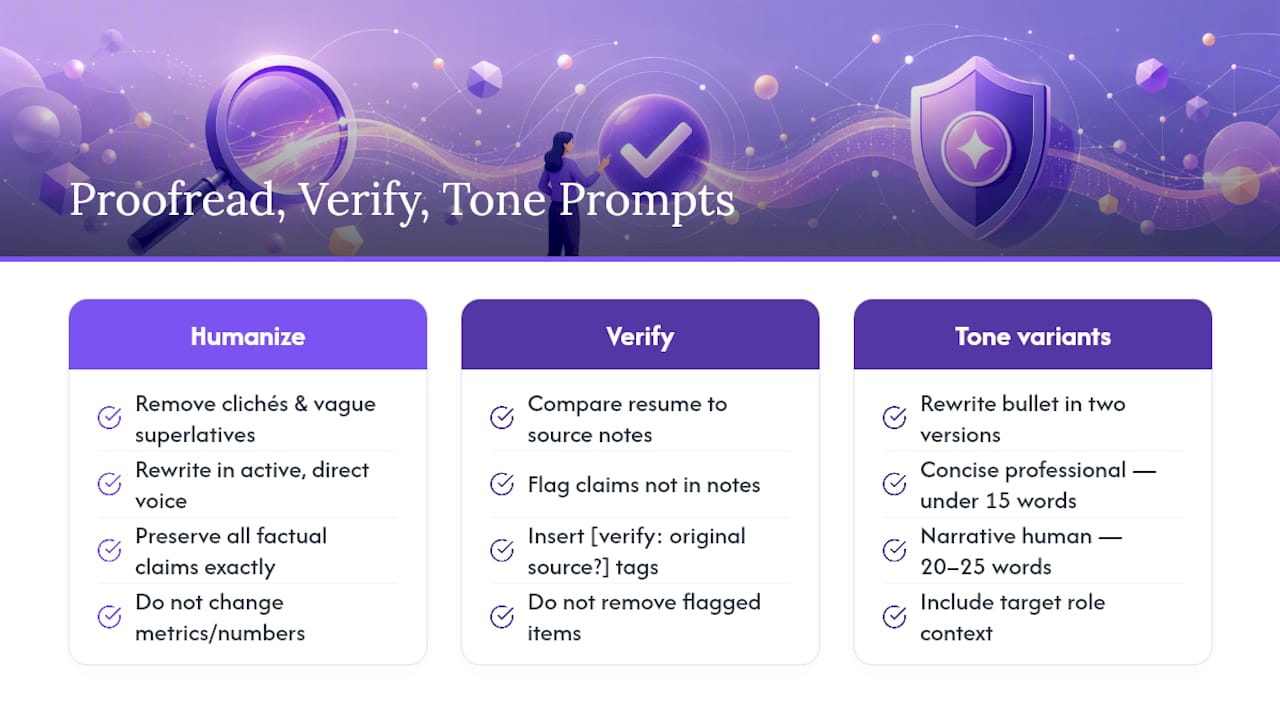
AI-generated resume text has recognizable patterns: passive constructions, vague superlatives (“results-driven professional”), and an absence of the candidate’s actual voice. The prompts below address each problem directly.
Humanizing and cliché removal: “Review this resume section for AI-generated language patterns: [paste section]. Remove any clichés, vague superlatives, or passive constructions. Rewrite each sentence in an active, direct voice. Preserve all factual claims exactly. If a sentence contains a metric, do not alter the number.”
Hallucination check: “Review the following resume text against the source notes I provided: [paste resume text]. [Paste original notes.] Flag any claim in the resume that does not appear in my notes. Insert [verify: original source?] next to each flagged item. Do not remove flagged items — mark them for my review.”
Tone variants: “Rewrite this bullet in two versions: (1) concise professional — under 15 words, no filler; (2) narrative human — 20–25 words with context that a recruiter would find memorable. Bullet: [paste]. Target role: [title].”
Harvard FAS Career Services frames this precisely: AI used as a brainstorming and revision tool preserves authenticity; AI used as the primary author produces generic text that fails to differentiate the candidate. The hallucination-check prompt above operationalizes that principle by requiring the model to flag anything it cannot verify from your supplied input.
AIHR’s HR-focused prompt collection adds an ethical dimension worth noting: accuracy and candidate authenticity are not just personal concerns. HR professionals reviewing AI-assisted resumes are increasingly trained to identify inflated or fabricated claims, and the professional cost of a discovered fabrication outweighs any short-term benefit. The hallucination-check step is not optional.
For maintaining authentic voice while using AI-generated suggestions, the principle is consistent: supply your own language as input, use the model to refine rather than replace it, and read every output aloud before accepting it.
A QA checklist to verify AI output before you apply
Run every AI-generated resume section through this sequence before submitting an application. The checklist follows the structured workflow recommended by Resumly: gather real accomplishments first, prompt section-by-section, demand quantification, fact-check, then format in a dedicated builder.
- Run an ATS scan — Paste the resume and the job description into Jobscan or a comparable scanner. Review the match score and address any critical keyword gaps before submitting.
For structuring verifiable achievements that hold up under recruiter scrutiny, the underlying principle is the same: evidence precedes the claim, not the reverse.
A copy-paste library of 25+ resume prompts
Each prompt below includes a one-line usage note and a filled-in placeholder example. Paste the job description and your raw notes before running any prompt, and include the instruction to ask for missing numbers in every session.
Full resume generation
-
Full resume from scratch Best for: candidates with strong notes who need a complete first draft. “Act as a senior resume writer. I am a [title] with [X] years of experience in [industry]. My target role is [exact title] at a [company type]. Here are my raw career notes: [paste notes]. Here is the JD: [paste JD]. Write a complete resume including summary, experience (three to five bullets per role), skills, and education. Use past tense for all previous roles. Do not invent any metric — ask me for numbers.” Example placeholder filled: “I am a Senior Product Manager with eight years of experience in B2B SaaS targeting a Director of Product role at a Series B startup.”
-
Resume from LinkedIn profile Best for: professionals whose LinkedIn is more current than their resume. “Here is my LinkedIn profile text: [paste]. Target role: [title]. JD: [paste]. Convert this into a resume format with a summary, experience bullets, and skills section. Ask me for any metric not present in the profile.”
Summary rewrites
-
Summary for senior individual contributor Best for: ATS lift on technical roles. “I am a [title] targeting [exact title]. JD: [paste]. Current summary: [paste]. Rewrite in three sentences. Sentence one: exact job title + years of experience + primary domain. Sentence two: top technical skill + scope. Sentence three: measurable value. Ask for metrics.”
-
Executive summary Best for: VP-level and above, recruiter-readability. “Write a four-sentence executive summary for a [title] targeting [exact title] at a [company type]. Emphasize P&L ownership, team scale, and strategic impact. Raw notes: [paste]. JD: [paste]. Ask for any missing figures.”
-
Summary for recent graduate Best for: entry-level candidates with limited work history. “I am a recent graduate with a [degree] in [field] from [school]. I have [internship/project experience]. Target role: [title]. JD: [paste]. Write a three-sentence summary that leads with academic achievement and closes with a forward-looking value statement. No invented metrics.”
-
Summary for career changer Best for: recruiter-readability on pivot applications. “I am transitioning from [field A] to [field B]. Transferable skills: [list]. Target role: [exact title]. JD: [paste]. Write a four-sentence summary. Lead with transferable value. Do not apologize for the pivot. Ask for metrics.”
Bullet transformers
-
Single bullet from raw notes Best for: quick individual bullet generation. “Convert this raw note into one resume bullet: [paste note]. Format: strong past-tense verb + task + quantified result. Target role: [title]. Insert [confirm metric] if a number is missing.”
-
Weak bullet strengthener Best for: improving existing bullets. “Strengthen this weak resume bullet: [paste bullet]. Make it more specific, quantified, and action-oriented. Do not change the underlying facts. Ask me for any metric you need.”
-
STAR bullet compressor Best for: condensing long accomplishment stories. “Compress this STAR story into one 20-word resume bullet: Situation: [paste]. Task: [paste]. Action: [paste]. Result: [paste]. Preserve the result metric exactly.”
-
Five bullets for one role Best for: generating a complete bullet set for a single position. “Generate five achievement bullets for my role as [title] at [company], [dates]. Raw notes: [paste]. JD: [paste]. Each bullet: past-tense verb, specific task, quantified result, under 20 words. Ask for missing numbers.”
-
Leadership bullet set Best for: management roles emphasizing team and organizational impact. “Generate three bullets emphasizing leadership impact for my role as [title]. Focus on team size, hiring, mentorship, and organizational outcomes. Notes: [paste]. Ask for metrics.”
ATS keyword prompts
-
Keyword extraction from JD Best for: ATS lift, first step in tailoring workflow. “Extract and rank the top 10 keywords from this JD by frequency and strategic importance: [paste JD]. Separate technical skills, soft skills, and role-specific terminology.”
-
Keyword gap analysis Best for: identifying missing terms before tailoring. “Compare this keyword list [paste] to my resume [paste]. List keywords absent from my resume that I actually possess. Do not suggest skills I have not claimed.”
-
ATS-optimized summary Best for: maximum ATS match rate on the summary section. “Rewrite my summary to place the exact job title ‘[title]’ in sentence one and incorporate these ranked keywords: [paste list]. Current summary: [paste]. Keep it under 60 words.”
-
Skills section ATS alignment Best for: terminology matching in the skills section. “Rewrite my skills section using the exact terminology from this JD: [paste JD]. My current skills: [paste]. Do not add skills I have not listed. Group into Technical, Tools, and Domain Expertise.”
Career pivot and gap prompts
-
Employment gap explanation Best for: candidates with resume gaps. “I have a [duration] gap in my employment history from [date] to [date]. During this time: [brief honest explanation]. Target role: [title]. Write one sentence I can add to my resume or cover letter that addresses this gap professionally and honestly.”
-
Freelance-to-full-time transition Best for: independent contractors targeting salaried roles. “I have been freelancing as a [title] for [X] years. Clients and projects: [paste notes]. Target role: [exact title] at a [company type]. JD: [paste]. Write a summary and three bullets that frame freelance experience as equivalent to in-house experience. Ask for metrics.”
-
Military-to-civilian translation Best for: veterans translating service experience. “Translate this military experience into civilian resume language: [paste military role and responsibilities]. Target civilian role: [title]. JD: [paste]. Preserve rank and scope; translate jargon into standard business terminology.”
Proofreading and humanizing
-
Cliché and AI-language removal Best for: humanizing AI-generated drafts. “Review this resume section for clichés, passive constructions, and AI-generated language patterns: [paste]. Rewrite in active, direct voice. Preserve all facts and metrics exactly.”
-
Hallucination flag Best for: verifying AI output against source notes. “Compare this resume text [paste] to my original notes [paste]. Flag any claim in the resume not present in my notes. Insert [verify: source?] next to each flagged item.”
-
Two-tone variant generator Best for: choosing between ATS-focused and recruiter-focused copy. “Rewrite this bullet in two versions: (1) ATS-optimized — under 15 words, keyword-dense; (2) recruiter-readable — 20–25 words, narrative and memorable. Bullet: [paste]. Target role: [title].”
Skills and education
-
Certification relevance ranker Best for: selecting which credentials to feature. “I hold these certifications: [list]. Target role: [title]. JD: [paste]. Rank them by relevance to this role and write a two-line certifications section using the top three.”
-
Education section with coursework Best for: recent graduates and career changers. “Format my education entry: Degree [degree], Major [major], School [school], Year [year], Relevant coursework [list], Honors [list]. Output one ATS-parsable entry. No tables or special characters.”
Cover letter and application documents
-
Cover letter opening paragraph Best for: generating a strong hook for a cover letter. “Write the opening paragraph of a cover letter for [exact title] at [company]. My strongest relevant achievement: [paste]. JD: [paste]. The paragraph should open with the achievement, not with ‘I am applying for.’ Keep it under 75 words.”
-
AI-tailored application brief Best for: roles where a traditional cover letter is optional. “Write a 150-word application brief for [exact title] at [company]. Format: three short paragraphs — (1) who I am and my primary value, (2) one specific achievement with a metric, (3) why this company specifically. Notes: [paste]. JD: [paste]. Ask for any missing metric.”
-
LinkedIn summary from resume Best for: aligning LinkedIn with a newly tailored resume. “Convert my updated resume summary and top three bullets into a LinkedIn About section. Keep it under 300 words. Use first person. Preserve all metrics exactly. Target role context: [title].”
GPTResume’s tested prompt bank and CareerBldr’s library both confirm that task-specific, context-rich prompts with pasted JDs and explicit constraints consistently outperform generic requests across models. The prompts above follow that pattern throughout.
When prompts aren’t enough: evidence-backed portfolios
Resume prompts produce strong text. They cannot produce verified evidence. For roles where proof of work is as important as description of work — product management case studies, engineering system designs, research publications, design portfolios, consulting deliverables — a static resume, however well-prompted, leaves a gap that recruiters increasingly notice.
The workflow that addresses this gap runs in sequence: generate achievement bullets with prompts, link the underlying evidence (project documents, reports, design files) in an interactive portfolio, then generate a tailored resume or AI-readable brief that references those verified artifacts. The result is a professional record where every claim has a traceable source, and recruiters can query the evidence directly rather than taking the candidate’s word for it.
Multi-format resume assets are particularly relevant for senior technical candidates, where the gap between a well-written resume and a verifiable record of impact is widest.
| Use Case | Static Resume | Interactive Portfolio |
|---|---|---|
| ATS keyword matching | Strong | Not applicable |
| Speed of application | Fast | Requires setup |
| Verifiability of claims | Low | High |
| Recruiter engagement depth | Limited to text | Queryable AI assistant |
| Case-study-heavy roles | Weak | Strong |
| Career pivot narrative | Moderate | Strong (evidence contextualizes pivot) |
| Engineering or design artifacts | Cannot display | Linkable and queryable |
| Standardized screening | Optimized | Supplementary |
The comparison above is not an argument against resume prompts. It is an argument for knowing which tool fits the situation. ATS-heavy screening processes favor a well-prompted, keyword-calibrated resume. Roles where the hiring decision happens in a recruiter conversation or a portfolio review favor verified, queryable evidence. Many hiring processes involve both stages, which is why the two approaches are most powerful in combination.
Key Takeaways
Effective resume prompts require specific context — role, seniority, exact job title, and a pasted job description — to produce output that is both ATS-calibrated and recruiter-readable.
| Point | Details |
|---|---|
| Supply the JD and real metrics | Every prompt should include the full job description and your actual numbers; never let the model invent figures. |
| ATS lift vs. recruiter impact | Summary and keyword prompts move ATS match scores most; STAR bullet prompts improve recruiter-readability. |
| Forbid invention explicitly | Add “ask me for missing numbers, insert [confirm metric] as a placeholder” to every prompt session. |
| Verify before submitting | Run the eight-step QA checklist — confirm metrics, check tense, scan for ATS parsability, and read aloud. |
| Alloquy for evidence-heavy roles | When claims need verification, Alloquy links resume bullets to source documents and creates a recruiter-queryable AI profile. |
The workflow that actually produces a submission-ready resume
The conventional advice on AI resume writing misses a structural problem: most professionals run one big prompt and accept the output. The result is a resume that reads like a template because it was built like one. The prompts that produce genuinely strong resumes are narrow, sequential, and grounded in real input.
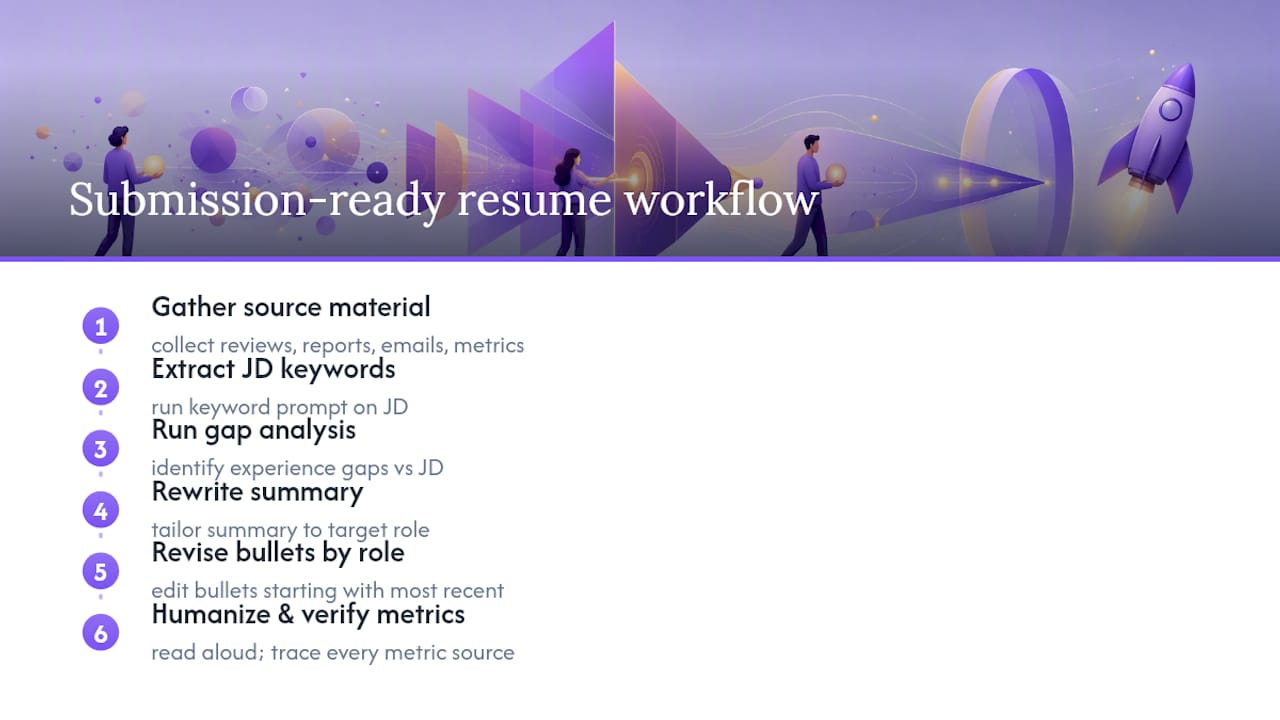
A more defensible workflow starts before any prompt is run. Gather your raw accomplishments first: pull performance reviews, project reports, client emails, and any document that contains a real number or a specific outcome. That source material is what separates a prompted resume from a fabricated one. The model can only work with what you give it, and the quality of your input is the ceiling on the quality of its output.
From there, the sequence matters. Run the keyword extraction prompt on the job description before touching your resume. Understand what the role actually requires before deciding how to present your experience. Then run the gap analysis. Then rewrite the summary. Then address bullets role by role, starting with the most recent position. Each step is a separate prompt, not a single request for a complete document.
The humanizing step is where most professionals stop too early. Reading AI output aloud is not a stylistic preference — it is a functional test. A sentence that cannot be spoken naturally will not be read naturally by a recruiter. The hallucination-check prompt is equally non-negotiable: every metric in the final document must trace back to a real source you can name in an interview.
What the prompts in this article cannot do is replace the judgment required to decide which achievements matter most for a specific role, how to frame a career pivot honestly, or when a resume is the wrong tool entirely. For roles where the hiring decision turns on demonstrated expertise rather than keyword density, the AI hiring shift toward verified evidence means that a well-prompted resume is a starting point, not a complete application strategy.
Alloquy turns prompt-generated bullets into verified, recruiter-queryable evidence
Prompt-based resume writing gets you to a strong first draft faster than any manual process. The gap it leaves is verifiability. A recruiter reading a bullet that claims “$4.2M in pipeline generated” has no way to confirm it from a PDF. Alloquy closes that gap by linking each resume bullet to the underlying evidence — project documents, reports, design files, case studies — stored in Google Drive or uploaded directly, and surfacing that evidence through a custom AI assistant that recruiters can query in real time.

The workflow is direct: run the prompts in this article to generate your achievement bullets, then connect those bullets to their source documents inside Alloquy. The platform generates a tailored resume or application brief from your verified data, and your public profile becomes a queryable record of your actual work. Recruiters who want to go deeper than the resume can ask the AI assistant specific questions and receive answers grounded in your linked evidence, not in generated text.
For professionals in case-study-heavy roles — product management, consulting, engineering, research — this distinction between “I claimed it” and “I can prove it” is increasingly what separates shortlisted candidates from the rest. See Alloquy’s plans and features to build your evidence-backed profile alongside your prompted resume.
Authoritative sources and further reading
The sources below were used throughout this article. Each addresses a distinct aspect of AI-assisted resume writing, from empirical ATS testing to ethical guidance for HR professionals.
- AI, Resumes, and Cover Letters | Harvard FAS Career Services
- How to use ChatGPT to write a resume (Coursera article)
- 23 ChatGPT Resume Prompts, Tested Against ATS (2026) | Jobscan
- How to Use ChatGPT for Your Resume: 2026 Workflow & Prompts | Resumly
- 50 Best ChatGPT Resume Prompts for Every Section (2026) | GPTResume Blog
- 50+ AI Resume Prompts: The Ultimate Copy-Paste Prompt Library for 2026 | CareerBldr
- 8 AI Prompts for Resume Writing — Tested on 4 Models | Nailedit.ai
- 25 Useful ChatGPT Résumé Prompts for HR Professionals | AIHR