

An interactive resume is a navigable digital experience where recruiters click through sections, view embedded proof, and query live evidence rather than scan a static document. The fastest path forward: maintain a Dual-CV strategy (an ATS-optimized PDF for applicant tracking systems plus an interactive profile link for human reviewers), prioritize one role-focused demo per application, and publish your profile on a production-ready platform like Alloquy.
- Step 1: Build or convert your existing resume into an interactive format using a dedicated platform.
- Step 2: Attach the interactive profile URL in your LinkedIn summary, outreach emails, and application cover letters.
- Step 3: Keep a clean ATS PDF in parallel so automated screening never filters you out.
Key Takeaways
An interactive resume paired with an ATS-optimized PDF fallback is the most effective dual-format strategy for professionals targeting roles where demonstrated evidence outperforms described experience.
| Point | Details |
|---|---|
| Dual-CV strategy is non-optional | Submit an ATS PDF through portals; share the interactive profile URL at every human touchpoint. |
| One prioritized demo beats many | Feature one role-focused case study with a quantified outcome rather than an unfocused portfolio. |
| Mobile and load speed first | Test on a real device; a profile that loads slowly or breaks on mobile loses recruiters before they engage. |
| Accessibility signals craft | Alt text, keyboard navigation, and video transcripts are evaluated by technically sophisticated hiring teams. |
| Alloquy closes the verification gap | Alloquy’s AI-powered platform adds verified evidence, recruiter AI chat, and analytics that DIY builds cannot replicate. |
Table of Contents
- What an interactive resume actually is — and how it differs from a PDF
- Interactive resume examples and templates worth studying
- How to create an interactive resume: a step-by-step workflow
- The core components that actually move the needle
- Best practices, ATS fallback workflow, and accessibility
- How Alloquy addresses the hardest parts of building an interactive profile
- When an interactive resume is actually worth the effort
- Your interactive portfolio, without the DIY overhead
- Sources
- FAQ
What an interactive resume actually is — and how it differs from a PDF
A static PDF delivers information sequentially; a recruiter reads top to bottom, with no ability to drill into a claim or verify it in context. A video resume is linear in the opposite direction: it controls pacing and forces the viewer to watch in order. An interactive resume, by contrast, is a navigable digital experience. Recruiters click to expand case studies, follow links to live demos or repositories, watch embedded video pitches, and explore metrics visualized as charts or timelines. The recruiter controls the path, which means a hiring manager focused on leadership can jump straight to that section while a technical screener dives into the engineering work.
The practical distinction matters for modern hiring workflows: an ATS-optimized PDF handles automated parsing, while the interactive layer handles human engagement after the initial screen.
| Format | Recruiter experience | ATS compatibility | Proof depth |
|---|---|---|---|
| Static PDF | Linear reading, no interaction | High | Low |
| Video resume | Passive viewing, fixed pace | None | Medium |
| Interactive resume / CV | Self-directed navigation, clickable proof | Low (needs fallback) | High |
Common interactive resume formats include:
- Single-page portfolio websites (built on personal domains or hosted platforms)
- Clickable PDFs with embedded hyperlinks to live demos and case studies
- Embedded prototype or Figma walkthrough links within a profile page
- Dashboard-style layouts with visualized metrics and navigable role sections
Interactive resume examples and templates worth studying
The most authoritative starting point for understanding the format’s structure is the Purdue OWL interactive résumé sample, which presents a media file where clicking each section reveals guidance on how to compose that part of a résumé. It is pedagogical by design, making it useful for both candidates learning the format and hiring professionals evaluating what well-structured navigation looks like in practice.
Beyond Purdue OWL, template galleries from platforms with independent user reviews on sites like G2 give you a sense of what interactive template categories exist and how real users rate their reliability. Template types worth exploring:
- One-page portfolio site: A single scrollable page with anchored navigation, a hero pitch section, and two or three case study cards.
- Clickable case-study layout: Each role expands into a structured micro-case-study with a problem statement, your approach, and a quantified outcome.
- Dashboard snapshot: Visualized metrics (growth percentages, delivery timelines, revenue impact) arranged as a scannable data layer.
- Prototype embed: A Figma or live-app embed that lets a product or design reviewer interact with your actual work without leaving the page.
Pro Tip: When evaluating a template, look first at its mobile rendering and load speed, not its visual design. A template that takes more than three seconds to load on a mobile connection will lose most recruiters before they read a single line.
How to create an interactive resume: a step-by-step workflow
Building an effective interactive digital resume follows a deliberate sequence. Skipping the planning phase is the most common reason candidates end up with a visually polished profile that communicates nothing specific to the role.
- Define the role focus. Identify the single job family or seniority level this version targets. Every section decision flows from that anchor.
- Audit your proof assets. Collect quantified outcomes, demo links, repository URLs, design files, and any media that substantiates your top three claims for that role.
- Select one prioritized sample. High-impact interactive resumes feature one role-focused demo rather than a broad portfolio dump, mirroring how screeners look for immediate evidence against the role’s primary question.
- Choose your build path. Use a hosted platform (fastest), a static-site generator on a personal domain (most control), or a clickable PDF with embedded links (lowest barrier).
- Build the core sections. Hero pitch, prioritized case study, visualized metrics, contact and CTA. Keep navigation to five items or fewer.
- Create the ATS PDF fallback. Export or write a plain-text-parseable PDF with the interactive profile URL placed visibly near your name and in the contact block.
- QA across devices. Test on Chrome and Safari, on desktop and a mid-range Android device. Verify every link resolves and every embed loads.
- Publish and share. Add the URL to your LinkedIn headline or summary, embed it in outreach emails, and include it in follow-up messages after interviews to improve visibility.
Asset checklist before publishing:
- Short video pitch (60–90 seconds, captioned)
- One prioritized live demo or case study link
- Two to four visualized metrics per featured role
- ATS-compatible PDF with the interactive URL in the header
The core components that actually move the needle
Not every interactive element earns its place. The components below consistently drive recruiter engagement because they answer the screener’s primary question — “Can this person do the specific job?” — with verifiable evidence rather than assertion.
- Hero pitch video: 60–90 seconds, captioned, placed above the fold. Recruiters who watch even part of a video pitch retain significantly more context than those who read an equivalent text block.
- Prioritized case study: One structured narrative per role, following a micro-template: situation (one sentence), your specific action (two sentences), measurable outcome (one metric with a link to proof).
- Visualized metrics: Micro-visuals and timelines increase recruiter recall; include some quantified outcomes per role, paired with ATS-safe text fallbacks.
- Repository or live demo link: For engineers and designers, a working link to a deployed app or a public repository is more persuasive than any description.
- Clear CTA: A visible “Schedule a call” or “View full portfolio” button at the bottom of every major section.
| Component | Primary audience | Evidence type |
|---|---|---|
| Hero pitch video | All roles | Behavioral / communication |
| Prioritized case study | All roles | Narrative + quantified outcome |
| Visualized metrics | Data, product, ops roles | Quantitative proof |
| Repo / live demo link | Engineering, design roles | Technical proof |
| Recruiter CTA | All roles | Conversion |
Navigation architecture matters as much as content. Organize sections so a technical screener and a hiring manager can each reach the evidence most relevant to them within two clicks.
Best practices, ATS fallback workflow, and accessibility
The Dual-CV strategy is the single most important structural decision you make. Submit an ATS-optimized PDF through every formal application portal, and reserve the interactive profile for human touchpoints: LinkedIn, direct outreach, and post-interview follow-ups. This combined workflow preserves automated-screening compatibility while maximizing engagement at the human review stage.
Design and performance dos and don’ts:
- Do keep page weight under 2 MB and test load time on a throttled mobile connection.
- Do place the interactive profile URL as plain text near your name in the ATS PDF, so a recruiter who prints the PDF can still reach it.
- Do include alt text on every image and chart; screen readers and accessibility-focused employers will notice.
- Don’t embed autoplay video or audio; it signals poor judgment about recruiter context.
- Don’t use font sizes below 14px or color contrasts that fail WCAG AA standards.
ATS fallback checklist:
- Plain-text URL in the PDF header and contact block
- All keywords from the job description present in the PDF body text
- No tables or multi-column layouts in the PDF that break ATS parsing
Pro Tip: Test your interactive profile on a real mobile device, not just a browser’s responsive-design simulator. Tap targets, scroll behavior, and embed rendering differ significantly between simulated and actual mobile environments.
Accessibility considerations extend beyond screen readers. Keyboard navigation, sufficient color contrast, and video transcripts are not optional courtesies; they are signals of professional craft that technically sophisticated hiring teams will evaluate.
How Alloquy addresses the hardest parts of building an interactive profile
Most DIY interactive resume approaches break down at three points: evidence verification, recruiter Q&A, and analytics. Alloquy is an AI-powered portfolio platform built specifically to close those gaps, converting documents into dynamic public profiles with verified evidence and a recruiter-accessible AI assistant.
Platform features mapped to the build checklist above:
- Verified evidence links: Connect Google Drive documents or upload files directly; Alloquy preserves the evidence chain so recruiters receive contextually accurate answers, not unverifiable assertions.
- Recruiter-accessible AI chat: A custom AI assistant on your public profile answers recruiter questions in real time, drawing only from your verified documents — no hallucinated claims.
- Customizable themes and branding: Adjust visual identity to match the role or sector without rebuilding from scratch.
- Tailored resume and cover letter generation: Alloquy generates application documents from your verified data, calibrated to a specific job description.
- Analytics: Track which sections recruiters engage with and for how long, enabling data-driven iteration on your profile. AI resume intelligence at this level is what separates candidates who iterate from those who guess.
Onboarding in four steps:
- Create a free account and connect your Google Drive or upload your existing resume and evidence files.
- Organize your verified achievements into case studies and role sections within the platform.
- Publish your public profile and copy the shareable URL.
- Add the URL to your LinkedIn summary, outreach templates, and ATS PDF contact block.
When an interactive resume is actually worth the effort
The honest answer is that an interactive resume delivers outsized returns in a specific subset of hiring contexts, and marginal returns in others.
Roles where the format pays off clearly: product management, UX and product design, software engineering, data science, marketing, and any consulting or advisory role where the quality of your thinking is the primary hiring signal. In these fields, the gap between claiming an outcome and demonstrating it with a live artifact is wide enough that an interactive profile changes the recruiter’s confidence level materially.
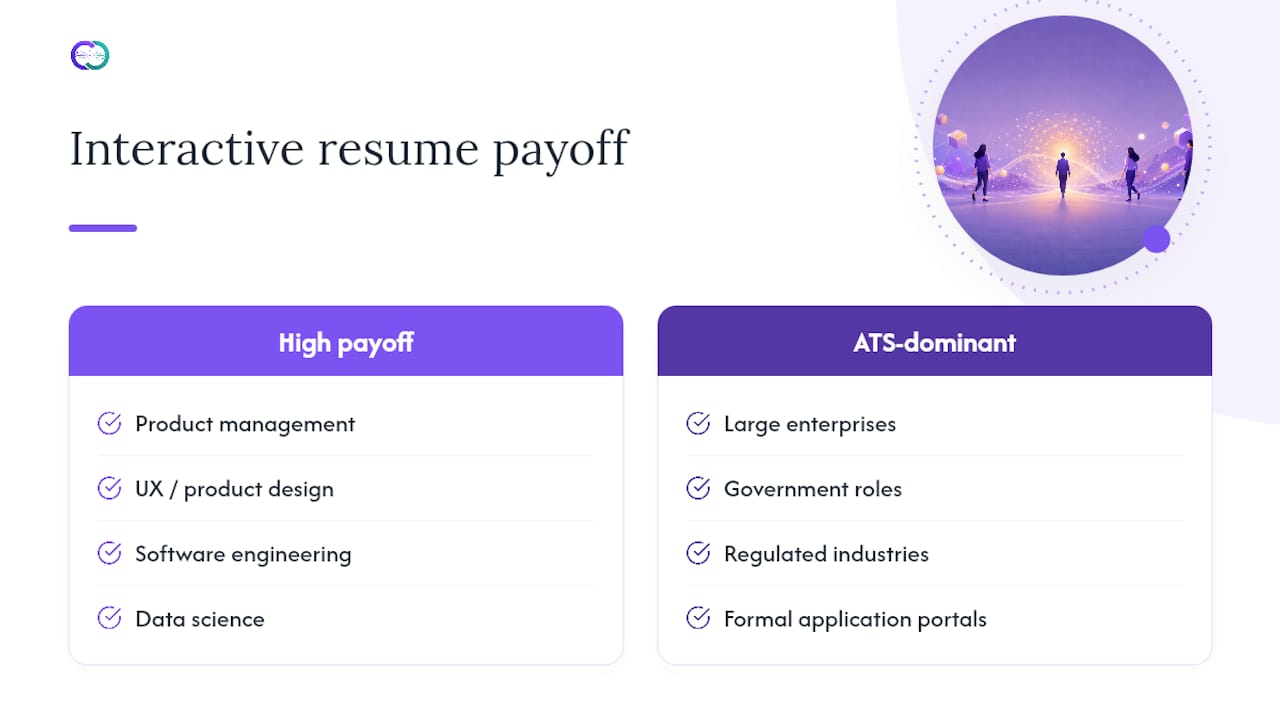
Formal application portals at large enterprises, government roles, and heavily regulated industries still route almost entirely through ATS systems that cannot process interactive content. For those contexts, the ATS PDF is the primary document; the interactive profile functions as a supplementary asset for the human review stage, not a replacement.
The time-investment threshold is roughly this: if the role is one you would spend more than two hours tailoring a cover letter for, it is worth spending an equivalent amount of time building or updating an interactive profile for that role family. Below that threshold, a well-optimized ATS PDF with a visible profile URL is sufficient.
Your interactive portfolio, without the DIY overhead
Static resumes describe what you did. Alloquy’s interactive portfolio platform lets recruiters verify it, query it, and engage with it in real time — a fundamentally different signal in a hiring process where every other candidate is submitting the same PDF.

The free tier gives you a live public profile with core features immediately. Paid plans on the Alloquy pricing page add verified evidence storage, custom domain options, expanded AI generation limits, and recruiter analytics — the features that matter most once you are actively in a hiring process. Keep your ATS PDF in parallel; the two assets are complementary, not competing.
Sources
- Interactive Résumé - Purdue OWL
- Interactive Resumes 2026: 7 Clickable Portfolio Tips | WAHResume
- Video Resume vs PDF Resume vs Virtual CV (2026 Guide) | Wipperoz
FAQ
What is an interactive resume?
An interactive resume is a navigable digital experience where recruiters click through sections, view embedded proof, and explore live demos rather than reading a static document linearly.
Do interactive resumes work with ATS systems?
Most ATS platforms cannot parse interactive web pages, so always submit an ATS-optimized PDF through application portals and reserve the interactive profile URL for human reviewers.
How do you share an interactive resume effectively?
Place the profile URL as plain text in your LinkedIn summary, in outreach emails, and in the contact block of your ATS PDF so every touchpoint, digital and printed, points to the live profile.
Which roles benefit most from an interactive resume?
Product management, UX design, software engineering, data science, and consulting roles benefit most, because the gap between claiming an outcome and demonstrating it with a live artifact directly influences recruiter confidence.
How does Alloquy differ from a standard portfolio website?
Alloquy adds verified evidence links, a recruiter-accessible AI assistant that answers questions from your documents in real time, and analytics tracking, capabilities that a static portfolio site or DIY builder does not provide.