

ATS resume keywords are the exact words and short phrases that applicant-tracking systems index and recruiters search for — mirror the job description, surface several genuine tokens, and place them where the parser expects them. Before editing a single bullet, run this three-step sequence:
- Fix parseability first. Save your resume as a single-column, text-based PDF. No columns, no text boxes, no images.
- Extract exact tokens from the job description. Highlight named tools, certifications, titles, and methodologies — not adjectives or soft descriptors.
- Place several genuine keywords across your Skills section, experience bullets, and summary. Include both the acronym and the full term (e.g., “Search Engine Optimization (SEO)”).
Quick do/don’t checklist:
- Do mirror the JD’s exact phrasing, including capitalization of product names
- Do include both acronyms and spelled-out versions of every technical term
- Don’t repeat a keyword more than two or three times across the document
- Don’t place keywords in headers, footers, or image alt text — parsers skip those fields
- Don’t fabricate skills you cannot demonstrate in an interview
Key Takeaways
Parsing failures and missing structural keywords — not a lack of action verbs — are the primary reasons qualified candidates disappear from ATS recruiter searches.
| Point | Details |
|---|---|
| Fix format before keywords | Save as a single-column, text-based PDF; parse errors erase keywords before matching begins. |
| Target structural tokens | Prioritize tools, certifications, titles, and methodologies — not verbs or soft skills — for ATS retrieval. |
| Extract 8–15 JD tokens | Read the JD twice, highlight named entities, and include both acronyms and full terms for each. |
| Place keywords with evidence | Every Skills-section keyword should appear in at least one quantified experience bullet. |
| Verify with a parse check | Run a parse-output tool after editing to confirm the ATS captures your updated fields correctly. |
Table of Contents
- What actually counts as an ATS resume keyword?
- How a modern ATS actually reads your resume
- How to extract the right keywords from any job description
- Where to place keywords on your resume for maximum ATS impact
- Representative ATS-friendly keywords by function
- How to tailor each application without keyword stuffing
- Tools to test your resume against ATS
- Why interactive portfolios strengthen your ATS keyword strategy
- The conventional ATS playbook has a critical blind spot
- Sources
- FAQ
What actually counts as an ATS resume keyword?
The term “keyword” gets used loosely, but for ATS purposes it refers to a specific class of tokens: named entities the system can index and a recruiter can search. These are structural keywords — tools, platforms, certifications, regulatory frameworks, job titles, and methodologies. Think “Python,” “Kubernetes,” “ASC 606,” “Certified Public Accountant (CPA),” or “Agile/Scrum.” They are discrete, searchable strings.
Action verbs are a different category entirely. Words like “spearheaded,” “led,” or “collaborated” improve how a human reads your bullet points, but they are not the tokens ATS systems match on. A recruiter running a database search for “Salesforce” will not retrieve your resume because it contains “managed.” Structural named entities are what trigger retrieval.
Hard skills vs. soft skills: Hard skills — programming languages, software platforms, industry certifications, financial standards — are the primary ATS targets because they are discrete and searchable. Soft skills like “communication” or “leadership” appear so universally that they carry almost no filtering weight. Include them in your summary for human readability, but do not rely on them for ATS discoverability.
The practical implication: audit your resume for named entities first. If your Skills section lists only verbs and adjectives, the parser has nothing concrete to index.
How a modern ATS actually reads your resume
Understanding the pipeline clarifies why keyword placement and document format are inseparable concerns. A modern ATS processes a submitted resume through several sequential layers:
- Text extraction: The system converts the file to raw text. PDFs with embedded fonts, Word documents, and plain text files parse reliably. Scanned images, decorative columns, and text inside graphics often produce garbled or empty output.
- Structural analysis: The parser identifies section headings (Work Experience, Education, Skills) and maps content to database fields: name, contact, job titles, dates, skills, education. Complex layouts — multi-column designs, tables, text boxes — frequently cause field misattribution or data loss.
- Keyword matching: The system runs literal token matching against the job requisition’s required and preferred qualifications. Exact string matches score highest at this layer.
- Semantic and LLM scoring: Modern ATS stacks combine literal keyword matching with semantic embedding layers and LLM judges, so contextual evidence in your bullets — not just the keyword itself — contributes to ranking. A resume that mentions “Tableau” once in a skills list scores lower than one that also shows Tableau used in a quantified context.
Formatting failures are the most common reason well-qualified candidates disappear from recruiter searches. Saving as a single-column, text-based PDF — exported from Word or Google Docs, not printed to PDF from a design tool — resolves the majority of parse issues before any keyword work begins.
Pro Tip: Paste your resume text into a plain-text editor like Notepad. If the content reads in logical order with no garbled characters, the parser will likely extract it correctly. If sections appear out of sequence or symbols replace characters, your format needs fixing before keywords matter.
How to extract the right keywords from any job description
The extraction workflow below is replicable across any role and seniority level. Practical guides confirm that reading the JD carefully, highlighting named entities, and mapping those tokens to resume bullets reliably improves match outcomes.
- Read the full JD twice. First pass for overall context; second pass with a highlighter mindset.
- Highlight named entities only. Tools, platforms, certifications, regulatory standards, methodologies, and exact job titles. Skip adjectives (“dynamic,” “detail-oriented”) and generic verbs.
- Tag required vs. preferred. Required qualifications are non-negotiable ATS filters in most systems. Preferred qualifications are secondary but still worth including if you have genuine exposure.
- Map each token to your evidence. For every keyword you plan to include, identify the specific role, project, or outcome where you used it. If you cannot map it, do not include it.
- Select 8–15 keywords. Prioritize required tokens first, then preferred ones where evidence exists.
- Add both the acronym and the full term. “Machine Learning (ML),” “Search Engine Optimization (SEO),” “Generally Accepted Accounting Principles (GAAP).” Parsers and recruiters search both forms.
Worked example: Consider a JD snippet for a mid-level data analyst role: “Proficiency in SQL and Python required; experience with Tableau or Power BI preferred; familiarity with dbt and Snowflake a plus.”
Extracted tokens, prioritized:
- Required: SQL, Python
- Preferred: Tableau, Power BI
- Bonus: dbt, Snowflake
A senior candidate would include all six with quantified context. A junior candidate should include only the ones they can defend in a technical screen. Note also that if your current title is “Data Insights Specialist” but the JD says “Data Analyst,” translate your title in the resume’s summary or objective line to the industry-standard term — parsers match on title strings, and a non-standard internal title can cost you a retrieval.
Where to place keywords on your resume for maximum ATS impact
Keyword placement follows a hierarchy based on how parsers weight different fields and how human reviewers scan the page.
Skills section (highest ATS priority):
- List 8–15 discrete skills, one per line or in a comma-separated block
- Include both acronym and full name: “Kubernetes (K8s),” “Certified Information Systems Security Professional (CISSP)”
- Group by category if the list exceeds 10 items: Languages, Platforms, Certifications, Methodologies
Experience bullets (highest human + semantic ATS value):
Weaving keywords into quantified bullets satisfies both the literal match layer and the LLM scoring layer. Structuring achievements so AI readers extract the right tokens and evidence requires pairing the keyword with a measurable outcome.
Before: “Responsible for managing data pipelines.”
Before: “Helped with digital marketing campaigns.”
Summary / objective (secondary ATS value, high human value):
Place your two or three most critical structural keywords in the first two sentences of your summary. Recruiters who read past the ATS filter will see this section first.
Certifications section:
List certifications exactly as the credentialing body names them: “Project Management Professional (PMP),” “AWS Certified Solutions Architect — Associate.” Parsers match on these exact strings.
Representative ATS-friendly keywords by function
The lists below are starting points. Always cross-reference against the specific JD — keyword strategies that mirror JD language are the tactics that actually increase discoverability without damaging human readability.
Action verbs (for human readability, not ATS matching): Architected, Deployed, Engineered, Automated, Negotiated, Forecasted, Audited, Synthesized, Migrated, Configured
Industry micro-lists:
| Function | Core ATS Keywords (structural tokens) |
|---|---|
| Software Engineering | Python, Java, Kubernetes, Docker, CI/CD, REST API, Git, AWS, Terraform, Agile/Scrum |
| Data & Analytics | SQL, Python, R, Tableau, Power BI, dbt, Snowflake, Spark, ETL, Machine Learning (ML) |
| Finance & Accounting | GAAP, ASC 606, IFRS, Excel (Advanced), SAP, NetSuite, Financial Modeling, CPA, Variance Analysis |
| Product Management | Roadmap Planning, OKRs, A/B Testing, JIRA, Figma, User Story Mapping, Go-to-Market (GTM), Agile |
| Design (UX/UI) | Figma, Sketch, Adobe XD, Prototyping, Usability Testing, Design Systems, Accessibility (WCAG) |
| Sales & Marketing | Salesforce (CRM), HubSpot, SEO, Google Ads, Demand Generation, Account-Based Marketing (ABM), Quota Attainment |
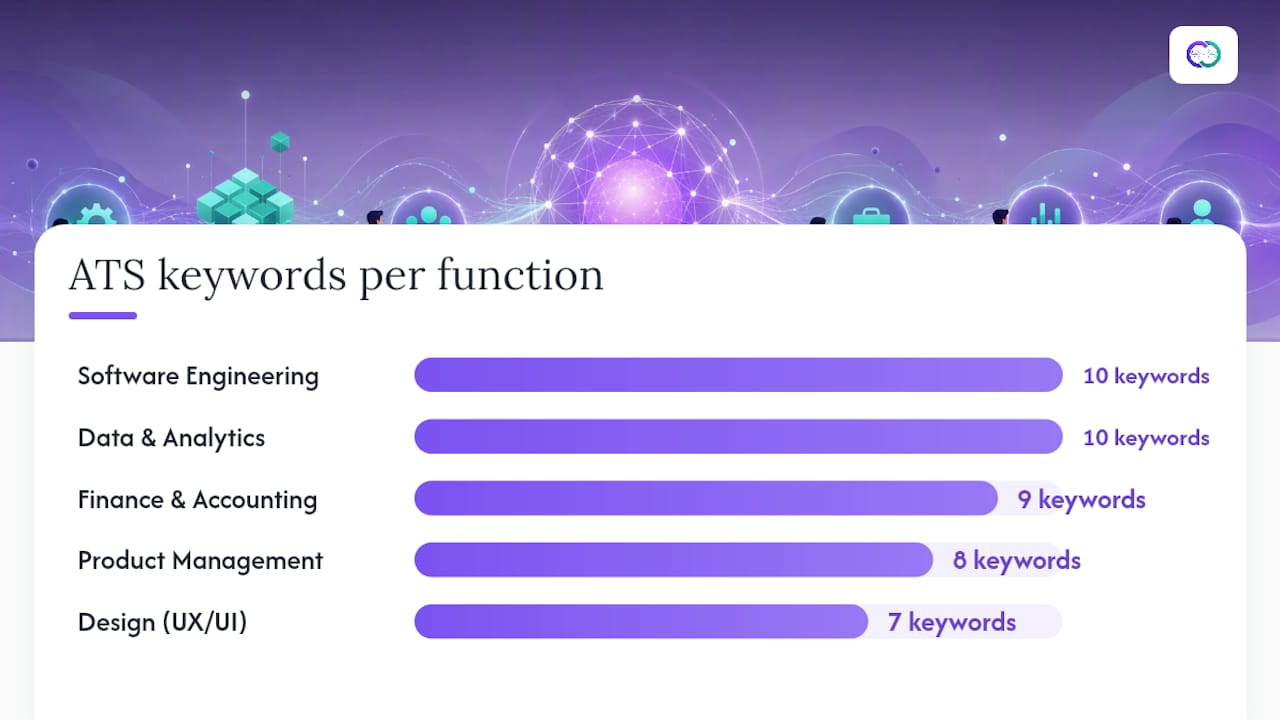
For technical roles, seniority-tiered token expectations mean that senior candidates should include architecture-level terms (Terraform, system design, distributed systems) alongside execution-level tools. A staff engineer’s resume that lists only “Python” and “Git” signals a mid-level profile to both the ATS and the LLM scoring layer.
How to tailor each application without keyword stuffing
Tailoring does not mean rewriting your resume from scratch for every role. It means adjusting the Skills section and two or three experience bullets to mirror the specific JD’s language. Much popular ATS advice is misleading; the tactics that work are precise mirroring and evidence depth, not volume.
Dos:
- Swap in the JD’s exact tool name if you used an equivalent (e.g., the JD says “Workday” and you used “ADP Workforce Now” — list both if true, not just the one you prefer)
- Include “preferred” qualifications you genuinely have, even if lightly
- Document lesser-used skills with a parenthetical context: “Snowflake (2 projects, 2024)”
Don’ts:
- Do not paste the JD’s requirements verbatim into a hidden white-text block — modern LLM layers detect this and flag it
- Do not list a tool you cannot discuss in a 10-minute technical screen
- Do not repeat the same keyword in every bullet — two or three appearances across the document is sufficient
Final review checklist before submitting:
- Run a parse check (paste into a plain-text editor or use a dedicated parser tool)
- Confirm each of your 8–15 keywords appears at least once in the Skills section
- Verify that every keyword in the Skills section also appears in at least one experience bullet with quantified context
- Check that no keyword appears more than three times across the full document
- Confirm the file is saved as a single-column, text-based PDF
On keyword density: Newer ATS platforms with LLM judges penalize unnatural token density. Prioritize depth of evidence over breadth of tokens — one keyword with a strong, quantified bullet outperforms five keywords with no supporting context.
Tools to test your resume against ATS
Testing falls into three categories, each revealing a different layer of the pipeline.
1. Parse-output checkers These tools show you what the ATS actually extracted: which fields populated, which dates parsed correctly, and which skills were captured. A parsing-first check is essential because a match score alone can hide missing or mis-parsed fields. Tools like Jobscan’s resume parser view and dedicated parse-output checkers at sites like ATSVerification display the raw extracted data. Fix parse errors before adjusting keywords.
2. Match-score scanners Jobscan compares your resume text against a pasted JD and returns a match percentage alongside a list of missing keywords. Use the keyword gap list, not the percentage score, as your primary signal.
3. Semantic similarity tools Some platforms use embedding-based comparison to identify contextual gaps — cases where you have the skill but have not phrased it in a way the LLM layer recognizes. These outputs are most useful for senior roles where LLM-based recruiter scoring weighs contextual evidence heavily.
How to run a complete test sequence:
- Export your resume as a plain-text PDF
- Run a parse-output check and fix any field misattributions
- Paste the corrected resume and the target JD into a match-score scanner
- Add missing required-qualification keywords where you have genuine evidence
- Re-run the parse check to confirm the additions parsed correctly
Current HR software and ATS platforms vary significantly in how they weight literal vs. semantic matches, which is why a parse-first workflow beats optimizing for a single tool’s score.
Why interactive portfolios strengthen your ATS keyword strategy
A parseable, keyword-rich resume is necessary. It is not sufficient when a recruiter moves to deeper verification — and in 2026, AI resume intelligence has changed recruiter workflows to include post-ATS profile checks that go well beyond the resume text.
An interactive portfolio built on verified evidence addresses the gap between what a resume claims and what a recruiter can confirm. When a candidate links Google Drive documents, project artifacts, or case studies to a profile, each keyword in the resume gains a verifiable artifact behind it. A recruiter querying “Snowflake” in an AI-powered portfolio assistant receives not just the claim but the project context, the scale, and the outcome — the kind of evidence that multi-format resume assets surface that a static PDF cannot.

This matters for rare or high-value tokens. If your resume includes “Terraform” or “ASC 606” and a recruiter doubts the depth of that experience, a linked case study or project document resolves the question before the phone screen. Harvard Business School research on hidden workers underscores that discoverability and verifiable matching in recruiter databases directly affect hiring pipeline outcomes — candidates who surface with evidence get further.
Pro Tip: A portfolio does not replace an ATS-parseable resume. Submit a clean, keyword-matched PDF through every ATS portal. Use the portfolio link in your email signature, LinkedIn profile, and cover letter so recruiters who advance you past the ATS filter can access verified evidence on demand.
Key benefits of an evidence-backed portfolio in an ATS-aware workflow:
- Reduces the need to overstate keyword frequency on the resume itself
- Provides verifiable context for specialized or rare tokens that a resume cannot fully explain in two lines
- Gives recruiters a queryable record when they conduct deeper checks post-ATS

Alloquy’s platform lets you build exactly this kind of interactive, evidence-linked profile — with a custom AI assistant that answers recruiter questions using your verified documents, and a tailored document generator that produces ATS-ready resumes and cover letters from your portfolio data. Explore Alloquy’s features or review pricing plans to see how the platform fits your job search workflow.
The conventional ATS playbook has a critical blind spot
Most keyword guides stop at the match score. That advice is incomplete in 2026, and in some cases it actively harms candidates.
The real problem is sequencing. Keyword optimization performed on a resume that fails to parse is wasted effort — the ATS never sees the tokens you carefully placed. Parse-first is not a minor caveat; it is the prerequisite that most guides bury in a footnote. Fix the document structure before touching a single keyword, and you will recover more discoverability than any keyword addition alone can produce.
The second blind spot is the evidence gap. Modern ATS stacks with LLM scoring layers do not just check whether “Kubernetes” appears — they assess whether the surrounding context suggests genuine proficiency. A resume that lists “Kubernetes” in a skills block but never mentions it in a bullet describing a real deployment will score lower than one that shows it in a quantified, contextual sentence. Depth of evidence per keyword outperforms breadth of keywords every time.
The third issue is what happens after the ATS. Candidates who pass the filter still face recruiter scrutiny, and a static PDF cannot answer follow-up questions. An interactive, evidence-linked portfolio — where a recruiter can query your AI assistant and receive verified project artifacts — closes the credibility gap that keyword optimization alone cannot address.
The playbook, properly sequenced: parse check, then keyword extraction, then evidence-backed placement, then portfolio verification. In that order.
Sources
The following sources informed this guide and are worth consulting directly for deeper technical detail:
- How an ATS Reads Your Resume: Parsing Explained (2026)
- How Modern ATS Parsers Actually Work (Workday, Greenhouse, Lever, Taleo Compared) | ResuAI
- ATS Keywords vs Action Verbs — What Gets You Filtered (2026) | ATS Verification
FAQ
What are ATS resume keywords?
ATS resume keywords are the exact named entities — tools, certifications, job titles, methodologies, and regulatory standards — that applicant-tracking systems index and recruiters search for in candidate databases. They are structural tokens, not action verbs or soft-skill descriptors.
Is a 70% ATS match score good?
What keywords does AI look for in a resume?
LLM-based ATS layers look for both exact structural tokens (tool names, certification titles, exact job titles) and contextual evidence that those tokens reflect genuine proficiency — a quantified bullet using the keyword in a real work context scores higher than the keyword appearing only in a skills list.
What are the best resume keywords for any job?
The best keywords are the exact named entities from the specific job description you are applying to — required tools, certifications, methodologies, and titles listed in that posting. Industry-agnostic starting points include role-specific platforms (Salesforce, Tableau, Python), certifications (PMP, CPA, AWS), and methodologies (Agile, Scrum, GAAP).
What are common resume buzzwords to avoid relying on?
Soft-skill buzzwords like “results-driven,” “team player,” “passionate,” and “detail-oriented” carry almost no ATS filtering weight because they appear on nearly every resume. Use them sparingly in your summary for human readability, but never substitute them for the structural named entities that actually trigger ATS retrieval.
Recommended
- Why Multi-Format Resume Assets Are Key to Modern Job Search Success | Alloquy Blog | Alloquy
- How AI Resume Intelligence Transformed Modern Hiring in 2026 | Alloquy Blog | Alloquy
- Blog | Alloquy - AI Career & Resume Intelligence | Alloquy
- The 2026 Career Tech Stack: Tools Every Modern Professional Needs | Alloquy Blog | Alloquy