

Yes, you should add a grounded chatbot to your portfolio, and you have three practical paths: deploy a ready template, build a focused retrieval-augmented generation (RAG) assistant, or use Alloquy to skip the engineering entirely. Start by collecting your canonical documents, resume, project write-ups, and metrics, before choosing a route. Done right, the payoff is fast, evidence-backed answers for recruiters instead of a static PDF nobody reads twice.
TL;DR:
- Using a static template is fast and easy for quick deployment but offers limited control and long-term customization.
- Building a retrieval-augmented generation bot requires managing chunking, embeddings, and updating content, making it suitable for experienced AI users.
- Alloquy provides a no-code, plug-and-play solution that handles document ingestion, chatbot deployment, and branding, ideal for quick setup and routine updates.
- Prepping source documents with clear headers and an evaluation set improves grounding accuracy and eases future maintenance.
- Implementing accessibility features like keyboard navigation, ARIA support, and high-contrast design ensures the chatbot is usable for all recruiters.
Table of Contents
- Why Add a Chatbot to Your Portfolio? What Recruiters Actually Need
- What Do You Need Before Building a Portfolio Chatbot?
- Should You Embed a Template, Build a RAG Bot, or Use Alloquy?
- How Do You Build a Portfolio Chatbot With RAG?
- What UI Patterns Make Recruiters Actually Use the Chat?
- Where Should You Host and Deploy Your Portfolio Chatbot?
- How Do You Test a Portfolio Chatbot Before Publishing?
- How Do You Keep a Portfolio Chatbot Accurate and Private?
- How Often Should You Update Your Portfolio Chatbot’s Content?
- Is Your Portfolio Chatbot Accessible to Every Recruiter?
- Why a Portfolio Chatbot Beats a Static Resume
- Get an Interactive Portfolio Without Writing a RAG Pipeline
- Sources
- FAQ
Why Add a Chatbot to Your Portfolio? What Recruiters Actually Need
Recruiters skim. A grounded assistant lets them ask direct questions instead of hunting through pages: “Does this person have production Kubernetes experience?” or “What was their role on the payments migration?” That conversational layer speeds discovery and invites the kind of follow-up questions a static page never gets.
Think of it as a career twin: an AI that represents your verified work when you are not in the room to explain it yourself. The assistant should reliably handle a narrow set of recurring recruiter tasks:
- Verifying specific skills or technologies against real project evidence
- Explaining scope, role, and outcomes on a named project
- Answering availability, location, and work-authorization basics
- Surfacing relevant links (GitHub repos, case studies, live demos) on request
What Do You Need Before Building a Portfolio Chatbot?
Engineers tend to jump into model selection before they have anything worth retrieving. Fix that order first.
- Gather your source files. Pull together resume.pdf, project write-ups in Markdown or MDX, GitHub READMEs, sample screenshots or demo videos, and a list of canonical metrics and dates (revenue impact, latency improvements, team size).
- Decide the scope. A single whole-portfolio assistant is simpler to maintain than several per-project bots, but per-project assistants can go deeper on complex case studies.
- Write a short evaluation set. Draft 15 to 20 recruiter-style questions (“What’s their strongest backend project?”, “Have they led a team?”) you will use later to test grounding.
Pro Tip: Keep every source document in one folder with consistent headers (“## Work Experience,” “## Project: Payments Migration”). That structure becomes your chunking map later, and it saves hours of reformatting.
If you are worried about exposing sensitive client details while still proving impact, Alloquy’s guide on showing evidence without over-exposure is worth reading before you finalize your document set.

Should You Embed a Template, Build a RAG Bot, or Use Alloquy?
The right approach depends on how much time you have, how much control you need, and how often your portfolio content changes.
- Embed a template. Deployable starter kits, including open-source AI resume templates, get a working demo online in an afternoon. Fine for a portfolio you rarely touch, weak on nuance and long-term maintenance.
- Build a DIY RAG bot. Full control over retrieval logic, embeddings, and prompt behavior, but you own chunking, vector storage, prompt tuning, and every future content update. A solid choice if you already work with AI infrastructure and want the practice.
- Use Alloquy. A plug-and-play interactive portfolio: link your Google Drive documents, and Alloquy handles verified-document ingestion, recruiter chat, customizable branding, and generation of tailored resumes and cover letters from the same evidence base. Engineering overhead drops to nearly zero.
Run a quick checklist: how fast do you need to ship, how much retrieval and prompt control do you actually want, and how often will your projects and metrics change? If the answer is “often” and “I’d rather spend that time job hunting,” the plug-and-play route wins on time saved, even for developers who could build the RAG version themselves.
How Do You Build a Portfolio Chatbot With RAG?
This is the core engineering work, and grounding is the part most builds get wrong.
Split source documents by header, not by fixed token windows. Chunking along natural boundaries like “## Work Experience” or “## Project: Payments Migration” preserves meaning far better than arbitrary character counts, a pattern confirmed across recent RAG portfolio builds. Pick an embedding model, store vectors in pgvector or a managed vector database, and index each chunk by source file and chunk ID so you can trace every answer back to its origin.
For retrieval, use top-k lookup and inject only the most relevant chunks into the system prompt, along with provenance links back to the source document. That single design choice, grounding every answer in a canonical resume file with an evidence-plus-outcome response format, is what makes replies genuinely useful to hiring managers rather than generic filler.
Your system prompt needs one non-negotiable rule: reply “I don’t know” when the answer is not in the corpus. No exceptions, no improvising.
- Stream responses token by token for perceived speed, not just actual speed
- Handle API retries and rate limits gracefully so a burst of recruiter traffic does not break the demo
- Log every question and retrieved chunk pair for later debugging
For a full working reference, the Career Twin example on GitHub combines retrieval, an email tool for recruiter introductions, and streaming responses in one repo worth studying line by line.
What UI Patterns Make Recruiters Actually Use the Chat?
The interface decides whether recruiters engage at all, and the wrong pattern kills adoption before the model gets a chance.
Use a right-side sliding or resizable panel instead of a modal. Recruiters need to keep reading your project page while chatting, and hiding that content behind an overlay breaks the flow. Developer writeups comparing the two consistently find panels outperform modals for engagement.
- Offer quick-question chips (“What’s your strongest project?”, “Are you open to remote work?”) as default entry points
- Return structured UI components, a pulsing project card or a row of skill badges, instead of long text blocks
- Keep chip options context-sensitive to whichever project page the recruiter is viewing
Pro Tip: Track which quick-chip a visitor clicks first. It tells you exactly what recruiters care about most, often before they’ve typed a single word.
Where Should You Host and Deploy Your Portfolio Chatbot?
Deployment choice comes down to how much infrastructure you want to manage yourself.
- Vercel serverless routes with the Vercel AI SDK handle streaming chat and edge deployment with minimal setup, a pattern several developer case studies rely on specifically because it simplifies provider swaps later.
- Static site plus a serverless function for retrieval and generation works well if your portfolio is already a static build (Astro, Next.js export, Jekyll).
- Iframe embeds through Gradio or Hugging Face Spaces are fast for demos but weaker on branding control and rate-limit handling.
Whichever route you pick, set explicit rate limits before launch. A viral LinkedIn post sending a burst of traffic to an unmetered API key is a bad way to find out your budget cap.
How Do You Test a Portfolio Chatbot Before Publishing?
Testing catches the failures that only show up once a real recruiter starts asking odd questions.
- Run your 20-question evaluation set against the live assistant and flag any answer that drifts from your source documents.
- Track ongoing metrics: question volume, follow-up rate, contact requests, and hallucination or error rate.
- A/B test prompt variants and watch which quick-chips actually drive contact form submissions, not just clicks.
Recruiter testing on AI-generated career materials backs this up directly: one head-to-head resume test found recruiters consistently preferred concise, evidence-backed output that had been checked by a human reviewer over unreviewed AI output, no matter which model produced it.
How Do You Keep a Portfolio Chatbot Accurate and Private?
Accuracy and privacy come from the same source: a tightly scoped corpus. Never give the assistant live web access; confine it strictly to the documents you supply. Bake explicit refusal behavior into the system prompt and surface provenance links whenever the bot makes a factual claim, so a skeptical recruiter can verify it in one click.
- Redact personal identifying information before it enters the retrieval corpus
- Add rate limits and basic moderation hooks before making the chat public
- Review your document set quarterly for anything you would not want indexed and searchable
How Often Should You Update Your Portfolio Chatbot’s Content?
A chatbot trained on stale information is worse than no chatbot. If it confidently describes a role you left eight months ago, that is a credibility problem, not a minor bug.
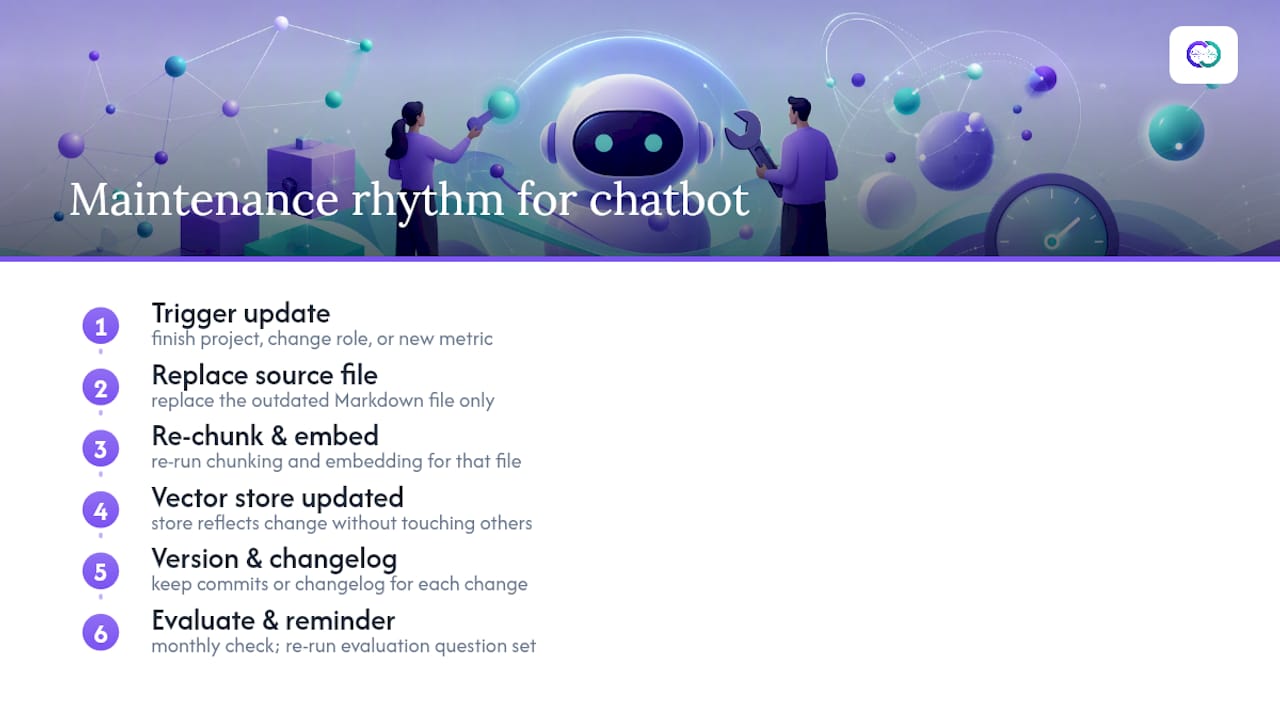
Set a maintenance rhythm tied to real events, not the calendar. Update the corpus whenever you finish a project, change roles, or hit a new metric worth citing, rather than waiting for a scheduled quarterly refresh. Because retrieval systems key off chunk IDs and source files, the update itself is usually mechanical: replace the outdated Markdown file, re-run the chunking and embedding step for that file only, and the vector store reflects the change without touching anything else.
Version your source documents the same way you version code. Keep a changelog of what changed and when, even if it is just commit messages on a private repo of your resume and project files. That habit matters more than it sounds: if a recruiter asks about a metric that changed last quarter, you want a fast way to confirm which version of the corpus generated that answer.
Bundling your data at build time rather than fetching it live also helps here. One documented pattern compiles per-profile context into a single JSON file at build time and loads only the relevant context at runtime, which cuts token costs and avoids the awkward situation where two source files quietly disagree with each other.
Set a recurring reminder, monthly is reasonable for an active job search, to re-run your evaluation question set after any content update. A five-minute check beats discovering a stale answer from a recruiter’s screenshot.
Is Your Portfolio Chatbot Accessible to Every Recruiter?
A chat interface that only works for sighted, mouse-using visitors on a fast connection excludes recruiters who use screen readers, keyboard navigation, or slower networks, and some of those recruiters make hiring decisions at companies with real accessibility standards of their own.
Build with keyboard navigation as a first-class path: every chip, input field, and send button needs a visible focus state and a logical tab order. Screen reader support means proper ARIA live regions on the chat panel, so new assistant messages get announced as they stream in rather than sitting silently until the recruiter happens to scroll down.
Color contrast matters more in a chat UI than people expect, especially with Alloquy’s purple-and-teal palette or any brand-colored theme, because low-contrast text on a colored bubble is exactly the kind of detail that passes a casual glance and fails a real audit. Run your panel through a contrast checker at both the light and dark theme variants if you support both.
Streaming responses help most users but can disorient screen reader users if messages announce mid-sentence. Consider a setting or fallback that delivers the full response at once for assistive technology, rather than forcing a partial read on every update. None of this is exotic engineering. It is the same web accessibility discipline you would apply to any interactive component, applied to a feature that happens to be the one recruiters interact with longest.
Why a Portfolio Chatbot Beats a Static Resume
A resume is a claim. A grounded chatbot is that claim with receipts attached, answerable on demand, and available at 11 p.m. the night before a recruiter’s screening call. That shift, from a document a recruiter reads once to a conversation they can actually interrogate, is the real value here, not the novelty of having AI on your site.
The engineering path works, and developers should build it if they enjoy the infrastructure work. But the harder problem is not the RAG pipeline, it is keeping evidence current, provenance clear, and answers boring in the best sense: accurate, sourced, and free of embellishment. Alloquy was built around that exact discipline, verified-document ingestion instead of freeform text, so every answer a recruiter gets traces back to something real you actually did.
— Alloquy Team
Get an Interactive Portfolio Without Writing a RAG Pipeline
If the technical blueprint above sounds like a weekend you’d rather spend job hunting, Alloquy gives you the same evidence-backed outcome without the vector database.

Link your Google Drive documents, and Alloquy handles the ingestion, chunking, and retrieval work described earlier, then exposes it through a recruiter-facing AI chat with customizable branding to match your personal site. The platform also generates tailored resumes and cover letters from the same verified evidence base, so your application documents and your live portfolio never drift out of sync. A free tier lets you set up a profile and test recruiter chat before committing to anything. Check the feature breakdown to see how document ingestion and chat map to your current portfolio, or go straight to pricing to compare tiers and start with the free plan today.
Sources
- Building a Resume RAG Chatbot for a Portfolio Assistant | Sadam Hussain
- Text Is Not Enough | Tyler Wall
- I had Claude, ChatGPT, and Gemini build my resume—our recruiter told me this one was the best | HowToGeek
FAQ
How Do I Embed a Chatbot Into a Website?
Add a chat component (built or third-party) to your site’s layout, connect it to an API route that handles retrieval and generation, and host the whole thing on a platform like Vercel or through an iframe for quick demos.
Are AI Chatbots Illegal?
No. Chatbots themselves are not illegal; legal exposure comes from how you handle user data, what claims the bot makes, and whether you disclose AI use where required, so keep your corpus factual and avoid collecting unnecessary personal data.
How Do I Make My Portfolio Using AI?
Start with your canonical documents, resume, project write-ups, and metrics, then either deploy a template, build a RAG assistant with semantic chunking and embeddings, or use a platform like Alloquy to generate and host the interactive profile for you.
How Can I Add an AI Chatbot to My Website?
Choose your build path based on time and control: a deployable template for speed, a custom RAG pipeline for full control, or Alloquy for verified-document ingestion and recruiter chat without writing retrieval code yourself.
What’s the Fastest Way to Add a Chatbot to a Portfolio?
An open-source deployable template gets a basic chatbot live in hours, while a plug-and-play platform like Alloquy adds recruiter chat, branding, and document generation with even less setup time.